Configure Settings Recipe Control
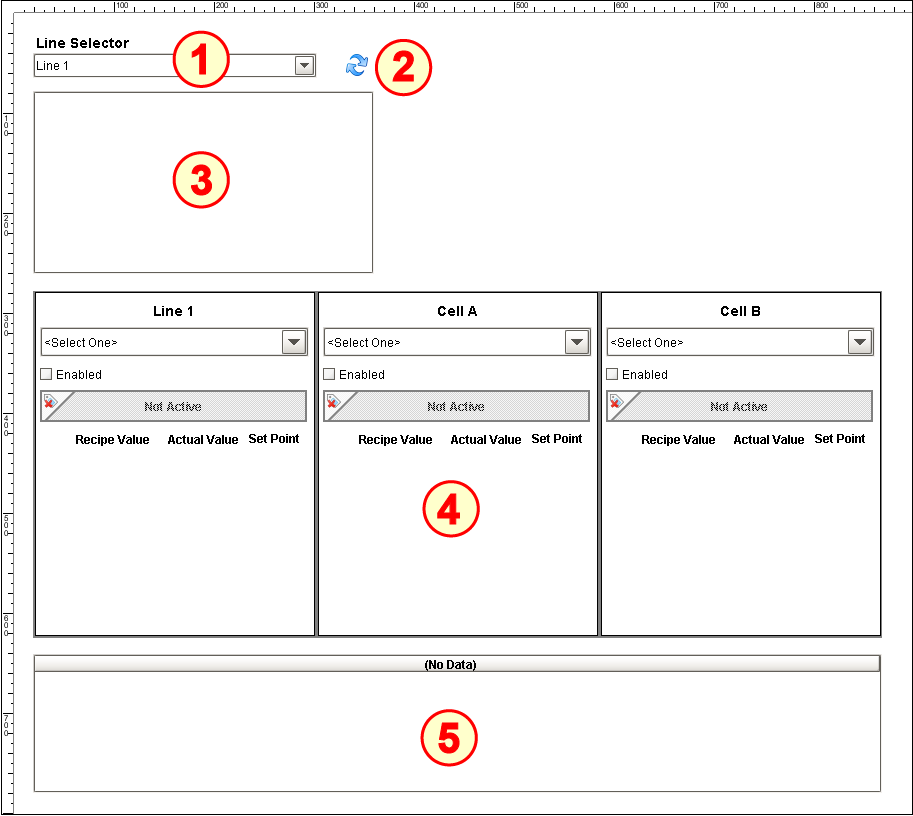
The Recipe Control set-up on the window REC_01_GUI/02_Production Control has five components:
- MES Object Selector
- Button (Ignition)
- Recipe Selector List
- Template Repeater (Ignition)
- Recipe Variance Viewer
Configure MES Object Selector
- Drag all five components listed above onto the screen and arrange as shown.
- Add a Label above the MES Object Selector that reads Line Selector.
- Type Line* into the Name Filter property.
- Set the checkbox for Include MES Line Objects.
- Open the Component Scripting dialog box (Ctrl-J), select the propertyChange event handler script area and paste in the following script.
Script for the propertyChange event handler
Codeif event.propertyName == 'equipmentItemPath': eqPath = event.source.equipmentItemPath startDate = system.date.now() hdr = ['eqPath', 'baseTagPath'] if eqPath != '': #Let's get the cells underneath the line filter = system.mes.object.filter.createFilter() filter.setMESObjectTypeName('LineCell') filter.setPrimaryMESObjectPath(eqPath) list = system.mes.searchMESObjects(filter) data = [] tagPath = eqPath.replace('\', '/') data.append([eqPath, tagPath]) for ndx in range(list.size()): mesObject = list.get(ndx) mesObject = list.get(ndx).getMESObject() cellPath = mesObject.getEquipmentPath() tagPath = cellPath.replace('\', '/') data.append([cellPath, tagPath]) else: data = [] event.source.parent.getComponent('Template Repeater').templateParams = system.dataset.toDataSet(hdr, data)

Refresh Button
Open the Component Scripting dialog box (Ctrl-J), select the actionPerformed event handler script area and paste in the following script.
Script for the actionPerformed event handler
Codeif event.propertyName == 'equipmentItemPath': eqPath = event.source.equipmentItemPath startDate = system.date.now() hdr = ['eqPath', 'baseTagPath'] if eqPath != '': #Let's get the cells underneath the line filter = system.mes.object.filter.createFilter() filter.setMESObjectTypeName('LineCell') filter.setPrimaryMESObjectPath(eqPath) list = system.mes.searchMESObjects(filter) data = [] tagPath = eqPath.replace('\', '/') data.append([eqPath, tagPath]) for ndx in range(list.size()): mesObject = list.get(ndx) mesObject = list.get(ndx).getMESObject() cellPath = mesObject.getEquipmentPath() tagPath = cellPath.replace('\', '/') data.append([cellPath, tagPath]) else: data = [] event.source.parent.getComponent('Template Repeater').templateParams = system.dataset.toDataSet(hdr, data)- (Optional) Set the Image Path property to Builtin/icons/24/refresh.png (
 ) if available, else save the icon in this sentence to your computer, then click the folder icon (
  ) in the Image Path property row and drag the saved icon into the window. Set Image Path to point to it.

Configure Recipe Selector List
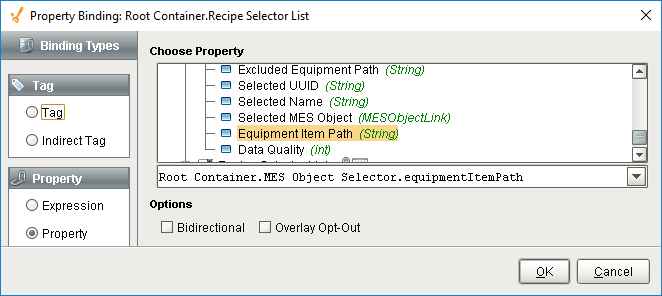
- Bind the Item Path property to the Equipment Item Path property of the MES Object Selector.
- No other configuration is required (the script in the MES Object Selector will push data to the Item Path property).

Configure Template Repeater
The Template Repeater component will repeat the selected template pattern for each row in the supplied dataset. Each instance of the template is indexed to the dataset, so each displays unique data. For this screen, the dataset will be pushed in to the Template Parameters property by the script in the MES Object Selector.
- Select the Recipe Machine template from the drop-down list (template is pre-built for you to save time).

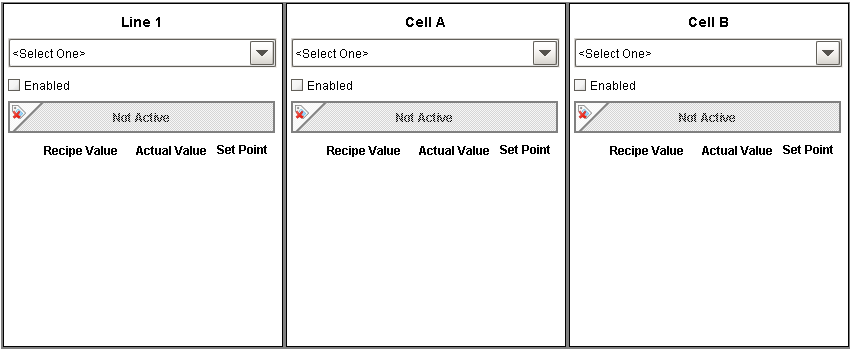
(Template Repeater with three instances of the Recipe Machine template)
Configure Recipe Variance Viewer
- Set the Start Date and End Date properties to at least span the time you will be working with this tutorial screen.
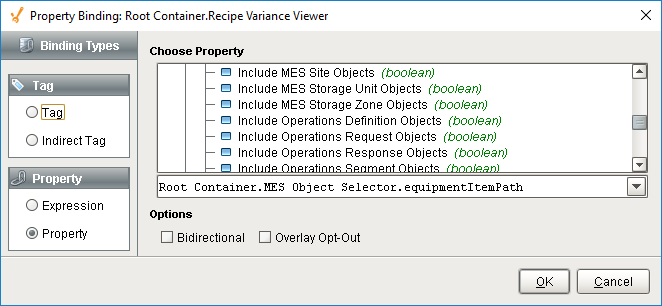
- Bind the Item Path Filter property to the Equipment Item Path property of the MES Object Selector.
- No other configuration is required (the script in the MES Object Selector will push data to the Item Path Filter property).