Configure Set Recipe for Equipment
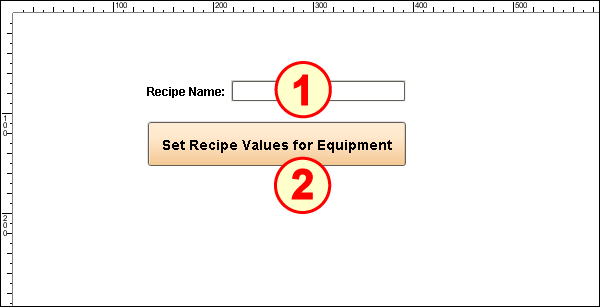
The Set Recipe for Equipment set-up on the window REC_02_SCR/02_Production Control has two main components:
- Text Field (Ignition)
- Button (Ignition)
Configure Text Field
In a production environment, the recipe name would be provided by a database and not a GUI component like a Text Field. However, for convenience in running this script repeatedly, manual text entry allows us to change the name each run.
- Drag an Ignition Text Field component onto the screen. Resize it to about double its default length.
- Change the Name property to tf_RecipeName.
- Add a Label called Recipe Name: to its left.
Configure Button
- Drag an Ignition Button onto the screen. Size it wide enough for the text shown.
- Set the Text property to Set Recipe Values for Equipment.
Open the Component Scripting dialog box (Ctrl-J), select the actionPerformed event handler script area and paste in the following script.
Script for the actionPerformed event handler
CodeeqPath = 'New Enterprise\Site\Area\Line 1' recipeName = event.source.parent.getComponent('tf_RecipeName').text enableValueMonitoring = True system.recipe.setItemRecipe(eqPath, recipeName, enableValueMonitoring) print recipeName + ' selected for ' + eqPath + ' and value monitoring is ' + str(enableValueMonitoring)
