Configure Sample Collection
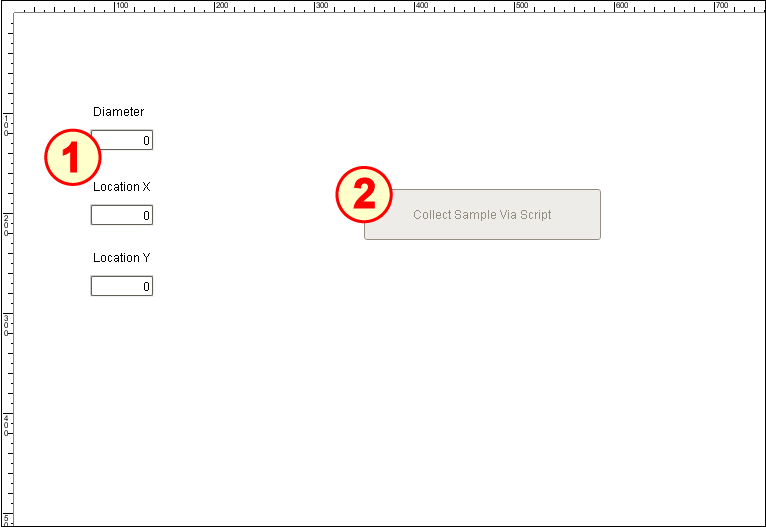
The Sample Collection page on the window SPC_03_Scripting/02_Production Control has four main components:
- Three Numeric Text Field (Ignition)
- Button (Ignition)
Configure Labels and Numeric Text Fields
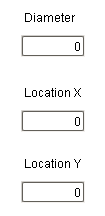
- Drag three Label components onto the window. Position and resize as shown above.
- Drag three Ignition Numeric Text Field components onto the window. Position under each Label and resize as shown.
- Change each LabelText property:
- Top Label: Diameter
- Middle Label: Location X
- Bottom Label : Location Y
- Change each Name property:
- Top Numeric Text Field: ntf_diameter
- Middle Numeric Text Field: ntf_locationX
- Bottom Numeric Text Field: ntf_locationY
Configure 'Collect Sample Via Script' Button
- Drag an Ignition Button component onto the window. Resize it enough to fit the text shown above.
- Change the Text property to Collect Sample Via Script.
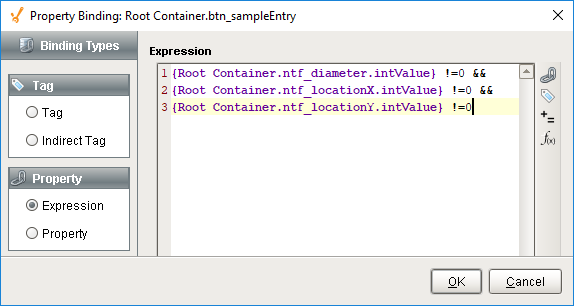
Bind the Enabled property with the following expression:
Expression for Enabled property
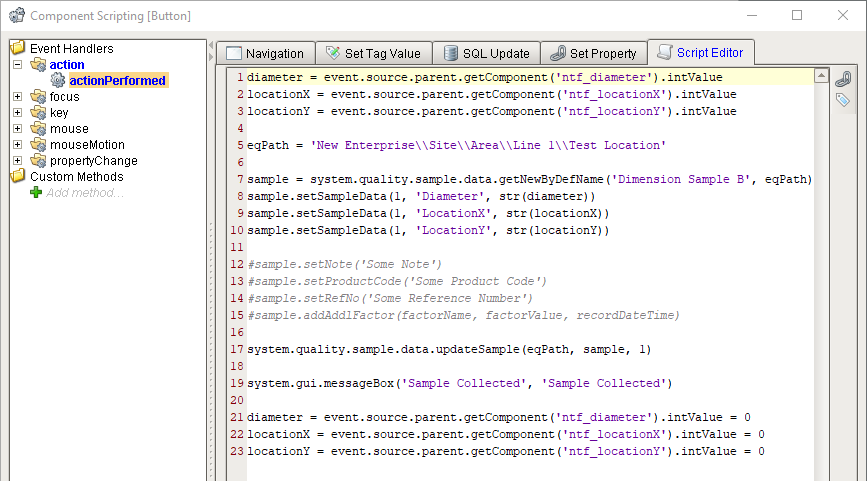
Code{Root Container.ntf_diameter.intValue} !=0 && {Root Container.ntf_locationX.intValue} !=0 && {Root Container.ntf_locationY.intValue} !=0- Open the Component Scripting dialog box (Ctrl-J), select the actionPerformed event handler script area and paste in the script below:
Script for actionPerformed event handler
Code |
|