Sepasoft MES Module Suite
Production Counters for OEE
In order to be able to calculate OEE Performance and OEE Quality, you need to provide at a minimum two counts, either outfeed and waste count, or infeed and outfeed counts at the line level. If all three counters are available for a line, then additional metrics can be generated such as actual transit time or accumulation (WIP).
The following sections provide specific details on adding Infeed, Outfeed and Waste Counters which are handled through the MES Counters in the Production Model Designer.
Refer to Production Counter Assignments for details on production counter placement and the effects on OEE metrics.
MES Counters
See Associating Process-Segment Operations with Production Counts.
Production Count Scenarios

|
There are a number of ways that production counts can be captured for a line. Understanding how to capture, what to capture and the ways that production counts can be captured is an important step in configuring the production model to ensure that we obtain accurate OEE metrics. |
Sources Of Production Counts
|
|
There are different sources to read the production counts. With the OEE Downtime Module, production counts can come from the PLC, a database, manually entered, barcode reads and so on. The video discusses a number of common sources for production counts. |
Best Practices for Production Counters
Tags are required from the lines devices that will provide the counts needed. These count tags are known as Raw Counts.
|
|
The term Raw Count is used because it is a relative production count. It just starts at zero and counts up to a rollover value, typically 32767, where it becomes zero again. The OEE module calculates the actual production count from raw count. This eliminates having to reset the value in the PLC, or other device, at the beginning of a production run. As a result, the programming that is required in the PLC, or other device is simplified. It also eliminates problems typically associated with reset handshaking and production runs that exceed the limits of PLC counters. For an OEE tracking system to be accurate, it must withstand communication errors power outages, etc. By using raw counts that rollover and let the OEE module handle the actual production count, the system is robust. Besides that, it is just less PLC programming that has to be done and tested. |
The OEE Engine calculates a Relative Production Count based on the beginning value of the Raw Count tag at the start of the run.
For example, if the Outfeed Count tag value is 100 at the start of the run, 100 becomes the baseline value.
Relative Production Count value will be calculated as Raw Count current value - Raw Count baseline value throughout the run.
Handling Rollovers
Max Raw Count
Each of the Counters, Infeed, Outfeed and Waste can have a Max Raw Count value defined to handle a rollover or overflow condition. Based on the datatype of the tag within the PLC, the rollover will occur when the maximum value the register can handle has been exceeded and the next increment resets its value to 0.
| DataType | Bits | Max Value |
|---|---|---|
| Signed Integer | 31 | 2147483648 |
| Unsigned Integer | 32 | 4294967296 |
Depending on the age of the PLC and the register type used, the rollover count may be much lower. 215 = 32,768.
The Max Raw Count setting handles the rollover by adding the value defined for the Max Raw Count to the value of the Relative Production Count whenever a rollover condition occurs.
Example

|
If Max Raw Count is set to 32,767 and the Raw Outfeed Count tag value changes from 32,765 to 5, the Relative Production Count recorded by the OEE Engine will be 5 - 32,767 (Max Raw Count). |
Non-Resetable Counters
The counters coming from the PLC must be non-resetable from the HMI or by an operator as we cannot control when an operator might chose to reset a production or shift counter. If the value suddenly changes from say 100 to 0, the OEE engine will assume that a rollover has occurred and the production count recorded will be in-correct.
Ideally, you will have or create lifetime counters within the PLC logic to manage production counts. The occurrence of a rollover should be an infrequent occurrence. In this case, you can set the Max Raw Count value to be the max value for the count tags coming from the PLC when those counters tags are non-resetable.
If the lifetime counters are functioning correctly, if the PLC logic has been written correctly so that a count tag does not yield an invalid value halfway through the scan, and if the device connection is solid, then the Max Raw Count will handle the rollover correctly. Otherwise, you may see large jumps throughout your production run and your production count will be wrong. In that case, having a Max Raw Count of 0 will allow for sloppy PLC code and poor device connection, but it will not handle the rollover when it occasionally occurs.
Count Validation Techniques
The Production Model Count fields for Infeed, Outfeed and Waste can be bound directly to a count tag from a PLC. However, a good practice is to use an expression tag to bind a tag to the Raw Count coming from the PLC and to then use a Tag Change Event to validate the count before passing it to a memory tag associated to the production count in the Production Model. This provides the flexibility of deriving a calculated value if the count is variable (see section on Variable Production Count below) as well as allowing for count validation prior to passing the value to the production model. In the code example, we are checking the tag quality to minimize issues caused by OPC connection issues. we are also checking to ensure the count value is not negative. The validation you provide is up to you. the Tag Change event makes it possible.
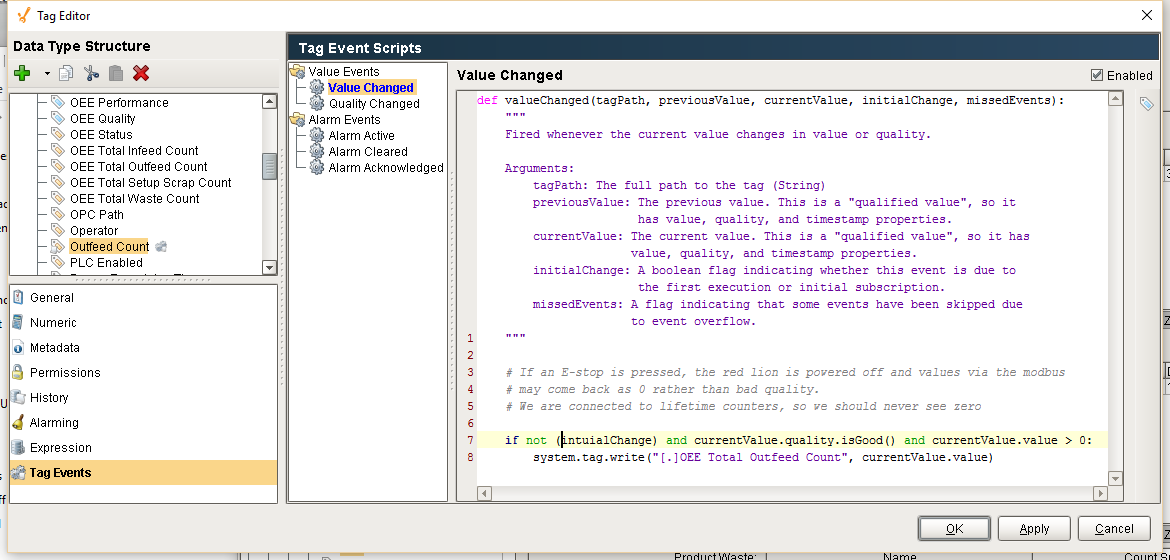
Tag Change Event Count Validation
Python |
if not (initialChange) and currentValue.quality.isGood() and currentValue.value > 0: system.tag.write("[.]OEE Total Outfeed Count", currentValue.value) |
High Volume Manufacturing
If your line is a high volume manufacturing process, where rollovers may be a common occurrence, it is possible to implement counters that are only resettable by the OEE module.
In the Advanced tab of the Production Model at the Enterprise level, we can define scripts that occur on process segment 'Begin' and 'End' events. These events are generated by the production model. These events could be used to reset the production counters at the end of each run. That would most likely eliminate rollovers from ever occurring, in which case Max Raw Count could be left at 0.
Variable Production Count
You may have a Production count coming from a PLC that provides strokes from a Stamping Press but you want to count the # of pins produced and the # of pins is dependent upon the Die being used in the Stamping Press. In this case, the Max Raw Count at the Production Count level will not help you as it becomes variable.
The Infeed Scale parameter in the Material Manager and the Infeed Scale Tag path allows you to set the scaling factor for the count.
Sepasoft MES Module Suite