Sepasoft MES Module Suite
SPC Locations
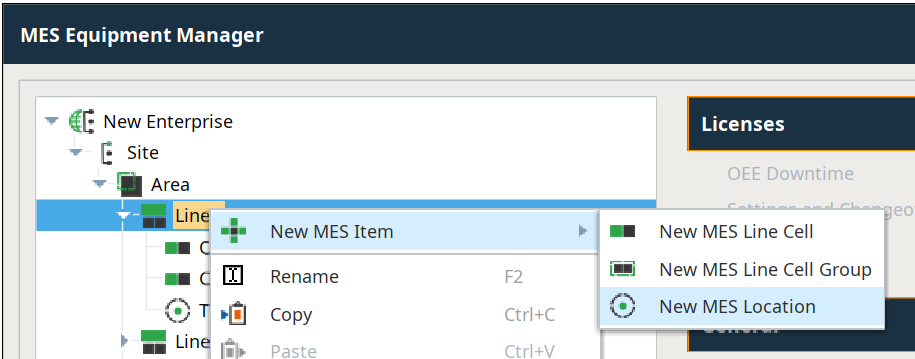
The SPC module deals with MES Locations. Location is where you take sample(s) and can be added under an Area or a Line in the Production Model (also referred to as the Equipment Model) Samples can be taken automatically or manually.

|
The option to add a Location is only visible when the SPC Module is installed. This is done in the MES Equipment Manager. |
You can add as many Locations that require samples. Keep in mind you can take multiple samples at one Location.
For example, you may only take one sample on a Line whereas you may need to take 3 samples in an Area. You only need two Locations in the Production Model: one location where 3 samples are taken and the other with one sample taken.
Additional Factors
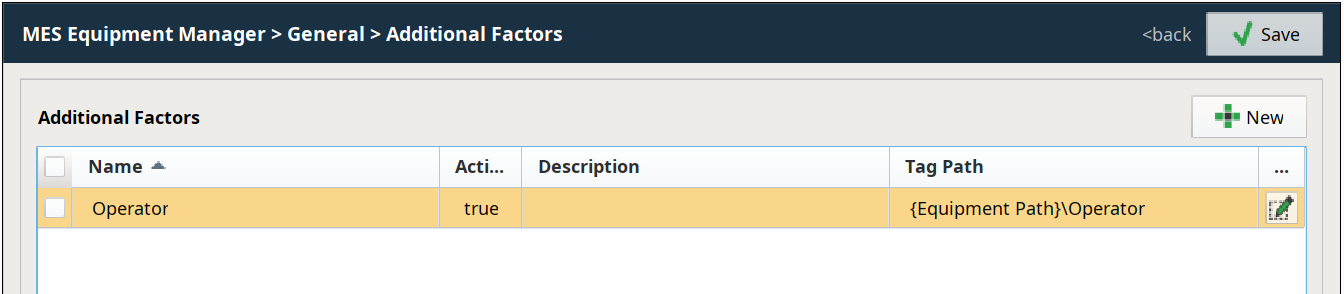
You can set up Additional Factors in the General section in the MES Equipment Manager. Active Additional Factor values are associated and stored with every sample taken.
Use Additional Factors to store metadata with samples. You can set up these for:
- Memory Tags
- Bar code readers
- Databases
- Calculations
- PLC
- Scripts
Any value that can be read by a Tag can be set as an Additional Factor and available for analysis. See Ignition.
For details about setting up Ignition Tags, see Ignition User Guide | Creating Tags
Sample Tag Collectors
SPC data can come from a variety of sources. The SPC module can automatically collect data from PLC devices, OPC connected devices, lab instruments, rs-232 and USB devices, data files, web services and external databases.
One way to collect data is through Ignition Tags. SPC Sample Tag Collectors are used to automatically collect measurement data from Ignition Tags and create samples with a collected measurement data.
Each sample is a single measurement of a single attribute. Sample collection must be associated with an SPC Location item created at the Area or Line levels in the Production Model (also referred to as the Equipment Model)
To set up Tag Collectors for a Location sample, select the Location and under General, click Tag Collectors .
For more info, refer to the Automated Tag Sample Collector .
Sepasoft MES Module Suite