Sepasoft MES Module Suite
Tag Sample Collectors
Tag Sample Collectors are used to automatically collect measurement data from an Ignition tag and create samples with the collected measurement data. The sample will be a single measurement of a single attribute (value). When configuring, the selected interval defines how often to create a new sample. For example, on every 100th value change of a checkweigher value, create a new sample and record the current value. Or, every 10 minutes while a process is running, create a sample and record the current temperature. The measurement data can come from a variety of sources including any OPC connected device, values from external databases, manual entries, etc.
Any samples that are automatically created and recorded by a Tag Sample Collector are automatically approved and will appear in the control charts. By setting the Auto Refresh property of either the SPC Selector or SPC Controller components on client screens, new samples will appear in the control charts in real time as they are created. In addition, the appropriate events found on the Advanced tab for the production location will be executed.
Adding and Editing Tag Sample Collectors
Sample collection must be associated with a Location production item. To add a Tag Sample Collector a sample definition must exist for the tag based sample. This is accomplished through the Sample Definition Manager component.
Once a Sample Definition is created and assigned to a location for collection in the Sample Definition Manager, the tag collector can be pointed to a specific tag in the MES Equipment Manager. In the image at right you can see the Tag Collector panel for the "Sample Location" location item. Here a tag path can be provided for the Sample Attribute "pH".

|
Avoid Duplicate Tag Sample Collector Names If a Tag Collector is created using the same name as an existing Tag Collector (even though they are configured on different SPC Locations), the system automatically appends the next available digit inside parentheses to the name. Example: Creating a second Tag Sample Collector called MyTagSampleCollector will result in it being named MyTagSampleCollector(1) instead. No errors are generated. For clarity, during use in analysis, it is recommended to include the location name. |
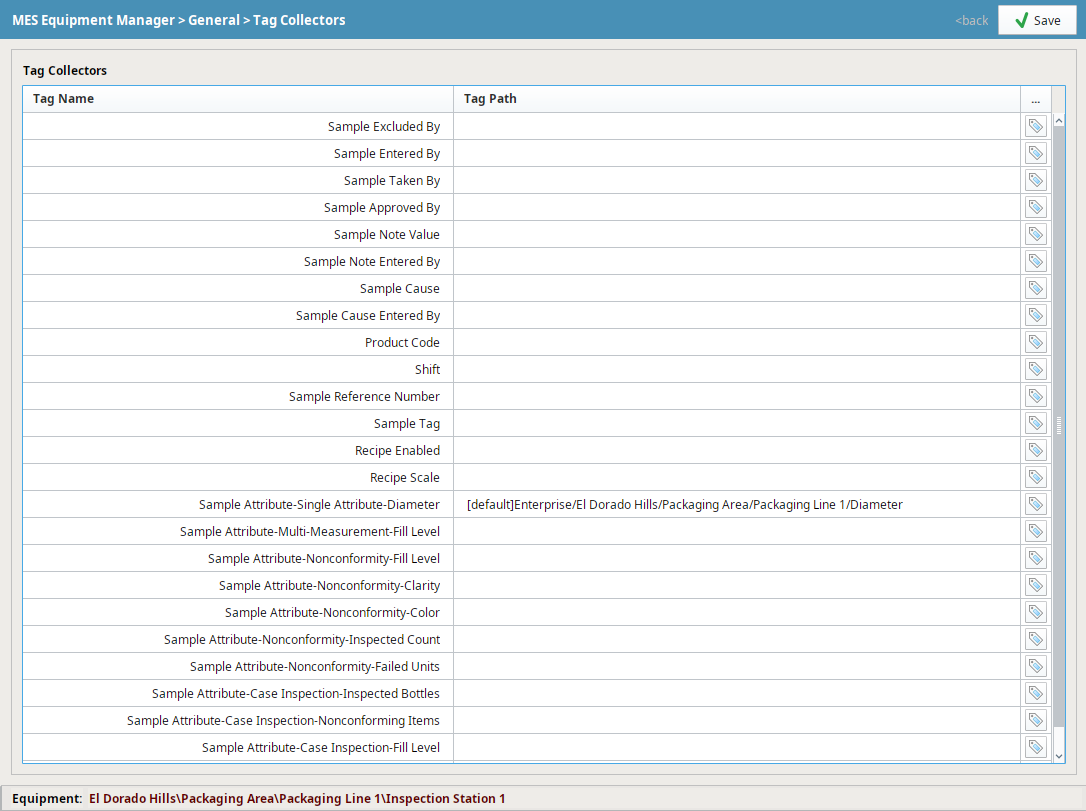
Setting Tag Paths in Equipment Manager
| Property | Description |
|---|---|
| Enabled | The enabled property provides a method of stopping the automatic collection of measurements and creation of samples. |
| Name | This is the required unique name of the Tag Sample Collector as it will appear, with SQLTag- prepended to it, in selection lists. Behind the scenes, a sample definition is created using this sample name. Sample Definitions created for the purpose of Tag Sample Collectors will not appear in the definition management and manual sample entry client screens. |
| Tag Path | This is the SQLTag path from which measurement values will be read. |
| Interval Type | The interval options that can be selected here are defined in the Intervals list on the Enterprise Quality tab. Only intervals that have scripts defined for them will be included as options for Tag Sample Collectors. The reason for this is that manual intervals, which are those without script, will never be created and do not apply to automatic collection of measurements. Refer to Sample Intervals for more information.. |
| Interval | The interval to collect data and create new samples. The units of this interval are defined by the interval type and can be minutes, days, every x value read, etc. |
| Control Limits | Control Limits that are enabled will be calculated for this Tag Sample Collector during signal evaluations. Available control limit options are defined in the Control Limits list on the Enterprise quality tab. It is important to include control limits that a signal depends on or the signal will not be evaluated correctly. Refer to Control Limits for more information. |
| Signals | The signals that are checked will be evaluated every time a new sample is recorded by the Tag Sample Collector. Available signal options are defined in the Signals list on the Enterprise Quality tab. Refer to Out Of Control Signals for more information. |
Deleting Tag Sample Collectors
To delete a tag sample collector, de-select the location in the Sample Definition Manager's Location panel. After de-selecting, click 'save'.
Sepasoft MES Module Suite