Sepasoft MES Module Suite
Trace Graph
A component that is added to visually see traceability results. It shows the flow of production for bulk lot (batch) and / or serialized items. This allows entering a lot (batch) number and seeing what went into making it up from raw materials through the production steps to the finished goods. Then if desired, product can be tracked beyond the production facility. Individual items can also tracked by using a serial number or other item identification.
Component Palette
If a node has a sublot that has a name that matches the Highlight Sublot Name, then text specified by the Sublot Match Text property will be displayed in the lot node. This is valuable at determining which lots contain the sublot (serial number) of interest.
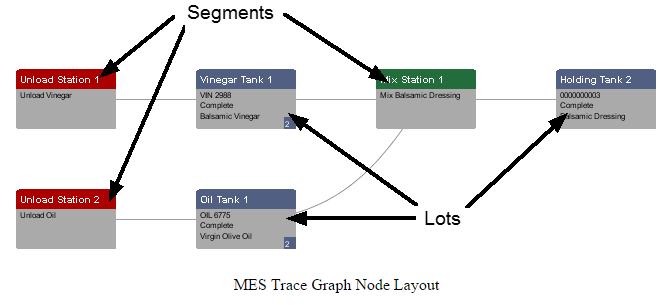
The nodes are laid out in chronological order from left to right. The node type alternates starting with a segment then showing a lot. The idea behind this is there are lots that are inputs to an operation and there are lot that the operation produced. In the image below, the upper left node titled Unload Station 1 is the operation that vinegar was unloaded. When this operation was done, a new lot VIN 2988 was created. Then that lot was used in the operation of making of balsamic dressing at Mix Station 1, which produced balsamic dressing that resides in Holding Tank 2.
The Trace Graph component also is an excellent navigation tool to zero in on non-trace information. Because the date and times, material, equipment, lot numbers, serial number, etc. are known, other data can be filtered to match the trace information being shown. This gives, otherwise just time series data, context to specific lots and serialized items without the need to look it up manually potentially across multiple systems.
To support this functionality, the trace graph component has very configurable menus that are used to display additional non-trace information. When the menu is selected by the user, the associated date and times, lot number, material, personnel, etc. is included in the menu event so that data within and outside of Ignition can be looked up and displayed.
Features
User Menu Items Property
The User Menu Items property allows custom menu items to be added. Custom script can then be added to the userMenuItemClicked event handler to add functionality to this component.
| Steps | Description | |
|---|---|---|
| 1 | Click the |  |
| 2 | Add your custom script to the userMenuItemItemClicked event handler. |

Node Configuration Property
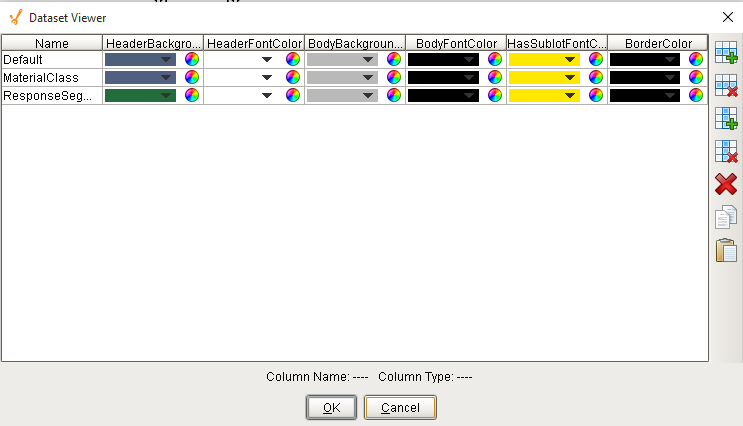
This property controls the appearance of each node. Click on the Dataset Viewer icon for the Behaviour property in Property Editor to set the values.
Name will filter the MES object name that should be included as nodes. Default, MaterialClass and ResponseSegment are the values inbuilt on Ignition, as shown below. HeaderBackground is the color of the node header. HeaderFontColor will decide the color of the text. Color of the node is determined by BodyBackground. BodyFontColor will decide the color of the text. The color of the nodes with sublots will be controlled by HasSublotFontColor. BorderColor is the color of the border.
Component Properties
Properties are provided that can be set to affect the operation and look of the component. They can be set through the Property Editor in the Designer or through scripting.
Example
Code |
|
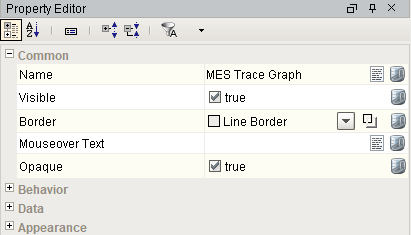
Behavior
| Name | Scripting | Property Type | Description |
|---|---|---|---|
| Allow Material Lot Modify | allowMaterialLotModify | Boolean | If true, show the modify menu item and allow material lots to be modified. |
| Allow Segment Modify | allowSegmentModify | Boolean | If true, show the modify menu item and allow response segments to be modified. |
| Lot Name | lotName | String | Lot name to show trace graph for. If this is set, it will ignore the Lot UUID property. |
| Lot UUID | lotUUID | String | Lot UUID to show trace graph for. If the Lot Name property is set, this property will be ignored. |
| Highlight Sublot Name | highlightSublotName | String | Optionally, set the name of the sub lot to highlight. |
| User Menu Items | userMenuItems | Dataset | A dataset that stores user menu items. |
| Enable Auto Sizing | enableAutoSizing | Boolean | If true, auto size on right mouse clicked on open space. |
| Node Configuration | nodeConfiguration | Dataset | A dataset that stores node configuration. |
Data
| Name | Scripting | Property Type | Description |
|---|---|---|---|
| Detailed Mode | detailedMode | Boolean | If true, more details are shown in the trace graph. |
| Max Fan Count | maxFanCount | int | The maximum number of nodes to fan out from a single node or fan in from a single node. |
Appearance
| Name | Scripting | Property Type | Description |
|---|---|---|---|
| Lot Tool Tip Format | lotToolTipFormat | String | Set to format the display of lot node tooltip. It is formatted in HTML and can reference the column names in the dataset that the trace graph display is generated from. The dataset results are the same as the Lot Trace Binding Function and Sublot Trace Binding Function that has full documentation of the available columns. Example<html>{LotName}<br/>{LotSequence}<br/>{LotStatus}<br/>{LotBeginDateTime}<br/>{LotEndDateTime}<br/>{MaterialName}<br/>{LotLocationName}</html> Possible Tooltips are: LotUUID SublotName PrevSegmentUUID EquipmentUUID SublotDescription Sublots |
| Segment Tool Tip Format | segmentToolTipFormat | String | Set to format to display the segment node tooltip. It is formatted in HTML and can reference the column names in the dataset that the trace graph display is generated from. The dataset results are the same as the Lot Trace Binding Function and Sublot Trace Binding Function that has full documentation of the available columns. Example:<html>{SegmentName}<br/>{SegmentLocationName}</html> Possible Tooltips are: LotUUID SublotName PrevSegmentUUID EquipmentUUID SublotDescription Sublots |
| Edge Color | edgeColor | Color | Color of the lines between nodes. |
| Sublot Match Text | sublotMatchText | String | Text to display when a lot contains the specified sublot name. |
| Breadcrumbs Visible | breadcrumbVisible | Boolean | Displays a list of breadcrumb links to previously viewed lot information. |
| Breadcrumb Font | breadcrumbFont | Font | Font used to display the breadcrumb links. |
| Breadcrumb Color | breadcrumbColor | Color | Color of the breadcrumb links. |
| Breadcrumb Underlined | breadcrumbUnderlined | Boolean | Show the breadcrumb links as underlined. |
| Breadcrumb Max Count | breadcrumbMax | int | The maximum count of breadcrumbs to keep in history. |
| Breadcrumb Icon Path | breadcrumbSeparatorIconPath | String | The relative path of an icon image used to separate the breadcrumb links. |
| Editor Title Font | editorTitleFont | Font | Font for titles of editing panels. |
| Category Font | categoryFont | Font | Font for category titles in editing table. |
| Property Font | propertyFont | Font | Font for properties in editing table. |
| Description Area Font | descriptionAreaFont | Font | Font for description area of editing table. |
| Button Font | buttonFont | Font | Font for buttons. |
| Close Button Font | closeButtonFont | Font | Font of the button to close the editing panel. |
| Miscellaneous Font | miscellaneousFont | Font | Font for miscellaneous components. |
| Title Background Color | titleBackgroundColor | Color | Color of the title background in the editing panel. |
| Title Text Color | titleTextColor | Color | Color of the title text in the editing panel. |
| Close Button Color | closeButtonColor | Color | Color of the button to close the editing panel. |
| Category Background Color | categoryBackgroundColor | Color | Background color of category rows. |
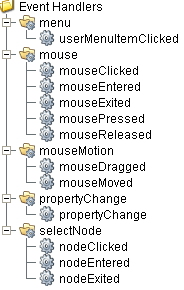
Event Handlers
Event handlers provide the ability to add custom script when a user interacts with a component such as by clicking a mouse, selecting a menu item or when a component property changes.
menu
userMenuItemClicked
Code Snippet
Code |
|

|
For various methods associated with this event, see Trace Graph User Menu Event. |
This event fires when the menu item is clicked, or if the user selects the menu item using the keyboard and presses the Enter key. It can also occur if an access key or shortcut key is pressed that is associated with the MenuItem.
| Property | Description |
|---|---|
| .source | The component that fired this event. |
| .menuItemName | Name of the user menu item that triggered the event. |
| .nodeName | Name of the node. This is the same as the name of the MES object that is associated with the node. |
| .objectType | Name of the MES object type that is associated with the node. |
| .uuid | UUID of the MES object that is associated to the node. |
| .lotUUID | UUID of the material lot. |
| .lotName | Name of the material lot. |
| .lotSequence | The sequence number associated with the material lot. |
| .lotUse | The lot use type of the material. |
| .beginDateTime | Date and Time at which the event was triggered. |
| .materialUUID | UUID of the material. |
| .materialName | Name of the material. |
| .lotEquipmentUUID | UUID of the equipment lot. |
| .lotEquipmentName | Name of the equipment lot. |
| .segmentUUID | UUID of the segment. |
| .segmentName | Name of the segment. |
| .segmentEquipmentUUID | UUID of the segment equipment. |
| .segmentEquipmentName | Name of the segment equipment. |
mouse
mouseClicked
This event signifies a mouse click on the source component. A mouse click the combination of a mouse press and a mouse release, both of which must have occurred over the source component. Note that this event fires after the pressed and released events have fired.
| Property | Description |
|---|---|
| .source | The component that fired this event. |
| .button | The code for the button that caused this event to fire. |
| .clickCount | The number of mouse clicks associated with this event. |
| .x | The x-coordinate (with respect to the source component) of this mouse event. |
| .y | The y-coordinate (with respect to the source component) of this mouse event. |
| .popupTrigger | Returns True (1) if this mouse event is a popup trigger. What constitutes a popup trigger is operating system dependent, which is why this abstraction exists. |
| .altDown | True (1) if the Alt key was held down during this event, false (0) otherwise. |
| .controlDown | True (1) if the Ctrl key was held down during this event, false (0) otherwise. |
| .shiftDown | True (1) if the Shift key was held down during this event, false (0) otherwise. |
mouseEntered
This event fires when the mouse enters the space over the source component.
| Property | Description |
|---|---|
| .source | The component that fired this event. |
| .button | The code for the button that caused this event to fire. |
| .clickCount | The number of mouse clicks associated with this event. |
| .x | The x-coordinate (with respect to the source component) of this mouse event. |
| .y | The y-coordinate (with respect to the source component) of this mouse event. |
| .popupTrigger | Returns True (1) if this mouse event is a popup trigger. What constitutes a popup trigger is operating system dependent, which is why this abstraction exists. |
| .altDown | True (1) if the Alt key was held down during this event, false (0) otherwise. |
| .controlDown | True (1) if the Ctrl key was held down during this event, false (0) otherwise. |
| .shiftDown | True (1) if the Shift key was held down during this event, false (0) otherwise. |
mouseExited
This event fires when the mouse leaves the space over the source component.
| Property | Description |
|---|---|
| .source | The component that fired this event. |
| .button | The code for the button that caused this event to fire. |
| .clickCount | The number of mouse clicks associated with this event. |
| .x | The x-coordinate (with respect to the source component) of this mouse event. |
| .y | The y-coordinate (with respect to the source component) of this mouse event. |
| .popupTrigger | Returns True (1) if this mouse event is a popup trigger. What constitutes a popup trigger is operating system dependent, which is why this abstraction exists. |
| .altDown | True (1) if the Alt key was held down during this event, false (0) otherwise. |
| .controlDown | True (1) if the Ctrl key was held down during this event, false (0) otherwise. |
| .shiftDown | True (1) if the Shift key was held down during this event, false (0) otherwise. |
mousePressed
This event fires when a mouse button is pressed down on the source component.
| Property | Description |
|---|---|
| .source | The component that fired this event. |
| .button | The code for the button that caused this event to fire. |
| .clickCount | The number of mouse clicks associated with this event. |
| .x | The x-coordinate (with respect to the source component) of this mouse event. |
| .y | The y-coordinate (with respect to the source component) of this mouse event. |
| .popupTrigger | Returns True (1) if this mouse event is a popup trigger. What constitutes a popup trigger is operating system dependent, which is why this abstraction exists. |
| .altDown | True (1) if the Alt key was held down during this event, false (0) otherwise. |
| .controlDown | True (1) if the Ctrl key was held down during this event, false (0) otherwise. |
| .shiftDown | True (1) if the Shift key was held down during this event, false (0) otherwise. |
mouseReleased
This event fires when a mouse button is released, if that mouse button's press happened over this component.
| Property | Description |
|---|---|
| .source | The component that fired this event. |
| .button | The code for the button that caused this event to fire. |
| .clickCount | The number of mouse clicks associated with this event. |
| .x | The x-coordinate (with respect to the source component) of this mouse event. |
| .y | The y-coordinate (with respect to the source component) of this mouse event. |
| .popupTrigger | Returns True (1) if this mouse event is a popup trigger. What constitutes a popup trigger is operating system dependent, which is why this abstraction exists. |
| .altDown | True (1) if the Alt key was held down during this event, false (0) otherwise. |
| .controlDown | True (1) if the Ctrl key was held down during this event, false (0) otherwise. |
| .shiftDown | True (1) if the Shift key was held down during this event, false (0) otherwise. |
mouseMotion
mouseDragged
Fires when the mouse moves over a component after a button has been pushed.
| Property | Description |
|---|---|
| .source | The component that fired this event. |
| .button | The code for the button that caused this event to fire. |
| .clickCount | The number of mouse clicks associated with this event. |
| .x | The x-coordinate (with respect to the source component) of this mouse event. |
| .y | The y-coordinate (with respect to the source component) of this mouse event. |
| .popupTrigger | Returns True (1) if this mouse event is a popup trigger. What constitutes a popup trigger is operating system dependent, which is why this abstraction exists. |
| .altDown | True (1) if the Alt key was held down during this event, false (0) otherwise. |
| .controlDown | True (1) if the Ctrl key was held down during this event, false (0) otherwise. |
| .shiftDown | True (1) if the Shift key was held down during this event, false (0) otherwise. |
mouseMoved
Fires when the mouse moves over a component, but no buttons are pushed.
| Property | Description |
|---|---|
| .source | The component that fired this event. |
| .button | The code for the button that caused this event to fire. |
| .clickCount | The number of mouse clicks associated with this event. |
| .x | The x-coordinate (with respect to the source component) of this mouse event. |
| .y | The y-coordinate (with respect to the source component) of this mouse event. |
| .popupTrigger | Returns True (1) if this mouse event is a popup trigger. What constitutes a popup trigger is operating system dependent, which is why this abstraction exists. |
| .altDown | True (1) if the Alt key was held down during this event, false (0) otherwise. |
| .controlDown | True (1) if the Ctrl key was held down during this event, false (0) otherwise. |
| .shiftDown | True (1) if the Shift key was held down during this event, false (0) otherwise. |
propertyChange
propertyChange
Fires whenever a bindable property of the source component changes. This works for standard and custom (dynamic) properties.
| Property | Description |
|---|---|
| .source | The component that fired this event. |
| .newValue | The new value that this property changed to. |
| .oldValue | The value that this property was before it changed. Note that not all components include an accurate oldValue in their events. |
| .propertyName | The name of the property that changed. NOTE: Remember to always filter out these events for the property that you are looking for! Components often have many properties that change. |
selectNode
Code |
#This code will set a tooltip regarding the equipment path information #Please expand the link below to see the various methods for selectNode event handler category eqUUID = event.getSegmentEquipmentUUID() eq = system.mes.loadMESObject(eqUUID) event.source.setSegmentToolTipFormat(eq.getEquipmentPath()) |
|
|
For various methods associated with this event handler category, see Trace Graph Select Node Event. |
nodeClicked
The NodeClick event is generated when the user clicks a particular Node object.
| Property | Description |
|---|---|
| .source | The component that fired this event. |
| .nodeName | Name of the node. This is the same as the name of the MES object that is associated with the node. |
| .objectType | Name of the MES object type that is associated with the node. |
| .uuid | UUID of the MES object that is associated to the node. |
| .lotUUID | UUID of the material lot. |
| .lotName | Name of the material lot. |
| .lotSequence | The sequence number associated with the material lot. |
| .lotUse | The lot use type of the material. |
| .beginDateTime | Date and Time to begin the segment. |
| .endDateTime | Date and Time to end the segment. |
| .materialUUID | UUID of the material. |
| .materialName | Name of the material. |
| .lotEquipmentUUID | UUID of the equipment lot. |
| .lotEquipmentName | Name of the equipment lot. |
| .segmentUUID | UUID of the segment. |
| .segmentName | Name of the segment. |
| .segmentEquipmentUUID | UUID of the segment equipment. |
| .segmentEquipmentName | Name of the segment equipment. |
nodeEntered
This event is generated when the Node is being hovered over.
| Property | Description |
|---|---|
| .source | The component that fired this event. |
| .nodeName | Name of the node. This is the same as the name of the MES object that is associated with the node. |
| .objectType | Name of the MES object type that is associated with the node. |
| .uuid | UUID of the MES object that is associated to the node. |
| .lotUUID | UUID of the material lot. |
| .lotName | Name of the material lot. |
| .lotSequence | The sequence number associated with the material lot. |
| .lotUse | The lot use type of the material. |
| .beginDateTime | Date and Time at which the event was triggered. |
| .endDateTime | Date and Time to end the segment. |
| .materialUUID | UUID of the material. |
| .materialName | Name of the material. |
| .lotEquipmentUUID | UUID of the equipment lot. |
| .lotEquipmentName | Name of the equipment lot. |
| .segmentUUID | UUID of the segment. |
| .segmentName | Name of the segment. |
| .segmentEquipmentUUID | UUID of the segment equipment. |
| .segmentEquipmentName | Name of the segment equipment. |
Enter Node and Publish MES Document
Code |
|
nodeExited
This event is generated when drag gesture exits this Node.
| Property | Description |
|---|---|
| .source | The component that fired this event. |
| .nodeName | Name of the node. This is the same as the name of the MES object that is associated with the node. |
| .objectType | Name of the MES object type that is associated with the node. |
| .uuid | UUID of the MES object that is associated to the node. |
| .lotUUID | UUID of the material lot. |
| .lotName | Name of the material lot. |
| .lotSequence | The sequence number associated with the material lot. |
| .lotUse | The lot use type of the material. |
| .beginDateTime | Date and Time at which the event was triggered. |
| .endDateTime | Date and Time to end the segment. |
| .materialUUID | UUID of the material. |
| .materialName | Name of the material. |
| .lotEquipmentUUID | UUID of the equipment lot. |
| .lotEquipmentName | Name of the equipment lot. |
| .segmentUUID | UUID of the segment. |
| .segmentName | Name of the segment. |
| .segmentEquipmentUUID | UUID of the segment equipment. |
| .segmentEquipmentName | Name of the segment equipment. |
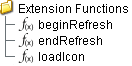
Extension Functions
beginRefresh
- Description
Called before refresh begins. It can be used to display updating status messages.
- Parameters
None
- Return
Nothing
- Scope
Client
endRefresh
- Description
Called after refresh ends. It can be used to display updating status messages.
- Parameters
Boolean cancelled - True if the request is cancelled. If a request for trace graph information is replaced with another request, then the first request is cancelled and this parameter will be True.
- Return
Nothing
- Scope
Client
loadIcon
- Description
Provides a chance to change an icon. Based on the icon name parameter, return the image path to the icon to use in place of the default icon.
- Parameters
self - A reference to the component that is invoking this function.
iconName - The name of the icon.
- Returns
Nothing
- Scope
Client
Example
Code |
# This example will return a path to a different image to replace the default delete image: if iconName == 'remove': return 'Builtin/icons/24/delete2.png' |
Custom Methods
Custom methods allow you to add your own component functions to a component that can be called through scripting. This is a useful and clean method of re-using script that is specific to the component (say you want to update a visual aspect of the component in the same way whether a user clicks on the component or a window property value changes). See Component Custom Methods in the Ignition Help Manual for more information.
Customizers
This component does not have any custom properties.
Event Objects
Trace Graph Select Node Event
Description
This object is returned by the selectNode event handler for MES Trace Graph component.
Methods:
getBeginDateTime()
Description
Get the beginning date and time to limit the results to return.
Syntax
getBeginDateTime()
- Parameters
None
- Returns
Date beginDateTime - The beginning date and time to filter results.
getEndDateTime()
Description
Get the end date and time to limit the results to return.
Syntax
getEndDateTime()
- Parameters
None
- Returns
Date endDateTime - The end date and time to filter results.
getLotEquipmentName()
Description
Gets name assigned to the equipment lot.
Syntax
getLotEquipmentName()
- Parameters
None
- Returns
String lotEquipmentName - The name of equipment lot.
getLotEquipmentUUID()
Description
Gets uuid assigned to the equipment lot.
Syntax
getLotEquipmentUUID()
- Parameters
None
- Returns
String lotEquipmentUUID - The uuid of equipment lot.
getLotName()
Description
Gets name assigned to the material lot.
Syntax
getLotName()
- Parameters
None
- Returns
String lotName - The name of material lot.
getLotSequence()
Description
Gets sequence of the material lot.
Syntax
getLotSequence()
- Parameters
None
- Returns
String lotSequence - The sequence of material lot.
getLotUse()
Description
Gets use property for the material lot.
Syntax
getLotUse()
- Parameters
None
- Returns
String lotUse - The use property of material lot.
getLotUUID()
Description
Gets uuid assigned to the material lot.
Syntax
getLotUUID()
- Parameters
None
- Returns
String uuid - The uuid of material lot.
getMaterialName()
Description
Gets name assigned to the material object.
Syntax
getMaterialName()
- Parameters
None
- Returns
String name - The name of material object.
getMaterialUUID()
Description
Gets uuid assigned to the material object.
Syntax
getMaterialUUID()
- Parameters
None
- Returns
String uuid - The uuid of material object.
getNodeName()
Description
Returns name of the selected node.
Syntax
getNodeName()
- Parameters
None
- Returns
String name - The name of the selected node.
getSegmentEquipmentName()
Description
Gets name assigned to the equipment segment.
Syntax
getSegmentEquipmentName()
- Parameters
None
- Returns
String segmentEquipmentName - The name of equipment segment.
getSegmentEquipmentUUID()
Description
Gets uuid assigned to the equipment segment.
Syntax
getSegmentEquipmentUUID()
- Parameters
None
- Returns
String segmentEquipmentUUID - The uuid of equipment segment.
getSegmentName()
Description
Gets name of the segment.
Syntax
getSegmentName()
- Parameters
None
- Returns
String name - The name of the segment.
getSegmentUUID()
Description
Gets uuid of the segment.
Syntax
getSegmentUUID()
- Parameters
None
- Returns
String uuid - The uuid of the segment.
getType()
Description
Gets type of the object.
Syntax
getType()
- Parameters
None
- Returns
String type - The type of MES object.
getUUID()
Description
Gets uuid of the object.
Syntax
getUUID()
- Parameters
None
- Returns
String uuid - The uuid of MES object.
setBeginDateTime(beginDateTime)
Description
Set the beginning date and time to limit the results to return.
Syntax
setBeginDateTime(beginDateTime)
- Parameters
Date beginDateTime - The beginning date and time to filter results.
- Returns
Nothing
setEndDateTime(endDateTime)
Description
Set the end date and time to limit the results to return.
Syntax
setEndDateTime(endDateTime)
- Parameters
Date endDateTime - The end date and time to filter results.
- Returns
Nothing
setLotEquipmentName(lotEquipmentName)
Description
Sets name assigned to the equipment lot.
Syntax
setLotEquipmentName(lotEquipmentName)
- Parameters
String lotEquipmentName - The name of equipment lot.
- Returns
Nothing
setLotEquipmentUUID(lotEquipmentUUID)
Description
Sets uuid assigned to the equipment lot.
Syntax
setLotEquipmentUUID(lotEquipmentUUID)
- Parameters
String lotEquipmentUUID - The uuid of equipment lot.
- Returns
Nothing
setLotName(lotName)
Description
Sets name for the material lot.
Syntax
setLotName(lotName)
- Parameters
String lotName - Name to set for material lot.
- Returns
Nothing
setLotSequence(lotSequence)
Description
Gets sequence of the material lot.
Syntax
setLotSequence(lotSequence)
- Parameters
String lotSequence - The sequence of material lot.
- Returns
Nothing
setLotUse(lotUse)
Description
Sets use property for the material lot.
Syntax
setLotUse(lotUse)
- Parameters
String lotUse - The use property of material lot.
- Returns
Nothing
setLotUUID(uuid)
Description
Sets uuid to the material lot.
Syntax
setLotUUID(uuid)
- Parameters
String uuid - The uuid to set for material lot.
- Returns
Nothing
setMaterialName(name)
Description
Sets name assigned to the material object.
Syntax
setMaterialName(name)
- Parameters
String name - The name of material object.
- Returns
Nothing
setMaterialUUID(materialUUID)
Description
Sets uuid assigned to the material object.
Syntax
setMaterialUUID(materialUUID)
- Parameters
String uuid - The uuid of material object.
- Returns
Nothing
setNodeName(name)
Description
Sets name of the selected node.
Syntax
setNodeName(name)
- Parameters
String name - The name of the selected node.
- Returns
Nothing
setSegmentEquipmentName(segmentEquipmentName)
Description
Sets name assigned to the equipment segment.
Syntax
setSegmentEquipmentName(segmentEquipmentName)
- Parameters
String segmentEquipmentName - The name of equipment segment.
- Returns
Nothing
setSegmentEquipmentUUID(segmentEquipmentUUID)
Description
Sets uuid assigned to the equipment segment.
Syntax
setSegmentEquipmentUUID(segmentEquipmentUUID)
- Parameters
String segmentEquipmentUUID - The uuid of equipment segment.
- Returns
Nothing
setSegmentName(name)
Description
Sets name of the segment.
Syntax
setSegmentName(name)
- Parameters
String name - The name of the segment.
- Returns
Nothing
setSegmentUUID(segmentUUID)
Description
Sets uuid of the segment.
Syntax
setSegmentUUID(segmentUUID)
- Parameters
String uuid - The uuid of the segment.
- Returns
Nothing
setType(type)
Description
Sets type of the object.
Syntax
setType(type)
- Parameters
String type - The type of MES object.
- Returns
Nothing
setUUID(uuid)
Trace Graph User Menu Event
Description
This object is returned by the userMenuItemClicked event handler for MES Trace Graph component.
Methods:
getBeginDateTime()
Description
Get the beginning date and time to limit the results to return.
Syntax
getBeginDateTime()
- Parameters
None
- Returns
Date beginDateTime - The beginning date and time to filter results.
getEndDateTime()
Description
Get the end date and time to limit the results to return.
Syntax
getEndDateTime()
- Parameters
None
- Returns
Date endDateTime - The end date and time to filter results.
getLotEquipmentName()
Description
Gets name assigned to the equipment lot.
Syntax
getLotEquipmentName()
- Parameters
None
- Returns
String lotEquipmentName - The name of equipment lot.
getLotEquipmentName()
Description
Gets name of the equipment lot.
Syntax
getLotEquipmentName()
- Parameters
None
- Returns
String lotEquipmentName - The name of equipment lot.
getLotEquipmentUUID()
Description
Gets uuid assigned to the equipment lot.
Syntax
getLotEquipmentUUID()
- Parameters
None
- Returns
String lotEquipmentUUID - The uuid of equipment lot.
getLotName()
Description
Gets name assigned to the material lot.
Syntax
getLotName()
- Parameters
None
- Returns
String lotName - The name of material lot.
getLotSequence()
Description
Gets sequence of the material lot.
Syntax
getLotSequence()
- Parameters
None
- Returns
String lotSequence - The sequence of material lot.
getLotUse()
Description
Gets use property for the material lot.
Syntax
getLotUse()
- Parameters
None
- Returns
String lotUse - The use property of material lot.
getLotUUID()
Description
Gets uuid assigned to the material lot.
Syntax
getLotUUID()
- Parameters
None
- Returns
String uuid - The uuid of material lot.
getMaterialName()
Description
Gets name assigned to the material object.
Syntax
getMaterialName()
- Parameters
None
- Returns
String name - The name of material object.
getMaterialUUID()
Description
Gets uuid assigned to the material object.
Syntax
getMaterialUUID()
- Parameters
None
- Returns
String uuid - The uuid of material object.
getMenuItemName()
Description
Returns the name of the selected menu item.
Syntax
getMenuItemName()
- Parameters
None
- Returns
String itemName - The name of the selected menu item.
getNodeName()
Description
Returns name of the node.
Syntax
getNodeName()
- Parameters
None
- Returns
String name - The name of the node.
getObjectType()
Description
Gets type of the object.
Syntax
getObjectType()
- Parameters
None
- Returns
String type - The type of MES object.
getSegmentEquipmentName()
Description
Gets name assigned to the equipment segment.
Syntax
getSegmentEquipmentName()
- Parameters
None
- Returns
String segmentEquipmentName - The name of equipment segment.
getSegmentEquipmentUUID()
Description
Gets uuid assigned to the equipment segment.
Syntax
getSegmentEquipmentUUID()
- Parameters
None
- Returns
String segmentEquipmentUUID - The uuid of equipment segment.
getSegmentName()
Description
Gets name of the segment.
Syntax
getSegmentName()
- Parameters
None
- Returns
String name - The name of the segment.
getSegmentUUID()
Description
Gets uuid of the segment.
Syntax
getSegmentUUID()
- Parameters
None
- Returns
String uuid - The uuid of the segment.
getUUID()
Description
Gets uuid of the object.
Syntax
getUUID()
- Parameters
None
- Returns
String uuid - The uuid of MES object.
setBeginDateTime(beginDateTime)
Description
Set the beginning date and time to limit the results to return.
Syntax
setBeginDateTime(beginDateTime)
- Parameters
Date beginDateTime - The beginning date and time to filter results.
- Returns
Nothing
setEndDateTime(endDateTime)
Description
Set the end date and time to limit the results to return.
Syntax
setEndDateTime(endDateTime)
- Parameters
Date endDateTime - The end date and time to filter results.
- Returns
Nothing
setLotEquipmentName(lotEquipmentName)
Description
Sets name assigned to the equipment lot.
Syntax
setLotEquipmentName(lotEquipmentName)
- Parameters
String lotEquipmentName - The name of equipment lot.
- Returns
Nothing
setLotEquipmentUUID(lotEquipmentUUID)
Description
Sets uuid assigned to the equipment lot.
Syntax
setLotEquipmentUUID(lotEquipmentUUID)
- Parameters
String lotEquipmentUUID - The uuid of equipment lot.
- Returns
Nothing
setLotName(lotName)
Description
Sets name for the material lot.
Syntax
setLotName(lotName)
- Parameters
String lotName - Name to set for material lot.
- Returns
Nothing
setLotSequence(lotSequence)
Description
Gets sequence of the material lot.
Syntax
setLotSequence(lotSequence)
- Parameters
String lotSequence - The sequence of material lot.
- Returns
Nothing
setLotUse(lotUse)
Description
Sets use property for the material lot.
Syntax
setLotUse(lotUse)
- Parameters
String lotUse - The use property of material lot.
- Returns
Nothing
setLotUUID(uuid)
Description
Sets uuid to the material lot.
Syntax
setLotUUID(uuid)
- Parameters
String uuid - The uuid to set for material lot.
- Returns
Nothing
setMaterialName(name)
Description
Sets name assigned to the material object.
Syntax
setMaterialName(name)
- Parameters
String name - The name of material object.
- Returns
Nothing
setMaterialUUID(materialUUID)
Description
Sets uuid assigned to the material object.
Syntax
setMaterialUUID(materialUUID)
- Parameters
String uuid - The uuid of material object.
- Returns
Nothing
setSegmentEquipmentName(segmentEquipmentName)
Description
Sets name assigned to the equipment segment.
Syntax
setSegmentEquipmentName(segmentEquipmentName)
- Parameters
String segmentEquipmentName - The name of equipment segment.
- Returns
Nothing
setSegmentEquipmentUUID(segmentEquipmentUUID)
Description
Sets uuid assigned to the equipment segment.
Syntax
setSegmentEquipmentUUID(segmentEquipmentUUID)
- Parameters
String segmentEquipmentUUID - The uuid of equipment segment.
- Returns
Nothing
setSegmentName(name)
Description
Sets name of the segment.
Syntax
setSegmentName(name)
- Parameters
String name - The name of the segment.
- Returns
Nothing
setSegmentUUID(segmentUUID)
Customizers
This component does not have any custom properties.
Component Functions
This component provide the following functions that can be called on it. If this component has been dropped onto the windows root container, the path and an example call would be event.source.parent.getComponent('MES Trace Graph').autoFit().
autoFit()
- Description
The trace graph is automatically resized as necessary to fit. Zooms a display such that all items within a given group will fit within the display bounds. By default, this achieved by clicking the right mouse button once, with no dragging.
- Parameters
None
- Return
Nothing
- Scope
Client
Example
Code |
|
getBackground()
- Description
Gets background color of the trace graph.
- Parameters
None
- Return
Color bg - Background color of the trace graph.
- Scope
Client
Example
Code |
|
getBreadcrumbColor()
- Description
Gets the breadcrumb color of trace graph.
- Parameters
None
- Return
Color breadcrumbColor - The breadcrumbColor color.
- Scope
Client
Example
Code |
|
getBreadcrumbFont()
- Description
Gets the breadcrumb font of trace graph.
- Parameters
None
- Return
Font breadcrumbFont - The breadcrumb font.
- Scope
Client
Example
Code |
|
getNodeConfiguration()
- Description
Gets the node configuration of the trace graph.
- Parameters
None
- Return
Dataset nodeConfiguration - Dataset representing the node configuration.
- Scope
Client
Code Example
Example
Code |
|
Output
Code |
Default java.awt.Color[r=170,g=170,b=170] java.awt.Color[r=255,g=255,b=255] java.awt.Color[r=185,g=185,b=185] java.awt.Color[r=0,g=0,b=0] java.awt.Color[r=255,g=232,b=0] java.awt.Color[r=0,g=0,b=0] MaterialLot java.awt.Color[r=81,g=96,b=130] java.awt.Color[r=255,g=255,b=255] java.awt.Color[r=170,g=170,b=170] java.awt.Color[r=0,g=0,b=0] java.awt.Color[r=255,g=232,b=0] java.awt.Color[r=0,g=0,b=0] Unload Station* java.awt.Color[r=172,g=0,b=0] java.awt.Color[r=255,g=255,b=255] java.awt.Color[r=170,g=170,b=170] java.awt.Color[r=0,g=0,b=0] java.awt.Color[r=255,g=232,b=0] java.awt.Color[r=0,g=0,b=0] Dock java.awt.Color[r=172,g=0,b=0] java.awt.Color[r=255,g=255,b=255] java.awt.Color[r=170,g=170,b=170] java.awt.Color[r=0,g=0,b=0] java.awt.Color[r=255,g=232,b=0] java.awt.Color[r=0,g=0,b=0] Cereal* java.awt.Color[r=0,g=128,b=128] java.awt.Color[r=255,g=255,b=255] java.awt.Color[r=170,g=170,b=170] java.awt.Color[r=0,g=0,b=0] java.awt.Color[r=255,g=232,b=0] java.awt.Color[r=0,g=0,b=0] Malt* java.awt.Color[r=219,g=118,b=0] java.awt.Color[r=255,g=255,b=255] java.awt.Color[r=170,g=170,b=170] java.awt.Color[r=0,g=0,b=0] java.awt.Color[r=255,g=232,b=0] java.awt.Color[r=0,g=0,b=0] Mash* java.awt.Color[r=71,g=71,b=255] java.awt.Color[r=255,g=255,b=255] java.awt.Color[r=170,g=170,b=170] java.awt.Color[r=0,g=0,b=0] java.awt.Color[r=255,g=232,b=0] java.awt.Color[r=0,g=0,b=0] Filter* java.awt.Color[r=172,g=172,b=0] java.awt.Color[r=255,g=255,b=255] java.awt.Color[r=170,g=170,b=170] java.awt.Color[r=0,g=0,b=0] java.awt.Color[r=255,g=232,b=0] java.awt.Color[r=0,g=0,b=0] ResponseSegment java.awt.Color[r=35,g=109,b=60] java.awt.Color[r=255,g=255,b=255] java.awt.Color[r=170,g=170,b=170] java.awt.Color[r=0,g=0,b=0] java.awt.Color[r=255,g=232,b=0] java.awt.Color[r=0,g=0,b=0] |
getSegmentToolTipFormat()
- Description
Gets tool tip format of the segment in trace graph.
- Parameters
None
- Return
String segmentToolTipFormat - Format for the segment tool tip.
- Scope
Client
Code Example
Example
Code |
|
Output
Code |
|
getSublotMatchText()
- Description
Gets the sublot match text to return all material lots that match this text.
- Parameters
None
- Return
String sublotMatchText - The sublot match text to return all the material lots.
- Scope
Client
isAllowMaterialLotModify()
- Description
Checks whether the material lot modification is allowed or not.
- Parameters
None
- Return
True if material lot modification is allowed and False otherwise.
- Scope
Client
Example
Code |
|
isAllowSegmentModify()
- Description
Checks whether the segment modification is allowed or not.
- Parameters
None
- Return
True if segment modification is allowed and False otherwise.
- Scope
Client
Example
Code |
|
refresh()
- Description
Makes an asynchronous request to update the trace graph to current data.
- Parameters
None
- Return
Nothing
- Scope
Client
Example
Code |
|
setAllowMaterialLotModify(allowMaterialLotModify)
- Description
Sets the permission to modify the material lots. Setting to True will allow modification and False will deny modification.
- Parameters
boolean allowMaterialLotModify - Set to True to allow modification and False otherwise.
- Return
Nothing
- Scope
Client
Example
Code |
|
setAllowSegmentModify(allowSegmentModify)
- Description
Sets the permission to modify the segments. Setting to True will allow modification and False will deny modification.
- Parameters
boolean allowSegmentModify - Set to True to allow modification and False otherwise.
- Return
Nothing
- Scope
Client
Example
Code |
|
setBackground(bg)
- Description
Sets the background color for the trace graph.
- Parameters
Color bg - The background color to set. Use system.gui.color to define colors.
- Return
Nothing
- Scope
Client
Example
Code |
|
setBreadcrumbColor(breadcrumbColor)
- Description
Sets the breadcrumb color for the trace graph.
- Parameters
Color breadcrumbColor - The breadcrumbColor color to set.
- Return
Nothing
- Scope
Client
Example
Code |
|
setBreadcrumbFont(breadcrumbFont)
- Description
Sets breadcrumb font for the trace graph.
- Parameters
Font breadcrumbFont - The breadcrumb font to set.
- Return
Nothing
- Scope
Client
Example
Code |
|
setMaxFanCount(maxFanCount)
- Description
Sets the maxFanCount (maximum number of lots to fan out) for the trace graph.
- Parameters
int maxFanCount - The maximum number of lots to fan out to before returning an error. Compiling huge amounts of trace data requires system resources and typically is not useful to the end user. This setting is a safety to prevent inadvertently requesting huge amounts of trace data.
- Return
Nothing
- Scope
Client
Example
Code |
|
setNodeConfiguration(nodeConfiguration)
- Description
Sets the node configuration of the trace graph.
- Parameters
Dataset nodeConfiguration - Dataset representing the node configuration.
- Return
Nothing
- Scope
Client
setSegmentToolTipFormat(segmentToolTipFormat)
- Description
Sets tool tip format of the segment in trace graph.
- Parameters
String segmentToolTipFormat - Format for the segment tool tip.
- Return
Nothing
- Scope
Client
setSublotMatchText(sublotMatchText)
- Description
Sets the sublot match text to return all material lots that match this text.
- Parameters
String sublotMatchText - The sublot match text to return all the material lots.
- Return
Nothing
- Scope
Client
Sepasoft MES Module Suite