Sepasoft MES Module Suite
Adding Parameter Expressions
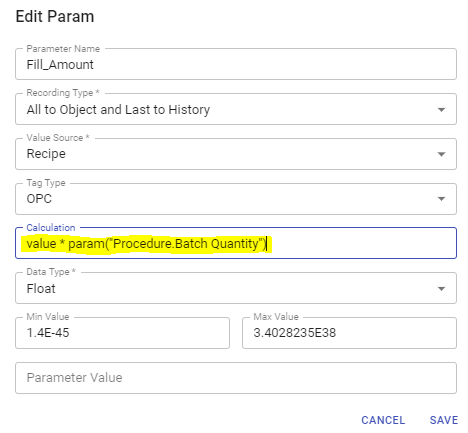
In Batch Recipe Editor, you can add and edit parameter expressions under the Calculation field of a parameter's edit dialog. The purpose of the calculation field here is to perform mathematical expressions during batch execution. Keep in mind that within batch execution speed is important and that parameter expressions here may be called frequently.
One line of Python code is accepted. System functions are not available for use in the one line of code. This means that you cannot access tags, execute DB queries, etc. The Script Phase is the correct method to do more extensive Python scripting because it is not repeatedly executed (unless you intentionally do so in the Batch Recipe). The lifecycle of a Script Phase can be tracked for troubleshooting.
See Referencing Parameters in Batch Recipes: Syntax

|
After the first execution, the calculation is updated whenever a parameter (set as a factor in the calculation) changes. |
|
|
In MES 3.81.12 SP0, MES 4.83.1 SP0 and later: Changes to the calculation field of a recipe parameter inherited from a phase prevents overwriting during sync-and-save. New button on the Calculation field: clicking the button once resets to the default value from the phase; clicking again undoes the reset. |
When an expression is entered (via Recipe Editor or scripting) that has circular references an error is returned and the recipe is flagged invalid and cannot be run.

|
Not supported in a Calculation Expression:
|
Supported Python Operators
| + | Addition |
| - | Subtraction |
| * | Multiplication |
| / | Division |
| % | Modulus |
| ** | Exponentiation |
| // | Floor division |
| == | Equal |
| != | Not equal |
| > | Greater than |
| >= | Greater than or equal to |
| < | Less than |
| and | Returns True if both statements are true |
| or | Returns True if one of the statements is true |
| not | Reverse the result, returns False if the result is true |
| in | Returns True if a sequence with the specified value is present in the object |
| not in | Returns True if a sequence with the specified value is not present in the object |
Sepasoft MES Module Suite