Sepasoft MES Module Suite
Process Segment
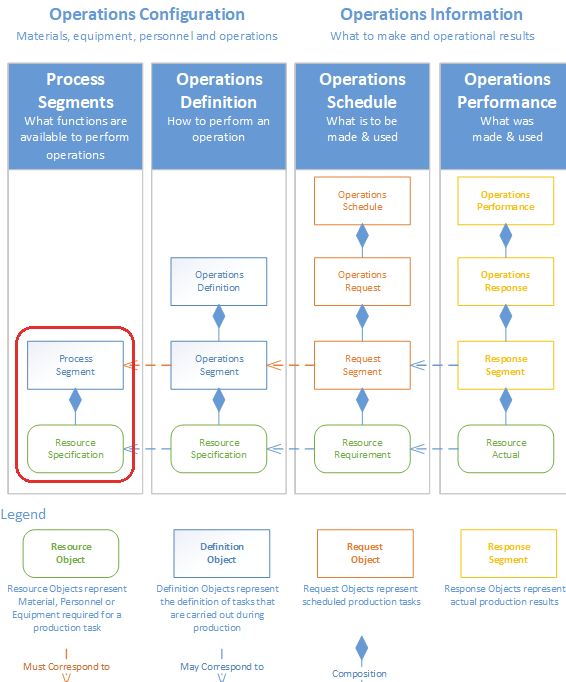
This object holds the definition of tasks that are performed in a manufacturing facility.
Tasks can be as simple as 'Receive Material' or 'Package Product', but can also be more granular such as 'Changeover Line', 'Clean Tank' or 'Inspect Material'.
The Process Segment is never used in an actual operation but acts as a template for Operation Segments to be derived from.
The Process Segment itself is derived from the AbstractMESObject and inherits all the exposed properties, methods and events for that object.
Object Creation
Process segments can be created in the client using the MES Object Editor component or through scripting using the following functions:
Python |
#Create a process segment to base the operations segment on ps = system.mes.createMESObject('ProcessSegment') ps.setPropertyValue('Name','Unload Nuts') #Create a new equipment reference complex property eqProp = ps.createComplexProperty('Equipment', 'Station') #Set the Equipment Reference for it eqLink = system.mes.getMESObjectLinkByName('Line', 'Nut Unloading') eqProp.setEquipmentRefType(eqLink.getMESObjectType().getName()) eqProp.setEquipmentRefUUID(eqLink.getMESObjectUUID()) #Create a new material reference complex property matProp = ps.createComplexProperty('Material', 'Received Nuts') #Set the lot Equipment Reference for it matEqLink = system.mes.getMESObjectLinkByName('EquipmentClass', 'Nut Silos') matProp.setEquipmentRefType(matEqLink.getMESObjectType().getName()) matProp.setEquipmentRefUUID(matEqLink.getMESObjectUUID()) #Set the material for it matObj = system.mes.loadMESObject('Bulk Nuts', 'MaterialClass') matProp.setMaterialRefUUID(matObj.getUUID()) matProp.setMaterialRefType(matObj.getMESObjectType().getName()) #Set the other remaining properties for it matProp.setUse('Out') #Set lot number source #The lot number of material being unloaded will be entered manually or with script matProp.setLotNumberSource('Manual') #Set the quantity source #The quantity of material being unloaded will be entered manually or with script matProp.setQuantitySource('Manual') #Creates a new material lot object for this material matProp.setAutoGenerateLot(True) matProp.setRatePeriod('None') matProp.setUnits('lbs') #The new process segment only resides in memory so save it to the database system.mes.saveMESObject(ps) |
Updating Derived Objects
- When changes are made to the Process Segment using the MES Object Editor component, updating any derived Operations Segments is automatically updated.
- When changes are made to the Process Segment through scripting, you must handle updating any derived objects via scripting. The scripting function system.mes.updateDependencies() can be used for this purpose.
Core Properties
Inherits the AbstractMESObject
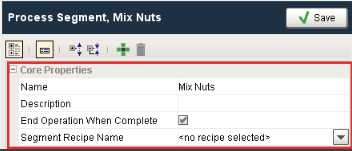
These properties are accessible through the MES Object Editor and with the provided object functions, but not directly as obj.properties. Property values can be accessed and changed for an object by using the getPropertyValue() and setPropertyValue() method.
|
Name
|
R/W
|
Description
|
|---|---|---|
| EndOperationWhenComplete |
Read/Write |
If this property is set to True, then the operations automatically ends when segment is complete |
| SegmentRecipeName | Read/Write | This is a drop down list of available recipes which can be set to be used on segment start |
Complex Properties
A process segment uses complex property objects to hold information about the resources associated with a task as well as OEE production settings. These complex properties can be added to the process segment using the MES Object Editor component or through scripting with the AbstractMESObject.createComplexProperty() function.
|
Property Object
|
Scripting
|
Description
|
|---|---|---|
| Material | Any material lots that may be consumed or created during an operation derived from the process segment are defined here. There is no requirement to create material complex properties e.g. a maintenance process segment, and there is no restriction on how many input, output or consumable materials are defined for a process segment. | |
| Equipment | A process segment requires one and only one Equipment complex property to be defined. this sets up production control on where this process segment can be executed. If you want to create a process segment that can occur on any piece of equipment e.g. 'Clean Equipment', set the equipment reference to an equipment class that contains all equipment. | |
| SupplementalEquipment | Mobile equipment that can be moved around such as bins, containers, die sets etc. cannot be defined in the production model as fixed equipment as defined by ISA-95. The MES Object Editor and scripting functions can be used instead to create Supplemental Equipment. Any supplemental equpiment that may be used by an operation can be defined here. | |
| Personnel | Personnel complex properties allow to you add production control to a process segment by defining who can execute this process segment. This complex property is optional and can be left blank. | |
| ProductionSettings | Production settings contain rate information that is used by the OEE module to calculate operational performance. |

Object Functions
This object provides the following functions:
Object Events
Objects have events associated with them that allow for custom scripts to be added whenever the event occurs.
Inherits the AbstractMESObject events.
Sepasoft MES Module Suite