Sepasoft MES Module Suite
Equipment Resource Property
This object defines the properties of equipment resources that a process segment can be run on. It holds resource information (as properties that are accessible through object function calls) that alter the way any operations segments derived from the process segment are executed. This object is stored as a complex property object of a process segment.

|
This object is not derived from the MESAbstractObject and therefore does not inherit its functions or properties. Instead it derives from AbstractMESComplexProperty object and inherits all its functions and properties. |
When an operations segment is scheduled or executed, a Response Equipment Property object is created. Refer to that object help for more details.
Object Creation
This object is created when using the MES Object Editor component. The following object methods can also be used to create or return this type of object.
- createComplexProperty()
- Process Segment object.getEquipmentProperty()
- Operations Segment object.getEquipmentProperty()
- Response Segment object.getEquipmentProperty()
- Request Segment object.getEquipmentProperty()
Python |
def create_process_segment_with_equipment_resource_property(ps_name, line_path): # Create and name Process Segment ps = system.mes.createMESObject('ProcessSegment') ps.setPropertyValue('Name',ps_name) # Create the Equipment Resource Complex Property and name it "Line to Run On" equipment_property = ps.createComplexProperty('Equipment', 'Line to Run On') # Connect the equipment to your Equipment Resource Property using the link to equipment equipment_link = system.mes.getMESObjectLinkByEquipmentPath(line_path) equipment_property.setEquipmentRef(equipment_link) # Save off the equipment to your server system.mes.saveMESObject(ps) def load_complex_property(ps_name): # Load newly created Process Segment ps = system.mes.loadMESObject(ps_name, 'ProcessSegment') # Get Equipment Resource Property with the name of Line to Run On print ps.getComplexProperty('Equipment.Line to Run On') # Get UUID of Equipment Resource Property with the name of Line to Run On print ps.getComplexProperty('Equipment.Line to Run On.EquipmentRefUUID') # Get references (Name, MES Object Type) of Equipment Resource Property with the name of Line to Run On print ps.getComplexProperty('Equipment.Line to Run On.EquipmentRef') # Instantiate ps_name = 'Example Process Segment' line_path = '[global]\Enterprise\Site\Area\Line 1' create_process_segment_with_equipment_resource_property(ps_name, line_path) load_complex_property(ps_name) |
Use
This object is not a parameter for any scripting or object functions.
Object Properties
These properties are accessible through the MES Object Editor component and with the provided object functions, but not directly as obj.properties. Property values can be accessed and changed for an object by using the getPropertyValue() and setPropertyValue() method. The setting name is what appears in the MES Object Editor component and the script name is what is used to set or get the value using script.
- MES Object Editor
- AbstractMESComplexProperty or details about accessing values using script.
This object has the following properties that affect how this object operates.
Setting Name | Data Type | Scripting | Description |
|---|---|---|---|
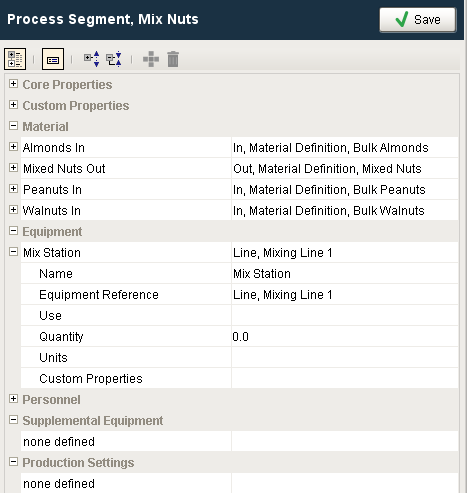
| Name | String | Equipment | This is the name to refer to this equipment resource by. Some process segments may have multiple equipment resources and this is a unique name displayed to the operator, shown in analysis and reports, and also internally used to reference this equipment resource. |
| Equipment Reference | PyDictionary | EquipmentRef | This can be set to a Equipment Class, Line, Line Cell, Line Cell Group or Storage Unit. By setting this to Equipment Class will cause the operator to be prompted for the specific equipment for this equipment resource. If set to a specific equipment item, then the selection will be automatically selected. |
| Equipment Reference UUID | String | EquipmentRefUUID | Unique identifier corresponding to the equipment reference. |
| Use | String | EquipmentUse | Currently this is here for reference and is included to align with the ISA-95 standard and will become significant in the next phase of the Track and Trace Module. |
| Quantity | Float8 | EquipmentQuantity | Currently this is here for reference and is included to align with the ISA-95 standard and will become significant in the next phase of the Track and Trace Module. |
| Units | String | EquipmentUnits | This specifies the units for the quantity setting. |
| Custom Properties | To add a new custom property, select this row and click add button on tool bar. |
Python |
#Example to return the reference uuid of an equipment #Load MES object mesObject = system.mes.loadMESObject('Mix Nuts', 'ProcessSegment') #Specify the equipment equipRef = mesObject.getComplexProperty('Equipment', 'Mix Station') #Get the reference uuid of an equipment print equipRef.getValue('EquipmentRefUUID') |
Python |
>>> c74eb7e9-5c76-46dd-993a-521087f91541 >>> >>> |
Object Functions
- Setting a Reference
- getEquipmentRef()
- getEquipmentRefProperty()
- getEquipmentRefType()
- getEquipmentRefUUID()
- getQuantity()
- getUnits()
- getUse()
- setEquipmentRef(equipmentRef)
- setEquipmentRefType(equipmentRefType)
- setEquipmentRefUUID(equipmentRefUUID)
- setQuantity(quantity)
- setUnits(units)
- setUse(use)
Setting a Reference
References can be set in the following ways:
Equipment
Passing an object link to the method setEquipmentRef(equipmentRef)
Python |
obj_link = system.mes.getMESObjectLinkByEquipmentPath('my/equipment/path') equip_prop.setEquipmentRef(obj_link) |
- Using a uuid and type with setEquipmentRefUUID(equipmentRefUUID) and setEquipmentRefType(equipmentRefType)
Python |
obj = system.mes.loadMESObjectByEquipmentPath('my/equipment/path') equip_prop.setEquipmentRefUUID(obj.getUUID()) equip_prop.setEquipmentRefType(obj.getMESObjectTypeName()) |
Sepasoft MES Module Suite