Sepasoft MES Module Suite
Parameter Properties
Depending on the phase and scenario, a property may be read-only.

|
| Property Name | Options | Description | ||||||||||||||||||||
|---|---|---|---|---|---|---|---|---|---|---|---|---|---|---|---|---|---|---|---|---|---|---|
| Recording Type | All to History | Parameter values on a regular update-interval are recorded to the database for MES Analysis use. | ||||||||||||||||||||
All to Object | Parameter values are saved against the MES Objects to ensure continuity of operation in case of power outage or server restart. | |||||||||||||||||||||
All to Object and History | Parameters are saved to both the object and history. | |||||||||||||||||||||
All to Object and Last to History | See “All to Object” above. Last values indicate only final parameter values are saved to history DB tables for analysis. For example, rather than an accumulated counter for quantity, only the final quantity would be recorded. | |||||||||||||||||||||
Changes Not Saved | Parameter values are not recorded. | |||||||||||||||||||||
Last to History | Parameter values are saved at the end of the phase to the DB for exposure to analysis. | |||||||||||||||||||||
| Value Source | Recipe | Gets the value from a recipe parameter before the batch starts. | ||||||||||||||||||||
| Execution | Gets value at runtime, once the batch has started. Runtime options are: the parameter value set in phase configuration, tag engine, and scripting. | |||||||||||||||||||||
| Recipe and Execution | Gets the value before the batch starts AND gets the value at runtime, once the batch has started. | |||||||||||||||||||||
| Monitor | Captures values from the equipment. Configure tags for history timeframe. When selecting Monitor, the parameter value becomes read-only, and a default value will not be set. The system checks every 100 milliseconds but only writes changes to history when the value changes. Monitor is intended for listening and recording in history values from the PLC. An example is Actual Temperature (PV_Temp) where the PLC has complete control of changing the value and the Batch Module only listens and records the value. Only accessible in Phase Manager. | |||||||||||||||||||||
| Synchronization Manager | Set on the receiving phase within a Sync Group of Synchronize Phases. | |||||||||||||||||||||
| Neither | These are parameters used internally by the Batch engine and cannot be changed via UI nor scripting. | |||||||||||||||||||||
| Tag Type | Memory | Parameters are instantiated in the Phase UDT as memory tags. | ||||||||||||||||||||
OPC | Parameters are instantiated in the Phase UDT as OPC tags. | |||||||||||||||||||||
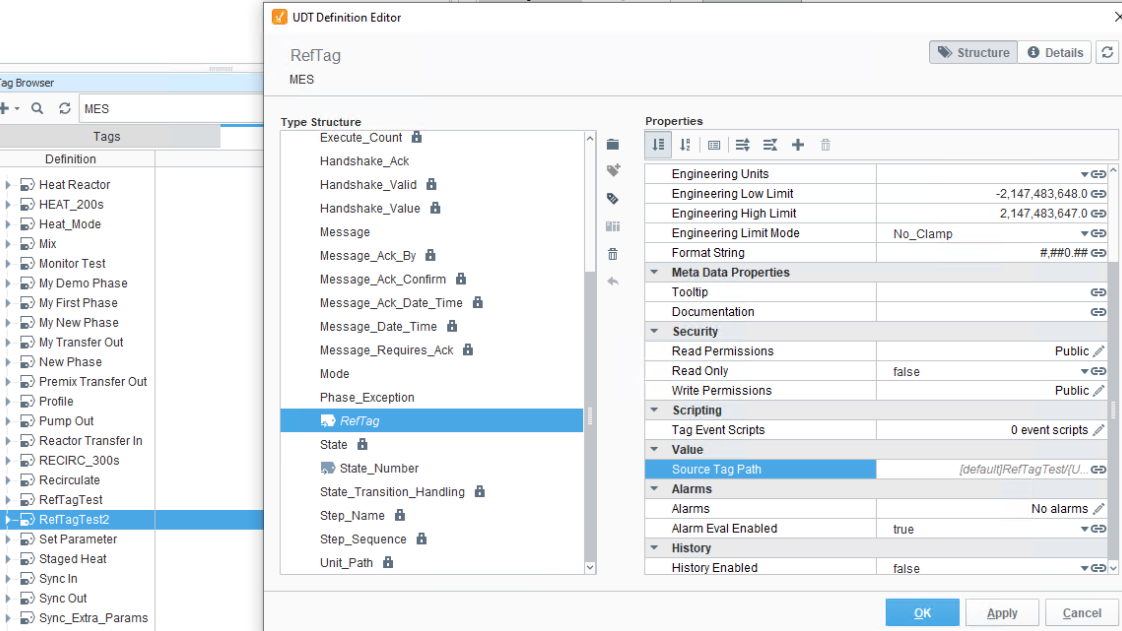
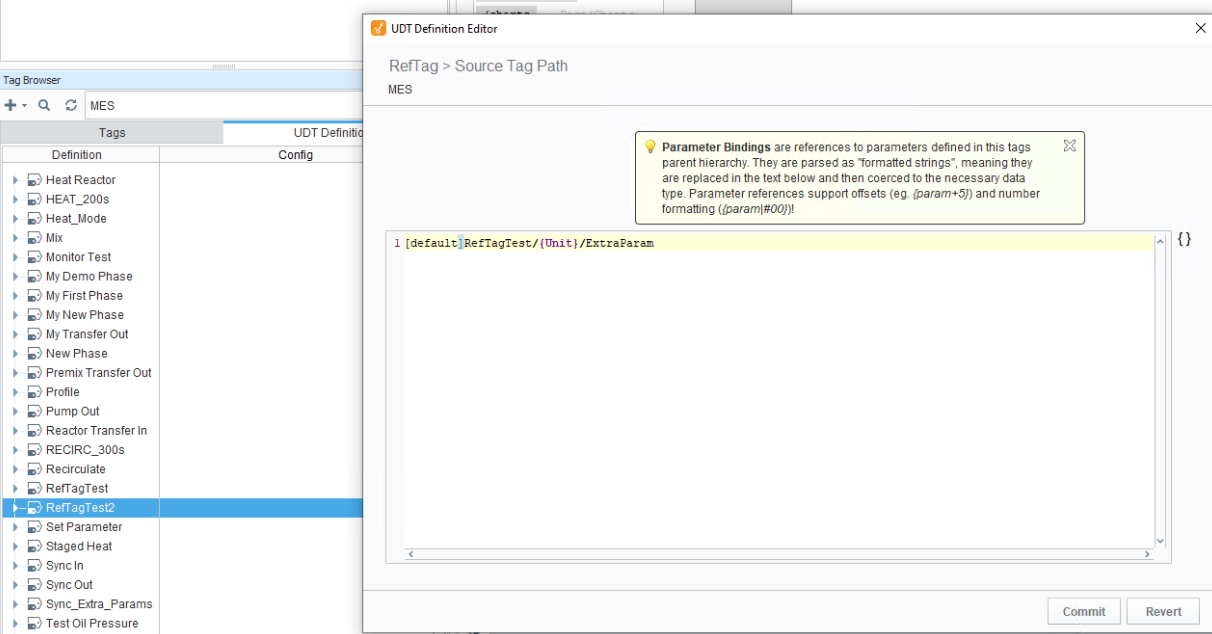
Reference | Parameters are instantiated in the Phase UDT as reference tags. You can set source tag paths for remote tags. For example:
  | |||||||||||||||||||||
| Calculation | Expression | Used for reference to another field or parameter OR when a unit of measurement needs to be calculated. Single line of Python. This is a function that is injected into a system Python. (Not available with the ENUM data type.) Start with a forward slash to set a path from the root of the procedure or recipe hierarchy. param(“/{}.Unit_Path”)
Use curly brackets to set at the current level within the hierarchy, e.g., param(“{}.Unit_Path”)
| ||||||||||||||||||||
| Data Type | Possible Data Types
|
Sepasoft MES Module Suite