Sepasoft MES Module Suite
Adding and Configuring Equipment Phases
For basic control of command-state and parameters, the system uses Equipment Phases.
- The type of process: The type of process and equipment
- The size of the batch: The size of the batch and the size and capacity of the equipment
- The desired level of automation: The automation level in the recipe-workflow design.
Adding an Equipment Phase
These steps require that Batch Phase Manager is added to a Perspective View.
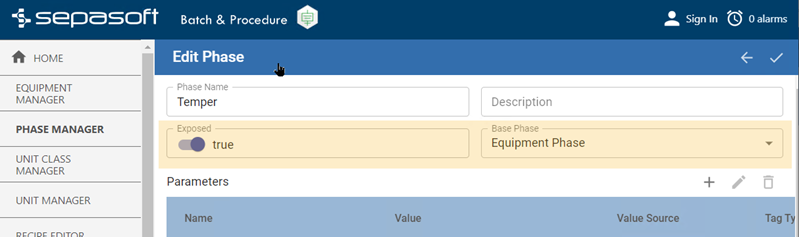
- Open Phase Manager, click the plus icon and select Phase Class.
- Click the plus icon again and select Phase.
- Select Equipment Phase as the Base Phase.
- Set Exposed to True.
User Defined Tag (UDT) Members
When you set a phase to Exposed UDT members are added. The tag values between an Ignition Gateway device connection and UDT members are populated in real-time. You can globally connect equipment phases to equipment devices (PLC mapping) by using parameterizing OPC Item Paths.
Equipment Phase Parameters
Phase parameters transfer data values back and forth between the Unit and control component.
- Output Parameters : Come from Ignition tags under a unit and go to the control component.
- Input Parameters : Come from the control component and go to the Ignitions tags for a unit in Ignition.
Next you can add equipment specific parameters.
See:
Sepasoft MES Module Suite