Sepasoft MES Module Suite
Adding Items to a Machine Recipe
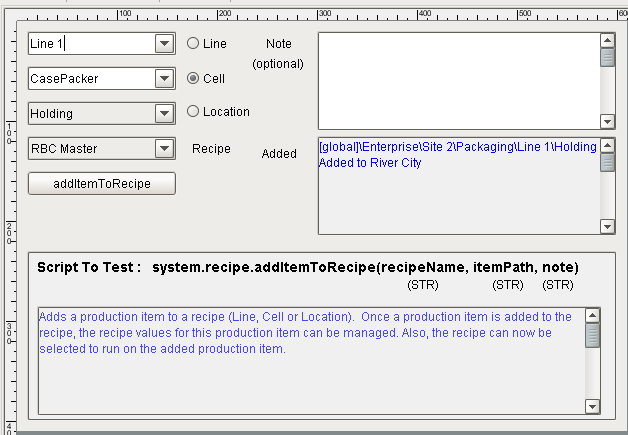
This example demonstrates how to add a production item to a recipe. The MES Object Selector component is used to select the production item. Other components used are Button, Label, Text Area and Radio Buttons.
Code Example
Python |
#Button's actionPerformed event handler script line = '[global]\' + event.source.parent.getComponent('mesosLine').equipmentItemPath cell = str(event.source.parent.getComponent('mesosCell').selectedName) location = event.source.parent.getComponent('sellLocation').selectedLocationPath recipeName = event.source.parent.getComponent('selRecipe').selectedRecipeName note = event.source.parent.getComponent('taNote').text #Radio Button Logic to determine the itemPath argument if event.source.parent.getComponent('cntSelections').getComponent('rbLine').selected: itemPath = line elif event.source.parent.getComponent('cntSelections').getComponent('rbCell').selected: itemPath = line + '\' + cell elif event.source.parent.getComponent('cntSelections').getComponent('rbLocation').selected: itemPath = location try: system.recipe.addItemToRecipe(recipeName, itemPath, note) event.source.parent.getComponent('taNote').text = '' event.source.parent.getComponent('taAdded').text = '' event.source.parent.getComponent('taAdded').text = ' ' + 'Production Item:' + ' ' event.source.parent.getComponent('taAdded').text = itemPath + ' Added to ' + recipeName except: system.gui.messageBox('Error - this Production Item already exists for this Recipe', 'Insert Failed') event.source.parent.getComponent('taAdded').text = '' |
Sepasoft MES Module Suite