Sepasoft MES Module Suite
Adding Sample Definitions with Scripting
The SPC Sample Definition Manager is generally used to add Sample Definition Classes and Sample Definitions. However, there are situations where you may want to add these via scripting. The SPC module provides scripting functions to perform a variety of tasks, such as adding or modifying Sample Definition Classes and Sample Definitions.
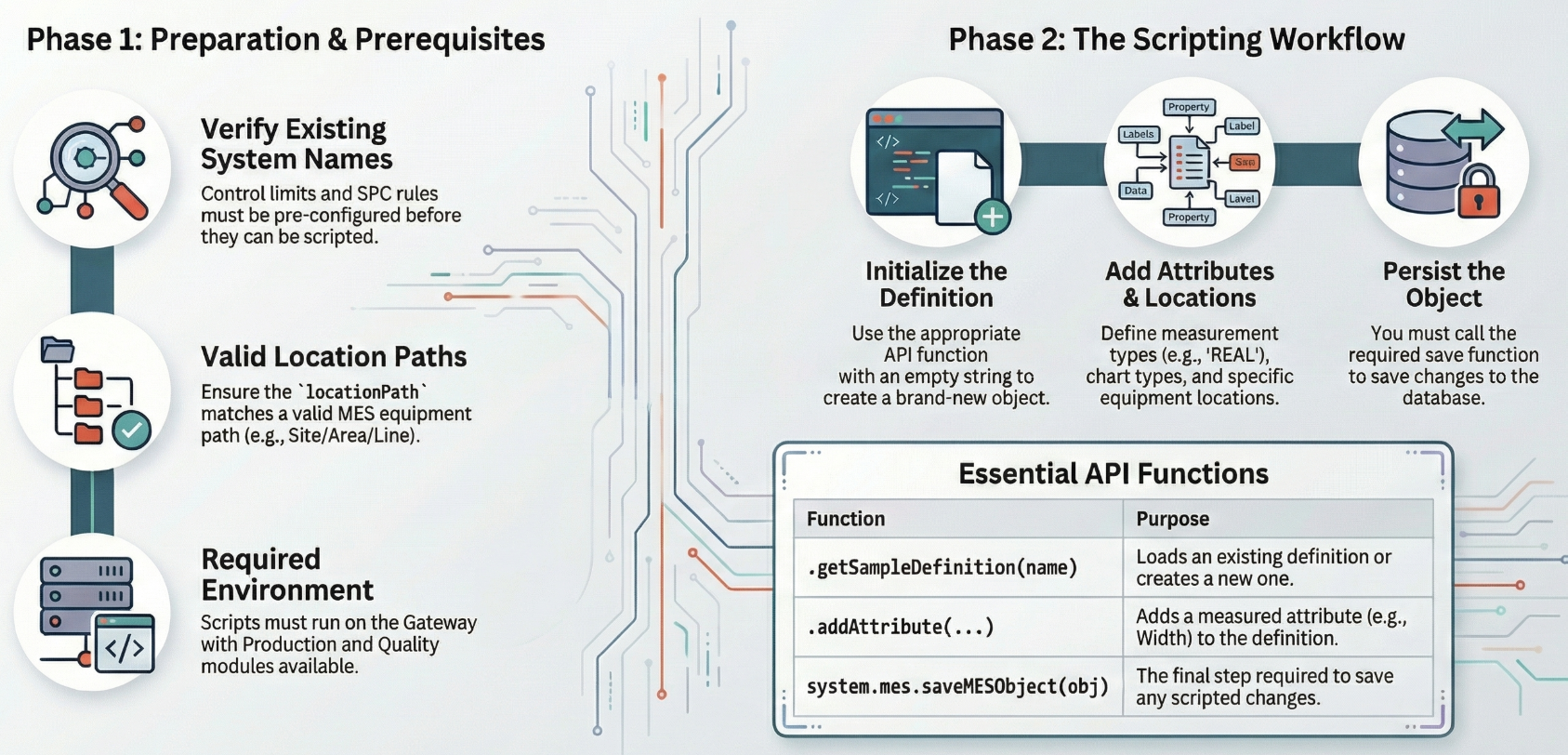
A sample definition (SPC definition) defines what to measure, where samples may be taken, and which control limits and rules apply. You can create and update definitions from script using system.mes.spc.definition, then persist the object with system.mes.saveMESObject. Run these scripts on the Gateway (or from the client in contexts that execute on the gateway) with Production and Quality modules available.
Before you begin
Use a unique definition name.
locationPath must be a valid MES equipment path to a location (for example Enterprise/Site/Area/Line/Location).
Sampling interval must match a configured interval name in your enterprise (for manual collection, Manual is typical).
Control limit and SPC rule (signal) names must already exist. Use the list functions below to see valid names in your system.
List valid limit and rule names
Python |
limitNames = system.mes.spc.definition.getLimitNameList() signalNames = system.mes.spc.definition.getSignalNameList() |
Optional: list existing sample definitions
showDisabled=True includes disabled definitions; False returns only enabled definitions.Python |
defs = system.mes.spc.definition.getSampleDefinitionList(False, '*', '') |
Create a new sample definition
- Before you begin
- List valid limit and rule names
- Optional: list existing sample definitions
- Create the definition object
- Set name, interval, and optional fields.
- Add one or more attributes
- Add allowed location(s)
- Add control limits (optional)
- Add SPC rules / signals (optional)
- Save
- Verify (optional)
- Update an existing definition
Create the definition object
Python |
sd = system.mes.spc.definition.getSampleDefinition('') |
Set name, interval, and optional fields.
Python |
sd.setName('Scripted Width SPC') sd.setInterval('Manual') sd.setDescription('Width monitoring from script') sd.setDefaultSampleSize(1) sd.setAutoApprove(False) sd.setAutoEvaluateSignals(True) |
Add one or more attributes
Python |
system.mes.spc.definition.addAttribute( sampleDefinition=sd, attributeName='Width', dataType='REAL', defaultChart='Individual', measurementCount=1, units='mm' ) |
Add allowed location(s)
Python |
system.mes.spc.definition.addLocation( sampleDefinition=sd, locationPath='Enterprise/Site/Area/Line/Location', autoApprove=True ) |
Add control limits (optional)
Python |
system.mes.spc.definition.addLimit(sd, 'Individual LCL') system.mes.spc.definition.addLimit(sd, 'Individual UCL') |
Add SPC rules / signals (optional)
Python |
system.mes.spc.definition.addRule(sd, 'Western Electric Rule 1') |
Save
Python |
system.mes.saveMESObject(sd) |
Verify (optional)
Python |
loaded = system.mes.spc.definition.getSampleDefinition('Scripted Width SPC') |
Update an existing definition
Load by name, change properties or add attributes, locations, limits, or rules, then save again.
Python |
sd = system.mes.spc.definition.getSampleDefinition('Scripted Width SPC') sd.setDescription('Updated from script') system.mes.saveMESObject(sd) |
Complete Jython Code Example
Replace paths, interval, limits, and rules with values that exist in your environment.
Python |
# Optional: inspect configured names # limits = system.mes.spc.definition.getLimitNameList() # signals = system.mes.spc.definition.getSignalNameList() sd = system.mes.spc.definition.getSampleDefinition('') sd.setName('Scripted Width SPC') sd.setInterval('Manual') sd.setDescription('Example sample definition created from script') sd.setDefaultSampleSize(1) system.mes.spc.definition.addAttribute( sampleDefinition=sd, attributeName='Width', dataType='REAL', defaultChart='Individual', measurementCount=1, units='mm' ) system.mes.spc.definition.addLocation( sampleDefinition=sd, locationPath='Enterprise/Site/Area/Line/Location', autoApprove=True ) # Optional — use names from getLimitNameList() system.mes.spc.definition.addLimit(sd, 'Individual LCL') system.mes.spc.definition.addLimit(sd, 'Individual UCL') # Optional — use names from getSignalNameList() # system.mes.spc.definition.addRule(sd, 'Western Electric Rule 1') system.mes.saveMESObject(sd) |
Script functions used in this topic
Function | Purpose |
|---|---|
New definition if name is blank; otherwise load by name. | |
Add a measured attribute to the definition. | |
Tie the definition to a location path. | |
system.mes.spc.definition.addLimit(sd, limitName) | Add a control limit by name. |
system.mes.spc.definition.addRule(sd, ruleName) | Add an SPC rule by name. |
List configured control limit names. | |
List configured signal/rule names. | |
system.mes.spc.definition.getSampleDefinitionList(showDisabled, nameFilter, locationPathFilter) | Query definitions as a dataset. |
system.mes.saveMESObject(mesObject) | Persist the sample definition. |
Related
system.mes.loadMESObject — Load MES objects by UUID or name and type when needed for other workflows.
system.mes.createMESObject — Alternative way to create a new object by type name (for example sample definitions) where supported by your scripting context.
Sepasoft MES Module Suite