Sepasoft MES Module Suite
EBR Viewer Component Reference
Installed with the Batch Procedure module.
Find this component under the Ignition Designer Perspective Component Palette, named EBR Viewer
For user information, see Using Batch Procedure EBR Viewer.
Component Properties
META Properties
| Name | ebrViewer |
Properties

|
Available in 3.81.11 RC and later The following components have a user property field:
These components record user actions in the EBR recording the component's actions, including setting parameter values, setting logic mode, issuing recipe commands, issuing step commands, forcing step completion, manually executing steps, and skipping transitions. In version 3.81.11 SP10 and later: EBR includes a ChangedBy column, see an example Sample Batch EBR PDF. |
|
|
Available in 3.81.11 RC and later | Calculated Parameter Values
|
| batchID |
You must specify either a recipe or a batch. When you execute a recipe, it is then referred to as a 'Batch'.
If you add values to both properties, then the batchID is used. |
|||||||||||
| recipeName | ||||||||||||
| procedure |
Defines what is shown in the EBR at the highest level in a recipe hierarchy, called the Procedure level. Keep in mind the step hierarchy when setting properties. The 'steps' property scope is defined by its level in this hierarchy. Valid Step Hierarchy:
|
|||||||||||
|
|
title |
Any batch procedure-level parameter and data items in the EBR can be referenced and displayed as value in the title property. To view all the data items in an EBR, see sample script queue.getBatchEBR and Print to JSON. |
String |
For Example:
Do not reference data items with the 'array' data type . This data type is not allowed in the title reference and will produce an error. |
||||||||
|
|
details |
|
|
|
||||||||
|
|
|
show | Boolean | True/False. When set to True, the EBR displays the details you list under the items property. | ||||||||
|
|
|
items | List Array |
Mapping of parameters to include in the EBR at the Procedure level (this is the top-level, also called recipe). The syntax is '<label in EBR>: {recipe parameters}'
Version Specific
|
||||||||
|
|
parameters |
Referring to the Valid Step Hierarchy above, you can reference properties in a Unit Procedure or Phase at the top Procedure recipe level. In the output EBR, you can sort parameter by clicking on the column headers. By default, the Parameter tables are sorted by the Timestamp column. |
||||||||||
|
|
|
show | Boolean |
True/False. When set to True, the EBR includes the parameter section of the report. |
||||||||
|
|
|
title | String | Title for parameter section. | ||||||||
|
|
|
includesystemParameters | Boolean | When set to True, EBR includes the parameters at the Procedure recipe level. | ||||||||
|
|
|
includeNameFilter | List Array |
List the parameters to include in the EBR. You can use wildcards in the expression: '*' and '?' ['*_Date_Time'] |
||||||||
|
|
|
excludeNameFilter | List Array |
Exclude the parameters in the EBR. You can use wildcards in the expression: '*' and '?' ['*_Date_Time'] |
||||||||
|
|
steps | Referring to the Valid Step Hierarchy above, this could include Unit Procedures or Phases at the top Procedure recipe level. | ||||||||||
|
|
|
show | Boolean | True/False. When set to True, the EBR displays the details defined within this section. | ||||||||
|
|
|
title | String | Title for parameter section. | ||||||||
|
|
|
includeIdleSteps | Boolean | True/False. When set to True, the EBR displays the steps that are in the Idle state and have not run. Only for Control Recipe EBR (i.e., Batches) | ||||||||
|
|
|
includeNameFilter | List Array |
List the steps to include in the EBR. You can use wildcards in the expression: '*' and '?' ['*_Date_Time'] |
||||||||
|
|
|
excludeNameFilter | List Array |
Exclude the parameters in the EBR. You can use wildcards in the expression: '*' and '?' ['*_Date_Time'] |
||||||||
| step |
Referring to the Valid Step Hierarchy above, this could include Operations or Phases under a Unit Procedure. |
|||||||||||
|
|
title | Sets the Title syntax of the Step panel in the EBR. | String |
Use curly braces to reference data items. In this example the Step can reference a unit procedure or a phase. Then the Phase references any phases under the step. '{Step} - {Phase}' |
||||||||
|
|
details |
|
|
|
||||||||
|
|
|
show | Boolean | True/False. When set to True, the EBR displays the details defined within this section. | ||||||||
|
|
|
items | List Array |
Mapping of parameters to include in the EBR at the step level (this could be a Unit Procedure, Operation and Phase). The syntax is '<label in EBR>: {recipe parameters}' 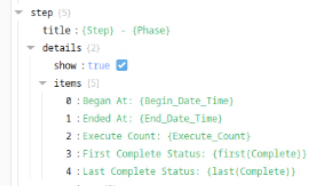
Version Specific
|
||||||||
|
|
parameters | In the output EBR, you can sort parameter by clicking on the column headers. By default, the Parameter tables are sorted by the Timestamp column. | ||||||||||
|
|
|
show | Boolean | True/False. When set to True, the EBR displays the details defined within this section. | ||||||||
|
|
|
title | String | Title for parameter section. | ||||||||
|
|
|
includeSystemParameters | Boolean | True/False. When set to True, the EBR displays the system parameters identified under includeNameFilter below. | ||||||||
|
|
|
includeNameFilter | List Array |
List the steps to include in the EBR. You can use wildcards in the expression: '*' and '?' ['*_Date_Time'] |
||||||||
|
|
|
excludeNameFilter | List Array |
Exclude the parameters in the EBR. You can use wildcards in the expression: '*' and '?' ['*_Date_Time'] |
||||||||
|
|
steps | Referring to the Valid Step Hierarchy above, this could include Unit Procedures or Phases. | ||||||||||
|
|
|
show | Boolean | True/False. When set to True, the EBR displays the details defined within this section. | ||||||||
|
|
|
title | String | Title for steps section. | ||||||||
|
|
|
includeIdleSteps | Boolean | True/False. When set to True, the EBR displays the steps that are in the Idle state and have not run. Only for Control Recipe EBR (i.e., Batches) | ||||||||
|
|
|
includeNameFilter | List Array |
List the steps to include in the EBR. You can use wildcards in the expression: '*' and '?' ['*_Date_Time'] |
||||||||
|
|
|
excludeNameFilter | List Array |
Exclude the parameters in the EBR. You can use wildcards in the expression: '*' and '?' ['*_Date_Time'] |
||||||||
| Use the properties below to customize the styling of an EBR. | ||||||||||||
| style |
|
classes |
|
You can use the Perspective styles to format this EBR. For information, see Styles.
You can apply Style Classes to the EBR. For information, see Perspective Style Classes. |
||||||||
| panelStyle |
|
classes |
|
|||||||||
| panelTitleStyle |
|
classes |
|
|||||||||
| tableStyle |
|
classes |
|
|||||||||
| tableHeaderStyle |
|
classes |
|
|||||||||
| toolbarStyle |
|
classes |
|
|||||||||
| tooltipStyle |
|
classes |
|
|||||||||
|
|
|
classes |
|
|||||||||
|
|
|
backgroundColor |
|
You can use the Perspective styles to format this EBR. For information, see Styles. | ||||||||
|
|
|
color |
|
|||||||||
|
|
|
fontSize |
|
|||||||||
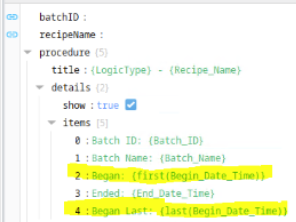
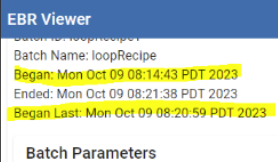

Sepasoft MES Module Suite