Sepasoft MES Module Suite
Batch Phase Manager Reference
Installed with the Batch Procedure module.
For user information, see Batch Phase Manager.
Component Properties
Meta Property
| Name | phaseManager |
These properties control the Phase Manager configuration and provide the runtime data for how the property appears and behaves in a session.
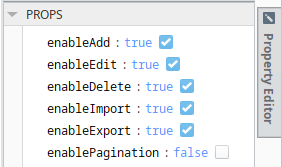
| enableAdd | Boolean |
If set to True, displays the plus icon to add phase classes and phases. |
Perspective Property Editor in Ignition Designer
|
||
| enableEdit | Boolean |
If set to True, displays the pencil icon to edit existing phase classes and phases. |
|||
| enableDelete | Boolean |
If set to True, displays the trash icon to delete phase classes and phases. |
|||
| enableImport | Boolean |
If set to True, displays the import icon to allow importing a recipe XML file. Keep in mind that recipe classes are not imported. You must create the class structure and then import under a class. |
|||
| enableExport | Boolean |
If set to True, the export icon displays to facilitate exporting as an XML file. Keep in mind that recipe classes are not exported. |
|||
| enablePagination | Boolean |
Set to False by default. If set to True, displays pagination controls at the bottom of the view. |
|||
| paramNameFilter | String |
Blank by default. All parameters display by default. Accept arrays of wildcards. Some examples: UD* shows parameters that start with the letters UD, such as UD_1234 or UDA84. D? shows parameters that start with UD and one character after. UD2 or UD- |
Version Specific
|
||
| phaseClassNameFilter | String |
Blank by default. All phase classes display by default. Accept arrays of wildcards. Some examples: wheel* shows parameters that start with the letters wheel, such as wheel_1234 or wheel-A84. wheel? shows parameters that start with 'wheel' and one character after. wheel2 or wheel- |
Version Specific
|
||
| phaseNameFilter | String |
Blank by default. All phase display by default. Accept arrays of wildcards. Some examples: wheel* shows parameters that start with the letters wheel, such as wheel_1234 or wheel-A84. wheel? shows parameters that start with 'wheel' and one character after. wheel2 or wheel- |
Version Specific
|

Sepasoft MES Module Suite