Sepasoft MES Module Suite
Allowing External Systems BAPI Calls to Interface for SAP Module
 | Available in 3.81.10 RC1 and later |
This functionality of adding Server functionality to the existing Business Connector Module allows external systems (clients) to make BAPI calls into the Interface for SAP module, Web Service provider endpoints, and files located in a directory.
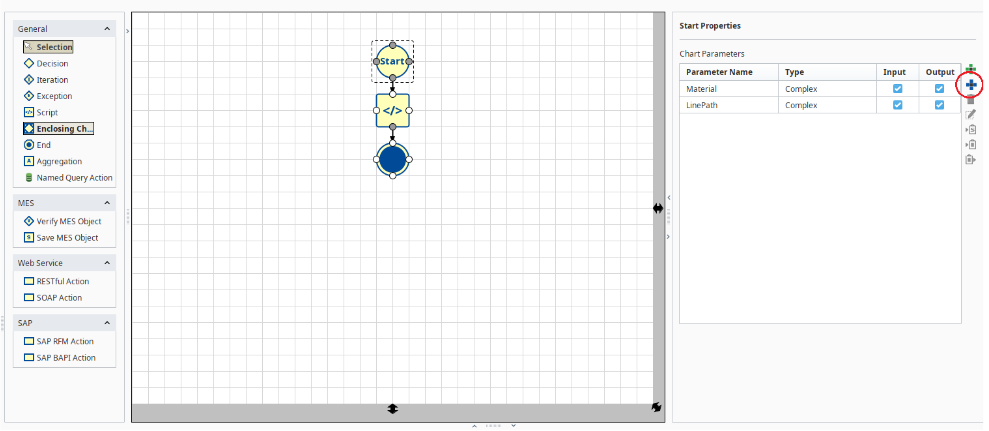
The data structure for input and output parameters are defined at the Business Connector chart start element. Parameters defined at the start element support complex and simple user-defined structures or select predefined structures. The predefined structures include B2MML and general MES structures. The general MES structures are stripped down to the point structures when the complexity of B2MML is not needed.
See below:
- Import into Chart Parameter Configuration of Business Connector
- SAP - JCo
- Setting Up a New SAP Server
- Backend Operations
Related Topics:
- Setting Up Server Functionality for SAP
- Input/Out Parameters in Start Block.
Import into Chart Parameter Configuration of Business Connector
This is similar to the import structure for Web Service consumers. The following formats are supported and automatically detected at the time of import.
- XSD
- XML
- JSON - Datatypes will default to String
SAP - JCo
Only sRFC (sequential RFC) calls are currently supported.
Setting Up a New SAP Server
Define a Business Connector chart that is executed when an SAP function request is received.
The SAP import (BC input) and export (BC output) parameters are defined on the Business Connector Begin element of the chart (chart input and output parameters). The functionality to expose the import and export parameters is not supported by JCo and is not required by these changes.
Add the desired actions to the Business Connector chart. Actions can be visually mapped to the chart input parameters that are passed in from the request. Similarly, action values can be visually mapped to the chart output parameters that will be returned to the function requester.
Define an SAP server
Define a Function under the server and select the Business Connector chart.
Backend Operations
When the Interface for SAP Module starts, each server configured from above is registered with the JCo library.
When JCo notifies the Interface for SAP Module of an inbound request:
The data is extracted from the SAP import (Business Connector chart input) parameter list of the function and parsed into XML that is compatible with the Business Connector.
The Interface for SAP listener shall detect malformed import or export structures and return the appropriate error back to SAP through the RETURN message structure.
SAP handles arrays as Tables (rows and columns). The Business Connector uses XML which doesn’t have the notion of tables but does support arrays. A translation between arrays and tables will need to be done between the Business Connector and Interface for SAP.
The Business Connector chart that is assigned to the function is invoked with the XML data from the previous step passed into the chart input parameters. This is a synchronous execution of the chart.
Actions within the chart can act on the data.
When the chart execution is complete, the chart output parameters are returned through the Interface for SAP and JCo library back to the function requester. Any exceptions should be returned back to the calling SAP server through the RETURN message structure.
The function is completed.
Sepasoft MES Module Suite