Sepasoft MES Module Suite
Changesets
Changesets fundamentally change how configurations are managed by allowing users to isolate, track, save, and synchronize changes before they are applied to a live production environment.

|
Version specific: In MES 4.83.3 SPO and later, when upgrading systems Changesets is disabled by default. In new systems, Changesets is enabled by default. This setting is located in a JSON configuration file: data\config\resources\core\productiongateway\mes-meta-data\config.json Field: changesetEnabled A Gateway restart is required after changing this setting. |
See Below:
- How To Use Changesets when Making Changes in the UI with MES Components
- How To Use Changesets when Making Changes in Scripting
- Moving, Testing, and Applying Changesets within a Database Environment
- Important Notes
- Scripting Functions
Also, see Changeset Objects.
How To Use Changesets when Making Changes in the UI with MES Components
By converting modifications into portable JSON files, the system allows for a physical transfer of data. Once these files are relocated, the software automatically reconciles the metadata and applies pending updates in the specific order required by their functional dependencies. This process ensures that system changes are deployed accurately and consistently across the entire production infrastructure.
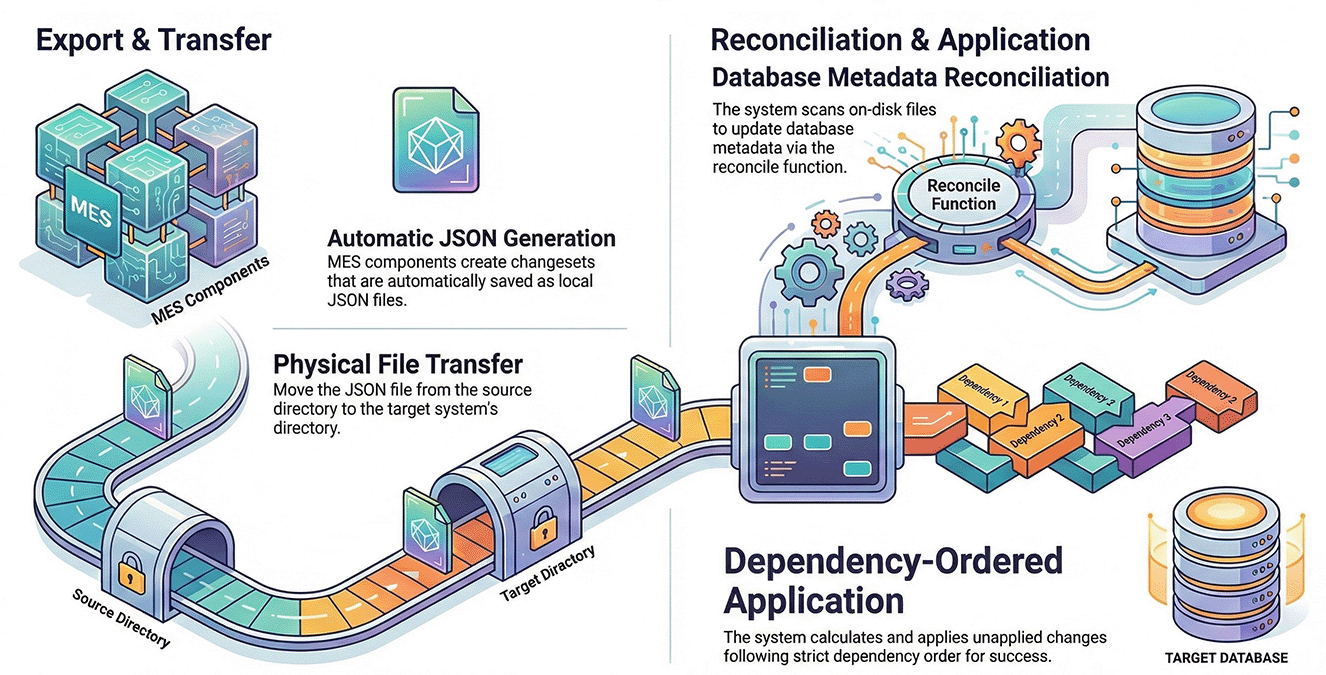
- Automated Creation & Storage: Changesets are created automatically for all MES modules when using the MES components. These configuration changes are automatically saved to a JSON file within the directory structure.
- File Transfer: To move those changes to a new system (for example, from a QA system to a production environment), you must physically copy the changeset files from the source directory to the target directory.
|
|
The data files are saved in the data directory, which is different depending on the operating system: Windows or Linux:<Data directory path>/changesets/configuration/diff/The data files are organized into folders and sub folders based on the changeset UUID. |
- Database Reconciliation: After copying the files, you first need to call system.mes.changeset.reconcile(). This function scans the on-disk changeset files and reconciles them into the database metadata, ensuring the new system's database recognizes the newly discovered files.
- Apply Missing Changes: Once reconciled, call system.mes.changeset.applyMissing(). This function automatically calculates which closed changesets have not yet been applied and applies them to the new system in the correct dependency order.
How To Use Changesets when Making Changes in Scripting
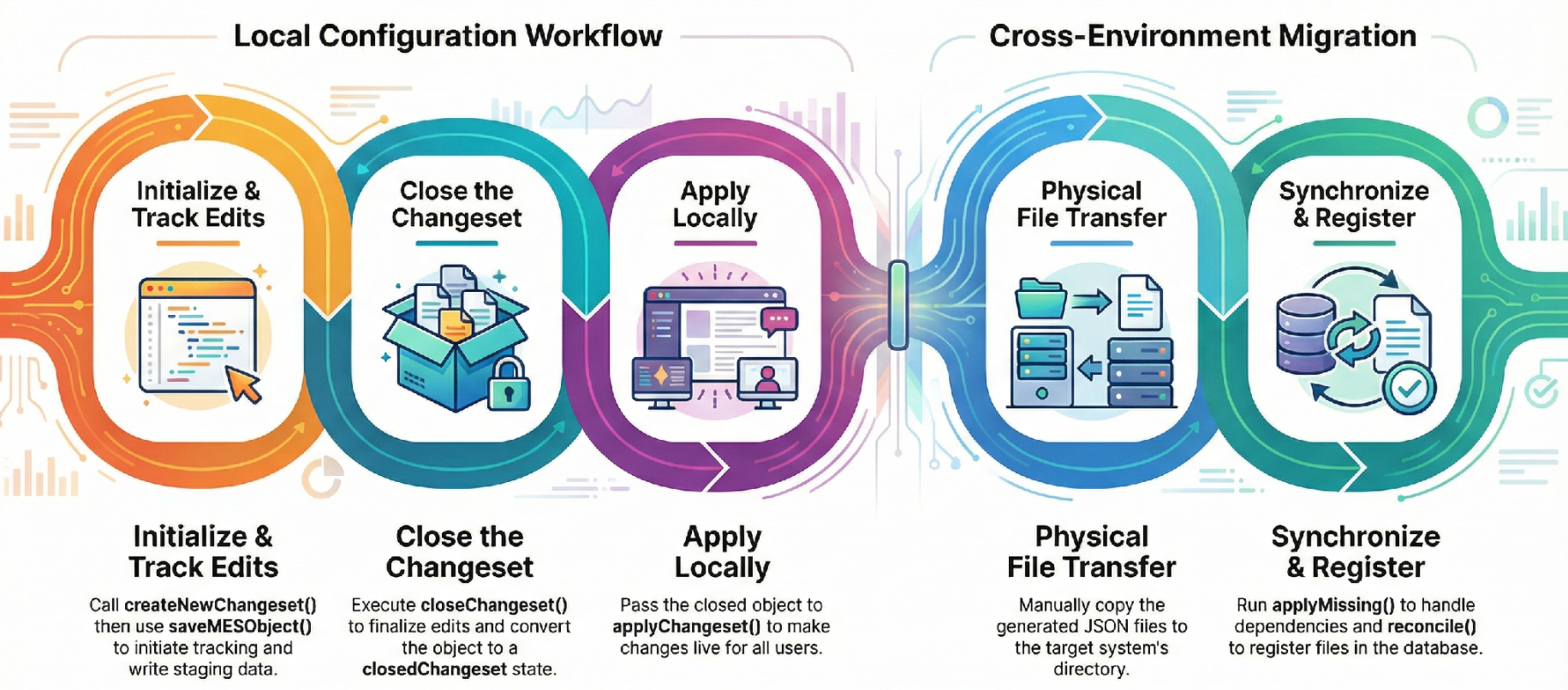
Workflow Step Detail:
- Create Changeset: Call
system.mes.changeset.createNewChangeset()to generate an OpenConfigurationChangeset object. By default, it attaches to your active session. - When Modifying Objects in Scripting: You must save the object with
system.mes.saveMESObjectto initiate tracking, which writes the staging data to the JSON file and allows the open changeset to be listed. - Close Changeset: Once edits are complete, call
system.mes.changeset.closeChangeset()The object is now a closedChangeset object. - Apply Locally (Current Environment): To make the changes live immediately, pass the closed object to
system.mes.changeset.applyChangeset().This updates its status to "Applied" and makes it visible to all users. - Migrate Changes to Other Environment
- Move to other Environment: Physically copy the JSON files to the target system's directory.
Example JSON file:
JSON |
|
|
|
The data files are saved in the data directory, which is different depending on the operating system: Windows or Linux:<Data directory path>/changesets/configuration/diff/The data files are organized into folders and sub folders based on the changeset UUID. |
- Run
system.mes.changeset.applyMissing()to automatically calculate and apply the unapplied changes in the correct dependency order.
|
|
system.mes.changeset.applyMissing(String csv) will apply changesets in the order of the csv string, if the string is empty or null, it calls system.mes.changeset.applyPlan() and uses that plan |
Moving, Testing, and Applying Changesets within a Database Environment
Together, these commands provide a framework for maintaining data integrity during complex system updates.
|
|
See applyPlan Command and Use Cases for function details and use cases. |
Reconcile MES Changeset
The reconcile function serves as an administrative tool that synchronizes local disk files with database records without modifying the actual objects.
Viewing Changeset(s)
Once these records are aligned, they become visible for tracking and can be manipulated through further scripts.
Applying Changesets
The applyPlan function automates this reconciliation process while generating a structured execution strategy. This resulting plan organizes changesets into a logical sequence to ensure dependencies are respected and identifies any potential errors or blocked tasks.
Important Notes
- Added in 4.83.2 RC3 - New ignition conf argument that can be set with `-Dcom.sepasoft.changeset.allowHashRewrite=True` that allows recomputing the hash during changeset bootstrapping.
Scripting Functions
- system.mes.changeset.createNewChangeset(description, note, associateWithSession)
- system.mes.changeset.closeChangeset(openChangeset)
- system.mes.changeset.applyChangeset(closedChangeset)
- system.mes.changeset.attachSessionChangesetUUID(uuid)
- system.mes.changeset.commit(uuid)
- system.mes.changeset.detachSessionChangeset()
- system.mes.changeset.cancelChangeset(openChangeset, reason)
- system.mes.changeset.closeChangeset(openChangeset)
- system.mes.changeset.listClosed()
- system.mes.changeset.listOpen()
- system.mes.changeset.getClosedConfigurationChangeset(uuid)
- system.mes.changeset.getOpenConfigurationChangeset(uuid)
- system.mes.changeset.reconcile()
- system.mes.changeset.applyPlan()
- system.mes.changeset.applyMissing(String csv)
- system.mes.changeset.applyMissingInOrder(List<String>)

|
Version Specific: 4.83.2 RC3 system.mes.changeset.getSessionChangesetUUID() returns the current changeset UUID for the session as a string, or null if there isn't a changeset associated with the session. |
system.mes.changeset.createNewChangeset(description, note, associateWithSession)
Syntax: system.mes.changeset.createNewChangeset(description, note, associateWithSession)
- Description:
Creates a new Open Changeset. The system returns an OpenConfigurationChangeset object. The changeset status is "Open" (or "Pending"). When associateWithSession is true (the default), the changeset is automatically attached to the current Perspective session; edits in that session will be recorded to this changeset.
This method is a Keyword Argument function, you can do any combination of the parameters in any order, as long as you use the name.
Valid parameter arguments:
Python |
system.mes.changeset.createNewChangeset(description="", note="", associateWithSession=True) system.mes.changeset.createNewChangeset(associateWithSession=True) system.mes.changeset.createNewChangeset(note="") system.mes.changeset.createNewChangeset(description="") |
If you don't use the names, the system interprets the parameters as listed in the Syntax section.
- Parameters:
description: String
note: String
associateWithSession: Boolean - Default to True. the changeset is automatically attached to the current Perspective session. When False, the changeset is created but not attached; you must later call attachSessionChangesetUUID(uuid) before edits will be attributed to it.
- Returns:
OpenConfigurationChangeset: The newly created Open Changeset, with no change data present in it.
Example 1: Create and attach a new changeset (default behavior)
Python |
# Create and attach a new changeset (default behavior) openChangeset = system.mes.changeset.createNewChangeset() changesetUuid = str(openChangeset.getUUID()) print("Created Changeset:", changesetUuid) |
Example 2: Create without attaching (e.g., to prepare a changeset for another session)
Python |
# Create without attaching (e.g., to prepare a changeset for another session) openChangeset = system.mes.changeset.createNewChangeset(associateWithSession=False) # Later: attach when ready to edit system.mes.changeset.attachSessionChangesetUUID(str(openChangeset.getUUID())) |
system.mes.changeset.closeChangeset(openChangeset)
Syntax: system.mes.changeset.closeChangeset(openChangeset)
- Description:
You must close the changeset before applying it.
- Parameters:
openChangeset: OpenConfigurationChangeset object - The open changeset to close.
- Returns:
None
system.mes.changeset.applyChangeset(closedChangeset)
Syntax: system.mes.changeset.applyChangeset(closedChangeset)
- Description:
Applies a Closed Changeset. Changes are written to the database. Changes are visible to all users and available for production runs.
- Parameters:
closedChangeset: Object - The Closed Changeset to apply.
- Returns:
message: String: A message if the Closed Changeset could not be applied.
Example: Get an open changeset from listOpen or createNewChangeset
Python |
# Get an open changeset (e.g., from listOpen or from createNewChangeset) openChangesets = system.mes.changeset.listOpen() if openChangesets and len(openChangesets) > 0: meta = openChangesets[0] openChangeset = system.mes.changeset.getOpenConfigurationChangeset(str(meta.changesetUUID)) closedChangeset = system.mes.changeset.closeChangeset(openChangeset) result = system.mes.changeset.applyChangeset(closedChangeset) if result: print("Apply message:", result) |
system.mes.changeset.attachSessionChangesetUUID(uuid)
- Description:
Activates the Open Changeset, causing edits to be attributed to it.
- Parameters:
String - uuid: The UUID of the Open Changeset to set as the session's currently active Open Changeset.
- Returns:
None
Example:
Python |
openChangesets = system.mes.changeset.listOpen() if openChangesets and openChangesets.size() > 0: openChangeset = openChangesets.get(0) system.mes.changeset.attachSessionChangesetUUID(str(openChangeset.changesetUUID())) |
system.mes.changeset.commit(uuid)
- Description:
Updates the database with the current state of the target Open Changeset.
- Parameters:
String - uuid: The UUID of the Open Changeset to update.
- Returns:
None
Example:
Python |
openChangesets = system.mes.changeset.listOpen() if openChangesets and openChangesets.size() > 0: openChangeset = openChangesets.get(0) system.mes.changeset.commit(str(openChangeset.changesetUUID())) |
system.mes.changeset.detachSessionChangeset()
- Description:
Deactivates the session's currently active Open Changeset, causing further edits to no longer be attributed to it.
- Parameters:
None
- Returns:
None
Example:
Python |
system.mes.changeset.detachSessionChangeset() |
system.mes.changeset.cancelChangeset(openChangeset, reason)
- Description:
Cancels an Open Changeset.
- Parameters:
OpenChangeset - openChangeset: The Open Changeset to cancel.
String - reason: An optional note explaining why the changeset was cancelled.
- Returns:
None
Example:
Python |
enChangesets = system.mes.changeset.listOpen() if openChangesets and openChangesets.size() > 0: openChangeset = openChangesets.get(0) if not openChangest.cancelled(): system.mes.changeset.cancelChangeset(openChangeset, 'Cancelling unintended changes.') |
system.mes.changeset.closeChangeset(openChangeset)
- Description:
Closes an Open Changeset.
- Parameters:
OpenChangeset - openChangeset: The Open Changeset to close.
- Returns:
ClosedChangeset: A Closed Changeset, containing an unmodifiable copy of the Open Changeset's data.
Example:
Python |
openChangesets = system.mes.changeset.listOpen() if openChangesets and openChangesets.size() > 0: openChangeset = openChangesets.get(0) system.mes.changeset.closeChangeset(openChangeset) |
system.mes.changeset.listClosed()
- Description:
Returns a list of all Closed Changesets found for the current session.
- Parameters:
None
- Returns:
List<ChangesetMeta>: A list of Closed Changeset elements.
Example:
Python |
closedChangesets = system.mes.changeset.listClosed() |
system.mes.changeset.listOpen()
- Description:
Returns a list of all Open Changesets found for the current session.
- Parameters:
None
- Returns:
List<ChangesetMeta>: A list of Open Changeset elements.
Example:
Python |
openChangesets = system.mes.changeset.listOpen() |
system.mes.changeset.getClosedConfigurationChangeset(uuid)
- Description:
Fetches a Closed Changeset. Will return an empty Closed Changeset if none exists with the given UUID.
- Parameters:
String - uuid: The UUID of the Closed Changeset to find.
- Returns:
ClosedChangeset: The Closed Changeset matching the UUID.
Example:
Python |
closedChangesets = system.mes.changeset.listClosed() if closedChangesets and closedChangesets.size() > 0: closedChangeset = closedChangesets.get(0) closedConfigChangeset = system.mes.changeset.getClosedConfigurationChangeset(str(closedChangeset.changesetUUID())) |
system.mes.changeset.getOpenConfigurationChangeset(uuid)
- Description:
Fetches an Open Changeset. Will generate a new Open Changeset if none exists with the given UUID.
- Parameters:
String - uuid: The UUID of the Open Changeset to find.
- Returns:
OpenChangeset: The Open Changeset matching the UUID.
Example:
Python |
openChangesets = system.mes.changeset.listOpen() if openChangesets and openChangesets.size() > 0: openChangeset = openChangesets.get(0) openConfigChangeset = system.mes.changeset.getOpenConfigurationChangeset(str(openChangeset.changesetUUID())) |
system.mes.changeset.reconcile()
Makes no object changes, it makes sure that the changesets on disk have an appropriate record in the database. This allows them to be viewed by listOpen or listClosed, and can then be used with other scripting functions like close or apply.
system.mes.changeset.applyPlan()
system.mes.changeset.applyMissing(String csv)
system.mes.changeset.applyMissingInOrder(List<String>)
Sepasoft MES Module Suite