Sepasoft MES Module Suite
Configuring Routing by Material
When configuring material to run on a production line, it may be that not all process cells in a line will be used for certain products. An example could be a packaging line where a certain product does not requires labels to be attached from the labeler. In this case we can configure the labeler cell to be disabled whenever this product code runs on the packaging line.
The OEE Material Manager allows us to do this by setting the Production Mode to DISABLED for the labeler cell in the Material Production Settings Pane.
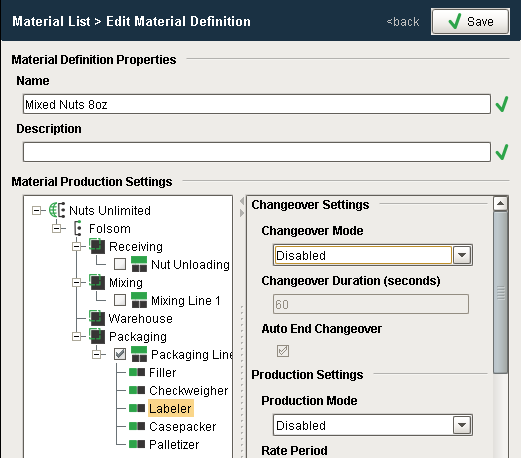
If we want to display to an operator the routing of which cells need to be operational during a production run, we can use scripting to access the production settings for this operations segment.
Example 1
Python |
segName = 'Mixed Nuts 8oz-Nuts Unlimited:Folsom:Packaging:Packaging Line 1' mesObject = system.mes.loadMESObject(segName, "OperationsSegment") prodList = mesObject.getComplexPropertyItemNames('ProductionSettings') for item in prodList: print item, " - ", mesObject.getComplexProperty('ProductionSettings',item).getModeRef().getMESObject().getModeType().getName() |
Output
Packaging Line 1 - Production
Packaging Line 1:Casepacker - Production
Packaging Line 1:Checkweigher - Production
Packaging Line 1:Filler - Production
Packaging Line 1:Labeler - Disabled
Packaging Line 1:Palletizer - Production
>>>
Example 2
Python |
matName = "Mixed Nuts 8oz" lineName = "Packaging Line 1" cellName = "Casepacker" for index in range(count): prop = seg.getComplexProperty("ProductionSettings", index) if prop.getName().endswith(cellName): modeRef = prop.getModeRef() mode = modeRef.getMESObject() modeType = mode.getModeType() print modeType.getName() break; |
Output
Production
>>>
Sepasoft MES Module Suite