Sepasoft MES Module Suite

Description
The Exception Block is used to handle errors thrown by the chart. It has a Yes output (error exists) and a No output (error does not exist) to route chart execution accordingly.
Connections
Three connections are required (must be connected in the order below):
Input — (input) Receives execution control from the previous Block in the sequence. Unlimited input connections are allowed (spread across one or two available edges).
Yes — (output) A chart error exists. Passes execution control to the Block connected to Yes (typically a Script Block used for error handling).
No — (output) A chart error does not exist. Passes execution control to the Block connected to No.
Properties
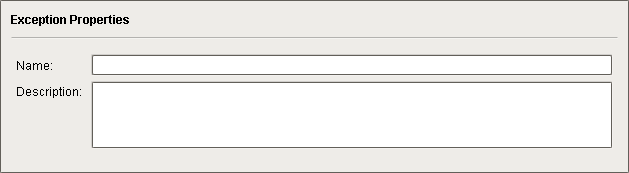
The optional Name and Description fields are included on most Blocks for clarity and documentation benefit.
Usage
Connecting the Exception Block
- Drag an Exception Block onto the Design Grid (position to be the next block in the chart sequence).
- Click on the previous Block in the sequence and draw a Connector to the Exception Block (any available edge). Repeat for another input Block, if applicable (unlimited connections are allowed on up to two edges.
- You will need two Blocks to accept the Yes and No outputs from the Exception Block. Drag those two blocks onto the Design Grid.
- Click on the Exception Block and draw a Connector (from any available edge) to the block chosen to accept the Yes output (chart error exists).
- Click on the Exception Block and draw a Connector (from any available edge) to the block chosen to accept the No output (chart error does not exist).
Example
In these two examples, an Exception Block is used to test for chart error(s) and divert execution control if any error exists:
- In both examples, if no chart error exists, execution control continues directly to the Save MES Object Block to create new MES Material objects.
- In the example chart on the left, if a chart error is thrown, then the creation of new MES Material objects in the Save MES Object Block is abandoned (control passes directly to the End Block).
- In the example chart on the right, if a chart error is thrown, then a Script Block is used to handle the error (typically repair or replace bad or null data) prior to passing execution control to the Save MES Object Block to create new MES Material objects.
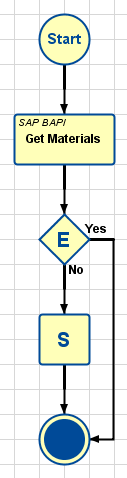
(abandon creating MES objects)
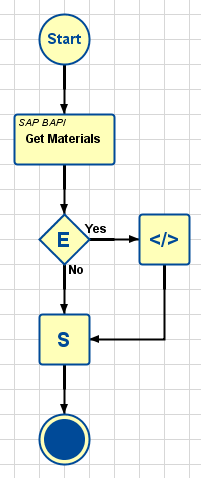
(repair error and then create MES objects)
Using Multiple Exception Blocks

|
Note that more than one Exception Block may be placed in a chart, to trap errors that occur at different locations in the chart sequence. In the example to the right: The Exception Block after the SAP BAPI Action Block will trap any error that occurred while fetching Material Definitions from the SAP database:
The second Exception Block will trap any error that occurred during the 'cleaning' script:
Since the Flag Chart Parameter can be returned to the calling script, it will know what type of error occurred and whether any MES Objects were created. |
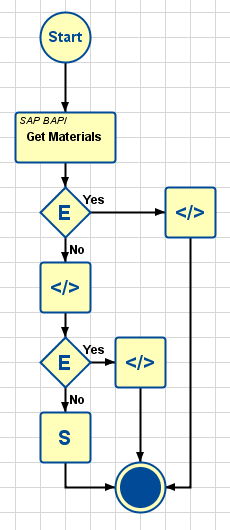
(checks for errors in two places)
Sepasoft MES Module Suite