Sepasoft MES Module Suite
Data Flow using Instrument Interface
The Instrument Interface module easily interfaces with different instruments, providing you with data collection from instruments such as gauges, analyzers, and barcode scanners. You can capture raw textual data from instrument type devices via serial, text files, OPC devices and more, enabling you to parse out the meaningful values that can be used in your Ignition application, or save the data directly to a database, or pass it along to other systems. This module provides a seamless solution to eliminating hundreds of lines of code and extracting only the meaningful values from devices connected to your SCADA system.
- Serial Communications
- File Monitoring
- Parsing
- Centralized Instrument Management
The Instrument Interface module is used to define communication settings and data parsing templates to an instrument. These settings and parsing templates are then used to read data from a instrument and parse the raw data to extract desired values. The data from an instrument can come from a file, serial communication port, TCP or UDP connection, OPC device such as a PLC, external data or web service.
The image shows the typical flow of data when reading instrument values through a serial communications port. Note that the Client Serial Support Module is required to read serial data on a client computer.
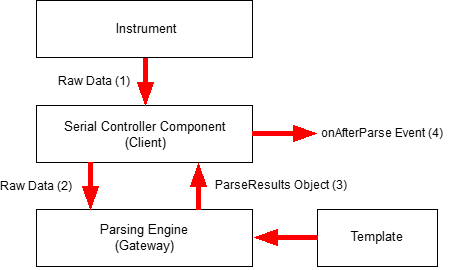
The Instrument Interface Module includes a component to make configuring and control of serial port communications easier than using the script only support of the Client Serial Support Module. If reading data from a serial communication port on the Ignition server is needed, then the Serial Server Support Module is needed.
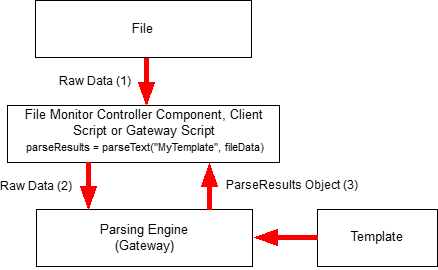
Some Instruments write their results to a disk file. The image shows the typical flow when reading data from a file and using the File Monitor component or parsing script functions that are available on both the client and the gateway to parse the raw data in the file.
Sepasoft MES Module Suite