Sepasoft MES Module Suite
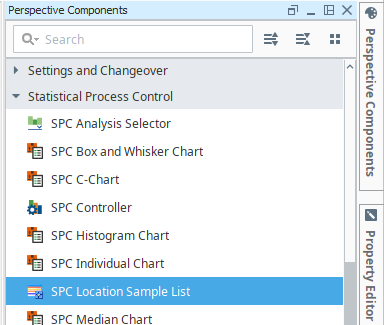
SPC Location Sample List in Perspective
Location Sample List displays samples for a location and optionally by sample ownership. Through configuration properties, it can show samples that are scheduled to be coming due, due, overdue, or waiting approval or approved.
When an allowable location is added to a sample definition, a tag value can be set. This component can limit the samples that appear by entering in matching tag values. It is typically used for defining who has ownership for collecting sample data. For example, the lab takes samples at packaging line 1 every 2 hours. The operator also takes samples at packaging line 1 every 1 hour. The lab does not want to see samples that the operator has ownership for and vice versa. To accomplish this, set the tag value to "Lab" for sample definitions that the lab has ownership for and to "Operator" for sample definitions that the operator has ownership for.

|
MES 3.81.9 and later Installed with the SPC Module |
Sample List UI

Sample Dataset

|
Available in 3.81.10 RC3 and later The second column returned in Perspective/Vision Location Sample List components and getSampleList script call is named "Definition" and contains the name of the Sample Definition attached to a sample entry. |
Component Properties
Properties are provided that can be set to affect the operation and look of the component. They can be set through the Property Editor in the Designer or through scripting.
Python |
self.getSibling("spcLocationList").showLocationSampleListHeader = True |
| Name |
Property Value Descriptions |
|||
|
showLocationSampleListHeader
|
Boolean - When True displays the header with the edit and approval tools display. |
|||
|
toolbarTitle
|
String - defaults to SPC Location Sample List
|
|||
| selectedUUID |
Boolean - Tracks the SampleUUID of the selected Sample in the list. Changing the property does not affect the component, it just relays information that can be used for linking. | |||
|
showEditNoteIcon
|
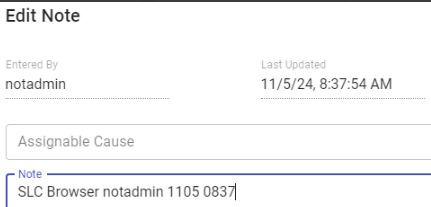
Boolean - When True allows adding and editing of sample notes.
|
|||
|
showApproveSampleIcon
|
Boolean - When True allows approving samples.
|
|||
|
showUnapproveSampleIcon
|
Boolean - When True allows unapproving samples.
|
|||
|
showSearchIcon
|
Boolean - When True displays search bar and allows searching on sample names.
|
|||
|
showIncludeSampleIcon |
Boolean - When True displays Include Sample icon
|
|||
|
showexcludeSampleIcon
|
Boolean - When True displays Exclude Sample icon
|
|||
|
tableColumns
|
Formatting of table columns: align alignVertical columnName dataFormat dataType fixed hidden include name order searchEnabled sortingEnabled title orginalTitle width wordWrapEnabled |
|||
|
selectedRow
|
Index of the first selected row, or -1 if none.
|
|||
|
data
|
Raw sample data
|
|||
|
executionTimes
|
in milliseconds
|
|||
|
readOnly
|
Boolean - When True, sets the list as read-only no allowing any editing.
|
|||
|
showWaitingApproval
|
Boolean - When True, samples that are waiting to be approved or unapproved show up in the table.
|
|||
|
showApprovedSamples
|
Boolean - When True, table displays samples that have been approved.
|
|||
|
showDueSamples
|
Boolean - When True, table displays samples that meet the Due threshold for sampling.
|
|||
|
showComingDueSamples
|
Boolean - When True, table displays samples that meet the Coming Due threshold for sampling.
|
|||
|
showOverdueSamples
|
Boolean - When True, table displays samples that meet the Over Due threshold for sampling.
|
|||
|
showExcludedSamples
|
Boolean - Use this to show all excluded or all included samples.
|
|||
|
startDate
|
Required start date/time for samples to display in the table.
|
|||
|
endDate
|
Required end date/time for samples to display in the table.
|
|||
|
locationPath
|
String - Show samples by Locations in the equipment path. E.g. 'Enterprise\Site\Area\K-A Location'
|
|||
|
produceCode
|
String - Show samples by product code.
|
|||
|
referenceNo
|
String - Show samples by reference number.
|
|||
|
sortType
|
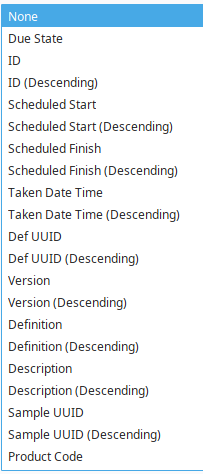
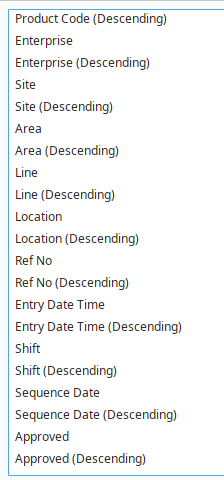
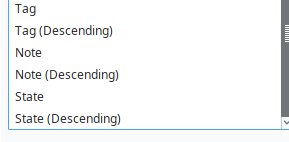
Set which column to sort on. Filter allowed on that data.
|
|||
|
tag
|
String - Show samples by tag.
|
|||
|
toolbarColumnChooserEnabled
|
|
|||
|
resizingAllowed
|
Boolean - When true, columns can be resized during runtime.
|
|||
| Note | String - Entered when the sample is taken
| |||
| NoteEnteredBy | based on login credentials | |||
Sepasoft MES Module Suite