Sepasoft MES Module Suite
Locations
Locations are where the samples are taken. Locations can be created under Areas and Lines in the Equipment Model in Equipment Manager.
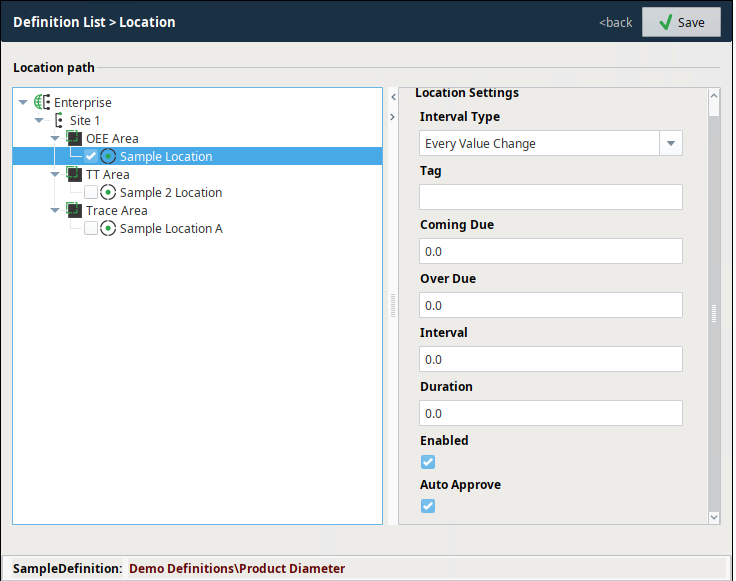
| Location Settings for Sample Definitions | |||
|---|---|---|---|
Location Path: Equipment-model browser provides a visual representation of the equipment path(s) to Location(s). Locations are configured in Equipment Manager. | |||
Interval Type Interval Type is set in two places: Sample Definition and Location. The top-level Sample Definition settings is used as the default setting and when the definition is associated with testing location(s) in the Location settings, the default is overwritten at the Location level if needed. This is useful when the Sample Definition is used for multiple locations and the interval is different at each location. 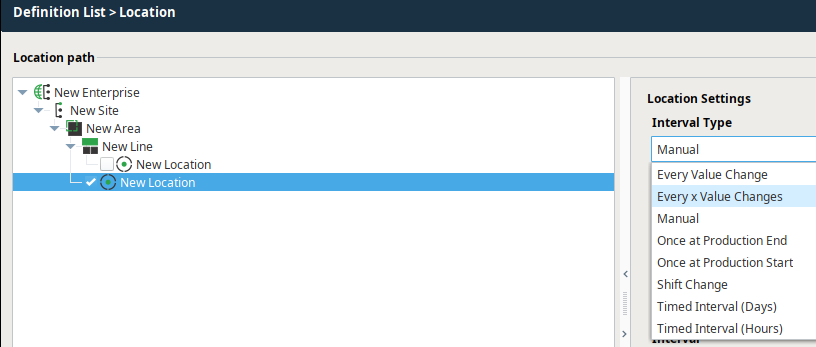 | For more information
| ||
Tag: Meta data type of tag. This is not a reference to a tag in the Tag Browser. | 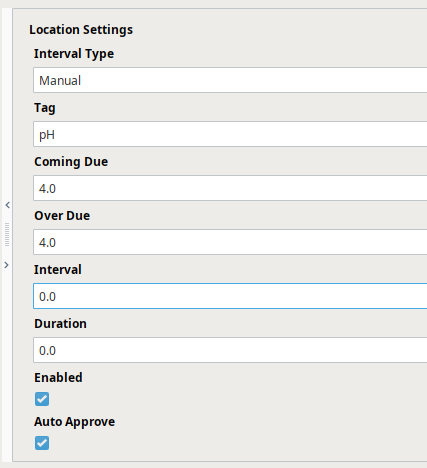 | ||
Coming Due: The amount of time before the sample is taken the system sets the sample as Coming Due. | |||
Over Due: The amount of time after the sample is taken the system sets the sample as Over Due. | |||
Interval: Interval unit based on the Interval Type | |||
Duration: The amount of time from beginning to end of the process that takes the sample. | |||
Enabled: Makes the sample definition active. | |||
Auto Approve: When set to True, the system automatically takes the sample for time- and schedule-based Interval Types. | |||
For more information

|
Sepasoft MES Module Suite