Sepasoft MES Module Suite
Binding Function | Lot Trace
The Lot Trace binding function and scripting function are used to retrieve trace information for a lot based on filter parameters. The binding function filters are shown in the screenshot below. The return data is the same data that the Trace Graph component uses to display lot history.
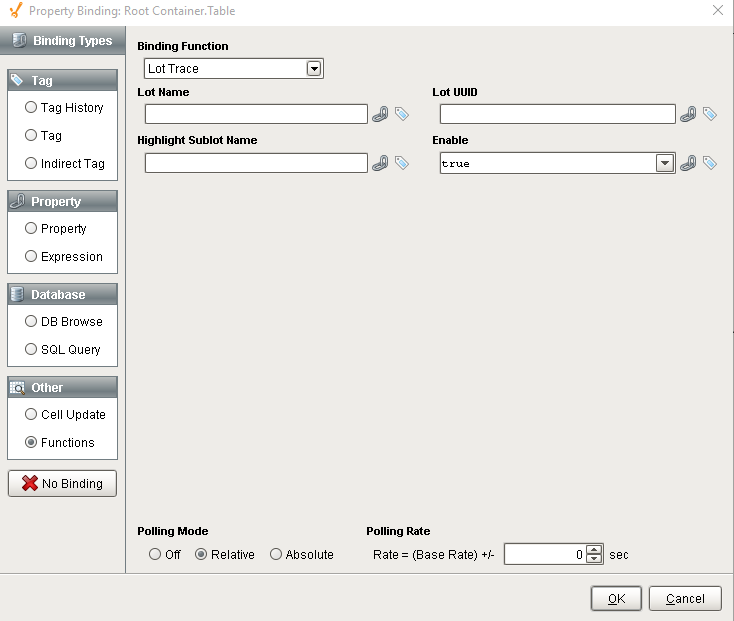
Parameters
| Name | Description |
|---|---|
| Enable |
Boolean If true, results will be retrieved. This provides a method to disable the retrieval of lot information results and the associated overhead. |
| Lot Name |
String The lot name to return the trace details results. Optionally Lot UUID can be used but not both. |
| Lot UUID |
String The lot UUID to return the trace details results. Optionally Lot Name can be used but not both. See UUIDs for more information. |
|
Highlight.Sublot.Name |
String If this property is not blank and a sublot of a lot name matches this property, then the LotContainsSublot column in the results will be set to 1. This indicates that the lot contains the specified sublot. |
Lot Trace Results
The lot trace results are returned as a dataset with the following columns.
Table Columns
| Column | Description |
|---|---|
| LotUUID | DataType: String Unique identifier for the material lot |
| LotName | DataType: String Name of the material lot |
| LotSequence | DataType: Integer The sequence property is incremented every time a new Material Lot is created for a given lot number. If it is less than zero, then the lot holding the maximum value is returned and if the same lot number is used for multiple segments, each lot with the same lot number will be assigned a different lot sequence number. |
| LotStatus | DataType: String The status of the material lot. It can be either Active or Complete. When active, there is a Response Segment to create this material lot that is currently running. |
| LotUse |
DataType: String Use setting of material lot.
Options
Out - is used for material feeding out of a segment that is or will be part of the finished goods Consumable - is used for material feeding into a segment that is not part of the finished goods By-product - is used for material feeding out of a segment that is not part of the finished goods |
| LotBeginDateTime | DataType: DateTime Date and time that this lot resource started |
| LotEndDateTime | DataType: DateTime Date and time that this lot resource ended |
| LotQuantity | DataType: Double The actual quantity for this lot resource. This can be the current quantity at anytime during the life of a Response Segment, but will equal the final production quantity when this lot resource is finalized. |
| MaterialUUID | DataType: String Unique identifier for each material object |
| MaterialName | DataType: String Name of the material object |
| LotLocationUUID | DataType: String Unique identifier for location |
| LotLocationName | DataType: String Name of the location |
| SegmentUUID | DataType: String Unique identifier for the segment |
| SegmentName | DataType: String Name of the segment |
| SegmentBeginDateTime | DataType: DateTime Date and time for the segment to begin |
| SegmentEndDateTime | DataType: DateTime Date and time for the segment to end |
| SegmentLocationUUID | DataType: String Unique identifier for the segment location |
| SegmentLocationName | DataType: String Name of the segment location |
| PrevSegmentUUID | DataType: String Unique identifier for the previous segment |
| PrevLotUUID | DataType: String Unique identifier for the previous lot |
| NextSegmentUUID | DataType: String Unique identifier for the next segment |
| NextLotUUID | DataType: String Unique identifier for the next lot |
| SegInCount | DataType: Integer Input count into the segment |
| SegOutCount | DataType: Integer Output count from the segment |
| LotInCount | DataType: Integer Input count into the lot |
| LotOutCount | DataType: Integer Output count from the lot |
| LotContainsSublot | DataType: Boolean True if lot contains sublot and False otherwise |
Sepasoft MES Module Suite