Sepasoft MES Module Suite
Manifests
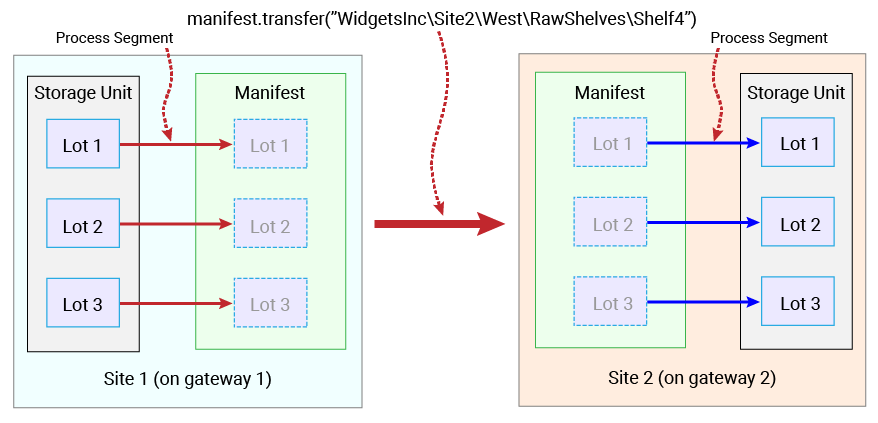
In a factory environment, materials are often transported in bulk (e.g by truck) between manufacturing sites. With Sepasoft Track & Trace, Material Lots can be 'transported' in bulk between gateways using a Manifest to 'hold' materials that will be reassigned to another gateway. This movement of material can occur between any gateway and any other gateway in the Enterprise network.
After creating a Manifest, Lots are added by running a Process Segment (legacy) or the system.mes.trace functions (recommended). The Manifest function .transfer is then used to reassign the Manifest to a Site on another gateway. The Lots are then unloaded from the Manifest into a Storage Unit by running another Process Segment.
Unlike a piece of Supplemental Equipment, which can be refilled again and again once emptied, a Manifest is intended to be created, 'transport' Material Lot objects to another gateway once, and then be discarded (automatically becomes disabled after being emptied).
Move Material Lots between gateways
Creating Manifests and Manifest Classes
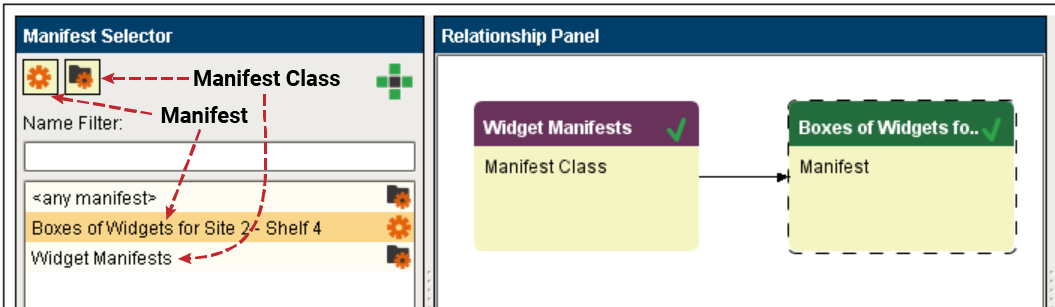
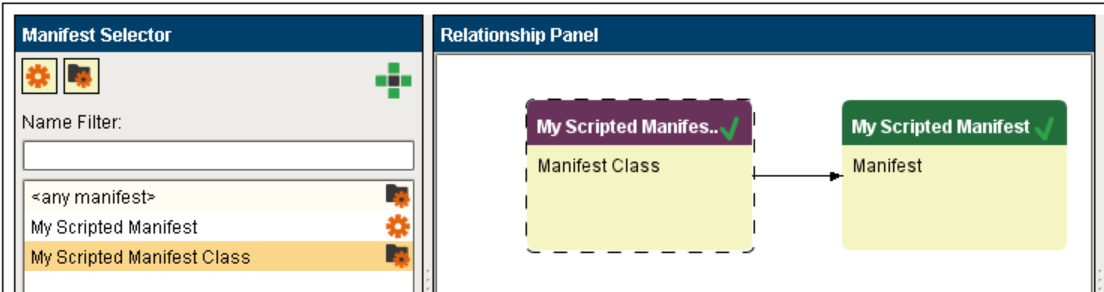
Manifests and Manifest Classes are created and organized in a similar fashion to Material and Material Class objects. In the MES Object Editor, right click on the add symbol (  ) and add either a Manifest Class or a Manifest object. Only the Name property is required for either.
Scripting Functions
The following script function is used to create these objects:
Creating Manifest Objects via scripting
|
#Create a Manifest Class
manifestClass = system.mes.createMESObject('ManifestClass')
manifestClass.setPropertyValue('Name', 'My Scripted Manifest Class')
system.mes.saveMESObject(manifestClass)

#Create a Manifest
manifest = system.mes.createMESObject('Manifest')
manifest.setPropertyValue('Name', 'My Scripted Manifest')
system.mes.saveMESObject(manifest)

#Add the Manifest as a child of the Manifest Class
man = system.mes.loadMESObject('My Scripted Manifest', 'Manifest')
manClass = system.mes.loadMESObject('My Scripted Manifest Class', 'ManifestClass')
manClass.addChild(man)
system.mes.saveMESObject(manClass)

#Alternative: Add the Manifest Class as a parent of the Manifest
#man = system.mes.loadMESObject('My Scripted Manifest', 'Manifest')
#manClass = system.mes.loadMESObject('My Scripted Manifest Class', 'ManifestClass')
#man.addParent(manClass)
#system.mes.saveMESObject(man)
|
Adding Lots to a Manifest
Material Lots can be added to an existing Manifest with using Operations Segment functions (legacy) or the system.mes.trace library (recommended).
Scripting Functions
The following script function is used to add one or more Material Lots selected on a Table component onto the selected Manifest:
Adding Lots to a Manifest via scripting (legacy)
|
#This example uses a table named 'Storage WIP Table' to select one or more Material Lots to add to a Manifest
#  and another table to show the contents of the Manifest (the table is bound via an Equipment WIP function
#  to an MES Object Selector component named 'Manifest Selector' that is set to MES Object type 'Manifest').
selected_rows = event.source.parent.getComponent('Storage WIP Table').getSelectedRows()
lot_dataset = event.source.parent.getComponent('Storage WIP Table').data
selected_manifest_name = event.source.parent.getComponent('Manifest Selector').selectedName
line_path = event.source.parent.getComponent('Line Selector').equipmentItemPath

#Load each Material Lot selected in the source table into the selected Manifest
for selected_row in selected_rows:
	selected_lot_no = lot_dataset.getValueAt(selected_row, "LotNumber")
	selected_material_type = lot_dataset.getValueAt(selected_row, "MaterialName")

	#Create a segment, set the material in and out properties, then execute the segment to load
	#   one Material Lot onto the selected Manifest
	seg = system.mes.createSegment("Add Lot to Manifest", line_path, False)
	seg.setMaterial("Material In", selected_lot_no)
	seg.setMaterial("Material Onto Manifest", selected_material_type, selected_manifest_name)
	seg.execute()
|
Adding Lots to a Manifest via scripting (recommended)
Adding Lots to a Manifest via scripting (recommended)
|
#This example uses functions from the system.mes.trace library to load lots onto a manifest. The input lot equipment path is the lot's current location.  The output lot equipment path is the manifest.
def loadManifest(lot, manifestName):

	lotInventory = system.mes.trace.getInventory(lotNumber=lot)['lots'][0]
	qty = lotInventory['NetQuantity']
	matName = lotInventory['MaterialName']
	fromEquipment = system.mes.loadMESObject(lotInventory['Location UUID']).getEquipmentPath()
	now = system.date.now()

	id = 'loadmanifest-' + str(now)

	matInDict1 = system.mes.trace.configureMaterial(userid='Mat In 1', name='Mat In 1', lotNo=lot, materialName=matName, quantity=qty, equipmentPath=fromEquipment, autoCreateLot=False)
	matOutDict1 = system.mes.trace.configureMaterial(userid='Mat Out 1', name='Mat Out 1', lotNo=lot, materialName=matName, quantity=qty, manifestName=manifestName, autoCreateLot=True)

	system.mes.trace.recordOperation(
	    userid = id,
	    name = 'LoadManifest',
	    beginDateTime = now,
	    endDateTime = now,
	    equipmentPath = fromEquipment,
	    materialIn = [matInDict1],
	    materialOut = [matOutDict1])
|
Transferring a Manifest
The 'transfer' of a Manifest is as simple as executing manifest.transfer(site_path) to reassign the Manifest to the other gateway.
Scripting Functions
The manifest.transfer(sitePath) script function is used to perform the transfer of the Manifest between gateways:
Transferring a Manifest via scripting
|
#Transfers a Manifest (with its payload of Material Lots) from a Site on one gateway
#  to a Site on another gateway. This example gets the Manifest Name from an
#  MES Object Selector component named 'Manifest Selector' that is set to MES Object type 'Manifest'.
site_path = event.source.parent.getComponent('Site Path Field').text
manifest_name = event.source.parent.getComponent('Manifest Selector').selectedName
manifest = system.mes.loadMESObject(manifest_name, "Manifest")

#Transfer the Manifest to the Site on the destination gateway.
manifest.transfer(site_path)
system.mes.saveMESObject(manifest)
|
Unloading a Manifest
Unloading Material Lots from a Manifest is done in the same manner as unloading a piece of Supplemental Equipment, using Operations Segment (legacy) or system.mes.trace (recommended) functions.
Scripting Functions
The following script function is used to unload one or more Material Lots selected on a Table component onto the selected Storage Unit:
Unloading a Manifest via scripting (legacy)
|
#Unloads the Material Lots selected on a table named 'Manifest WIP Table' (lists all Manifest contents)
#  into a Storage Unit. The Line and Storage Unit to receive the Lots are selected using two
#  MES Object Selectors named 'Line Selector' and 'Storage Selector'.
selected_rows = event.source.parent.getComponent('Manifest WIP Table').getSelectedRows()
lot_dataset = event.source.parent.getComponent('Manifest WIP Table').data
line_path = event.source.parent.getComponent('Line Selector').equipmentItemPath
storage_path = event.source.parent.getComponent('Storage Selector').equipmentItemPath

#Unload each Material Lot selected in the Manifest WIP Table into the selected Storage Unit
for selected_row in selected_rows:
	selected_lot_no = lot_dataset.getValueAt(selected_row, "LotNumber")
	selected_material_type = lot_dataset.getValueAt(selected_row, "MaterialName")

	#Create a segment, set the material in and out properties, then execute the segment to load
	#   one Material Lot onto the selected Storage Unit
	seg = system.mes.createSegment("Retrieve Lot From Manifest", line_path, False)
	seg.setMaterial("Material In From Manifest", selected_lot_no)
	seg.setMaterial("Material Out to Storage", selected_material_type, storage_path)
	seg.execute()
|
Unloading a Manifest via scripting (recommended)
Unloading a Manifest via scripting
|
#Unloads all material lots in a manifest to a given Equipment Location.

def unloadManifest(manifest, toEquipment):

	now = system.date.now()
	id = 'unloadManifests-' + str(now)
	matInList, matOutList = [],[]
	for i,lot in enumerate(manifest.getLotLinks(True)):
		lotSummary =system.mes.getLotInventoryByLot(lot.getName(),-1)
		qty = lotSummary.getNetQuantity()
		matName= lot.getMESObject().getMaterialDefLink().getName()
		#input material
		matInList.append(system.mes.trace.configureMaterial(userid='Mat In ' + str(i),
															name='Mat In ' + str(i),
															lotNo=lot.getName(),
															materialName=matName,
															quantity=qty,
															manifestName=manifest.getName(),
															autoCreateLot=False))
		#output material
		matOutList.append(system.mes.trace.configureMaterial(userid='Mat Out '+ str(i),
															name='Mat Out '+ str(i),
															lotNo=lot.getName(),
															materialName=matName,
															quantity=qty,
															equipmentPath=toEquipment,
															autoCreateLot=True))

	if len(matInList) > 0 and len(matOutList) > 0:
		system.mes.trace.recordOperation(
		    userid = id,
		    name = 'unloadManifest',
		    beginDateTime = now,
		    endDateTime = now,
		    equipmentPath = toEquipment,
		    materialIn = matInList,
		    materialOut = matOutList)

#Using the filter object to find all available Manifests.  Additional filtering can be added.
#https://help.sepasoft.com/docs/display/SEPA/MES+Object+Filter
filter = system.mes.object.filter.createFilter()
filter.setMESObjectTypeName('Manifest')
filter.setEnableStateName('Enabled')
objs = system.mes.searchMESObjects(filter)

#Where to unload lots from manifests
toEquipment = 'New Enterprise\Site 2\Area 1\Storage\Transfer Receiving'

for obj in objs:
	manifest = obj.getMESObject()
	if manifest.getManifestState().toString() != 'USED':
		unloadManifest(manifest, toEquipment)
|
Sepasoft MES Module Suite