Sepasoft MES Module Suite
MESAnalysisSettings Object
The MESAnalysisSettings object is used to store configuration for analysis including individual data points, filter expressions, grouping, ordering, and data conditioning settings are stored in this object.
By calling the analysis engine and executing against the configured settings, result data is returned to the user as requested.
Inherits properties, methods and events from:
Object Creation
The following scripting functions can be used to create or return an MES Analysis Settings object:
Object Functions
- addParameter(parameterName)
- addSecurityRole(roleName)
- addSettingValue(settingName)
- addSettingValue(settingName, settingValue)
- canUserExecute(user)
- canUserModify(user)
- clearSettingValue()
- getDataPointList()
- getDataPoints()
- getEndDateParameterName()
- getFilterExpression()
- getGroupBy()
- getGroupByList()
- getIncludeDrillDownOptions()
- getMessage()
- getOrderBy()
- getOrderByList()
- getOwnerUserName()
- getParameterCount()
- getParameter(index)
- getParameter(parameterName)
- getSecurityRoleCount()
- getSecurityRole(index)
- getSecurityRole(roleName)
- getSettingValues()
- getStartDateParameterName()
- hasDataPoints()
- removeParameter(parameterName)
- removeSecurityRole(roleName)
- setDataPoints(dataPoints)
- setEndDateParameterName(parameterName)
- setFilterExpression(expression)
- setGroupBy(groupBy)
- setGroupBy(groupBy)
- setIncludeDrillDownOptions(includeOptions)
- setOrderBy(orderBy)
- setOrderBy(orderBy)
- setParameterDataType(parameterName, parameterDataType)
- setSecurityRoleRights(roleName, canExecute, canModify)
- setSettingValues(settingValues)
addParameter(parameterName)
Adds a parameter to the analysis settings.
addParameter(parameterName)
- Parameters
String parameterName - Name of the parameter to be added.
- Returns
Nothing
- Scope
All
addSecurityRole(roleName)
Adds a security role to the analysis settings.
addSecurityRole(roleName)
- Parameters
String roleName - Name of security role to be added.
- Returns
Nothing
- Scope
All
addSettingValue(settingName)
Adds a setting value to the analysis settings object. This setting can modify the analysis data with specific conditioning such as ordering, limits, or count accumulation to give some of the many options. See Analysis Data Points and Settings > Setting Values
addSettingValue(settingName)
- Parameters
String settingName - Name of the setting to be added.
- Returns
Nothing
- Scope
All
Python |
##Load the analysis setting object into local memory analysisSettingObject = system.mes.analysis.getMESAnalysisSettings('OEE') ##Add a setting that modifies the analysis result-set, in this case an OEE Performance factor cap. analysisSettingObject.addSettingValue('OEE Performance Cap') ##Save the analysis setting object with the updated settings. system.mes.analysis.saveMESAnalysisSettings(analysisSettingObject) |
addSettingValue(settingName, settingValue)
Adds a setting value to the analysis settings. This setting can modify the analysis data with specific conditioning such as ordering, limits, or count accumulation to give some of the many options. More details on the available setting values can be found here.
addSettingValue(settingName, settingValue)
- Parameters
String settingName - Name of the setting to be added.
String settingValue - Value of the setting to be added.
- Returns
Nothing
- Scope
All
Python |
##Load the analysis setting object into local memory analysisSettingObject = system.mes.analysis.getMESAnalysisSettings('OEE') ##Add a setting that modifies the analysis result-set, in this case an OEE Performance factor cap. analysisSettingObject.addSettingValue('OEE Performance Cap', '1.0') ##Save the analysis setting object with the updated settings. system.mes.analysis.saveMESAnalysisSettings(analysisSettingObject) |
canUserExecute(user)
Checks whether an MES user is allowed to execute the analysis settings.
canUserExecute(user)
- Parameters
MESUser user - The MES user for which the canUserExecute property is checked for.
- Returns
boolean-True if the MES user can execute analysis settings and False otherwise.
- Scope
All
canUserModify(user)
Checks whether an MES user is allowed to modify the analysis settings.
canUserModify(user)
- Parameters
MESUser user - The MES user for which the canUserModify property is checked for.
- Returns
boolean-True if the MES user can modify analysis settings and False otherwise.
- Scope
All
clearSettingValue()
Removes the value of analysis settings.
clearSettingValue()
- Parameters
None
- Returns
Nothing
- Scope
All
getDataPointList()
Gets the list of data points associated with the analysis settings.
getDataPointList()
- Parameters
None
- Returns
List<String> dataPointList - A list of data points for the analysis settings.
- Scope
All
getDataPoints()
Gets the data points associated with the analysis settings.
getDataPoints()
- Parameters
None
- Returns
String dataPoints - Data points for the analysis settings.
- Scope
All
getEndDateParameterName()
Info
Analysis data can be filtered using Ignition report parameters. They can be selected from the drop down menu of the analysis sector (only for reports) as shown below.
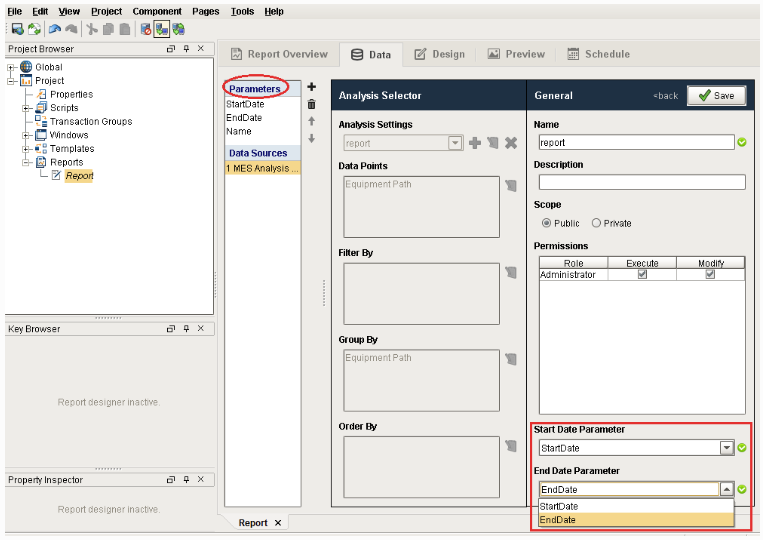
Gets the end date parameter name for the MES analysis.
getEndDateParameterName()
- Parameters
None
- Returns
String parameterName - The end date parameter name for the MES analysis (reports).
- Scope
All
getFilterExpression()
Gets the filter expression for the analysis settings.
getFilterExpression()
- Parameters
None
- Returns
String expression - The filter expression for the analysis settings.
- Scope
All
getGroupBy()
Gets the GroupBy for this analysis settings.
getGroupBy()
- Parameters
None
- Returns
String groupBy - GroupBys defined in the analysis settings.
- Scope
All
getGroupByList()
Gets the list of GroupBys defined in the analysis settings.
getGroupByList()
- Parameters
None
- Returns
List<String> groupByList - The list of GroupBys defined in the analysis settings.
- Scope
All
getIncludeDrillDownOptions()
Gets the includeDrillDownOptions property value for the analysis settings.
getIncludeDrillDownOptions()
- Parameters
None
- Returns
boolean includeOptions - True if the drill down options are included and False otherwise.
- Scope
All
getMessage()
Gets the message from the analysis engine after executing the analysis settings. Messages have error information if the analysis setting is malformed (e.g. data point name is spelled incorrectly, an equipment path is mis-typed, etc.) or if values in the result-set are null due to grouping configuration, etc.
getMessage()
- Parameters
None
- Returns
String message - The message from the analysis engine based on the analysis setting execution.
- Scope
All
getOrderBy()
Gets the OrderBys defined in the analysis settings.
getOrderBy()
- Parameters
None
- Returns
String orderBy - The OrderBys defined in the analysis data.
- Scope
All
getOrderByList()
Gets the list of OrderBys defined in the analysis settings.
getOrderByList()
- Parameters
None
- Returns
List<String> orderByList - The list of OrderBys defined in the analysis settings.
- Scope
All
getOwnerUserName()
Gets the name of user who owns this analysis settings.
getOwnerUserName()
- Parameters
None
- Returns
String userName - Name of the owner of this setting.
- Scope
All
getParameterCount()
Gets the number of parameter for the analysis settings.
getParameterCount()
- Parameters
None
- Returns
int count - The parameter count for the analysis settings.
- Scope
All
getParameter(index)
Gets the analysis parameter corresponding to the given index.
getParameter(index)
- Parameters
int index - The index representing the parameter.
- Returns
AnalysisParameterProperty analysisParameter - The analysis parameter complex property defined by the specified index.
- Scope
All
getParameter(parameterName)
Gets the analysis parameter.
getParameter(parameterName)
- Parameters
String parameterName - The name of the parameter to be returned.
- Returns
AnalysisParameterProperty analysisParameter - The analysis parameter complex property.
- Scope
All
getSecurityRoleCount()
Gets the security role count for the analysis settings.
getSecurityRoleCount()
- Parameters
None
- Returns
int count - The count of security roles associated with this analysis settings.
- Scope
All
Gets the security role corresponding to the index parameter.
getSecurityRole(index)
- Parameters
int index - The security role index.
- Returns
AnalysisSecurityProperty analysisSecurity - The analysis security complex property with the security role details.
- Scope
All
getSecurityRole(roleName)
Gets the security role corresponding to the role name parameter.
getSecurityRole(roleName)
- Parameters
String roleName - The role name to return the security role for.
- Returns
AnalysisSecurityProperty analysisSecurity - The analysis security complex property with the security role details.
- Scope
All
getSettingValues()
Returns the Analysis Data Points and Settings > Setting Values for the Analysis Settings object. These are settings that modify the analysis settings or configuration.
getSettingValues()
- Parameters
None
- Returns
String settingValues - The Setting Values for the Analysis Settings object. More details on the available setting values can be found here.
- Scope
All
Python |
##Load the analysis settings object into local memory. analysisSettingObject = system.mes.analysis.getMESAnalysisSettings('OEE') ##Get the settings on the analysis settings object. settings = analysisSettingObject.getSettingValues() print settings |
Include Children=True,OEE Performance Cap=1.0
getStartDateParameterName()
Info
Analysis data can be filtered using Ignition report parameters. They can be selected from the drop down menu of the analysis sector (only for reports).
Gets the start date parameter name from the MES analysis (report).
getStartDateParameterName()
- Parameters
None
- Returns
String parameterName - The start date parameter defined in the MES analysis.
- Scope
All
hasDataPoints()
Checks whether there exist any data points for the analysis settings.
hasDataPoints()
- Parameters
None
- Returns
boolean - True if there exist any data points for the analysis settings and False otherwise.
- Scope
All
removeParameter(parameterName)
Removes the specific parameter from the analysis settings.
removeParameter(parameterName)
- Parameters
String parameterName - Name of the parameter to be removed.
- Returns
Nothing
- Scope
All
removeSecurityRole(roleName)
Removes a security role from the analysis settings.
removeSecurityRole(roleName)
- Parameters
String roleName - The name of security role that is to be removed.
- Returns
Nothing
- Scope
All
setDataPoints(dataPoints)
Sets the data points for this analysis settings.
setDataPoints(dataPoints)
- Parameters
List<String> dataPoints - The data points to set for the analysis settings. Ensure dataPoints is a list of strings.
- Returns
Nothing
- Scope
All
analysis_setting = system.mes.analysis.createMESAnalysisSettings("test_setting")
datapoints = [
"Elapsed Time",
"OEE Availability",
"Runtime",
"Planned Downtime",
"Infeed Standard Count",
"OEE Performance",
"OEE Infeed Count",
"OEE Quality",
"OEE Reject Count",
"OEE Outfeed Count",
"Equipment Operation Sequence"
]
analysis_setting.setDataPoints(datapoints)
analysis_setting.addParameter('path')
analysis_setting.setFilterExpression("Equipment Path = @path AND Operation UUID != ''")
analysis_setting.setGroupBy("Equipment Operation Sequence")
start_date = system.date.addYears(system.date.now(), -1)
end_date = system.date.now()
params = {'path':'\\Enterprise\Site\Area\Line 3'}
print system.mes.analysis.executeAnalysis(start_date, end_date, analysis_setting, params).getDataset()
|
setEndDateParameterName(parameterName)
Info
Analysis data can be filtered using Ignition report parameters. They can be selected from the drop down menu of the analysis sector (only for reports).
Sets the end date parameter name for the MES analysis settings (reports).
setEndDateParameterName(parameterName)
- Parameters
String parameterName - The end date parameter name to set for the analysis settings.
- Returns
Nothing
- Scope
All
setFilterExpression(expression)
Sets the filter expression for the analysis settings.
setFilterExpression(expression)
- Parameters
String expression - The filter expression to be set for.
- Returns
Nothing
- Scope
All
Python |
settings = system.mes.analysis.createMESAnalysisSettings("test_setting") settings.setFilterExpression("""Equipment Path LIKE 'Enterprise\Site\OEE Area\Packaging Line 1\* AND Equipment State Type != 'Running' AND Equipment State Type != 'Unplanned Downtime'""") |
setGroupBy(groupBy)
Sets the GroupBy to group the analysis data.
setGroupBy(groupBy)
- Parameters
String groupBy - The factors to group the analysis data.
- Returns
Nothing
- Scope
All
setGroupBy(groupBy)
Sets the factors (GroupBy) to group the analysis data.
setGroupBy(groupBy)
- Parameters
List<String> groupBy - The list of GroupBys separated by commas.
- Returns
Nothing
- Scope
All
setIncludeDrillDownOptions(includeOptions)
Sets the includeDrillDownOptions property value for the analysis settings.
setIncludeDrillDownOptions(includeOptions)
- Parameters
boolean includeOptions - Set to True if you like to include the drill down options and False otherwise.
- Returns
Nothing
- Scope
All
setOrderBy(orderBy)
Sets the OrderBy for the analysis data.
setOrderBy(orderBy)
- Parameters
String orderBy - The orderBy to set for the analysis data.
- Returns
Nothing
- Scope
All
setOrderBy(orderBy)
Sets a list of OrderBys for the analysis data.
setOrderBy(orderBy)
- Parameters
List<String> orderBy - The list of OrderBys for the analysis data.
- Returns
Nothing
- Scope
All
setParameterDataType(parameterName, parameterDataType)
Sets the datatype for the analysis parameter.
setParameterDataType(parameterName, parameterDataType)
- Parameters
String parameterName - Name of the parameter to set the data type for.
String parameterDataType - Data type to set for the parameter.
- Returns
Nothing
- Scope
All
setSecurityRoleRights(roleName, canExecute, canModify)
Sets the rights to security role.
setSecurityRoleRights(roleName, canExecute, canModify)
- Parameters
String roleName - The name of the security role to set the security rights for.
boolean canExecute - Set to True if this security role can execute the analysis and False otherwise.
boolean canModify - Set to True if this security role can modify the analysis and False otherwise.
- Returns
Nothing
- Scope
All
setSettingValues(settingValues)
Sets values for the analysis settings. These settings can modify the analysis data with specific conditioning such as ordering, limits, or count accumulation to give some of the many options. See Analysis Data Points and Settings > Setting Values.
setSettingValues(settingValues)
- Parameters
List<String> settingValues - The values to set for.
- Returns
Nothing
- Scope
All
Python |
##Load the analysis setting object into local memory. analysisSettingObject = system.mes.analysis.getMESAnalysisSettings('OEE') ##Get the settings on the analysis settings object. settings = analysisSettingObject.getSettingValues() ##Since the analysis setting's settings are a string, append an additional setting to the string. settings += ',OEE Performance Cap=1.0' ##Set the updated setting string on the analysis setting object. analysisSettingObject.setSettingValues(settings) ##Save the analysis setting object. system.mes.analysis.saveMESAnalysisSettings(analysisSettingObject) |
Sepasoft MES Module Suite