Sepasoft MES Module Suite
MES Export Import Controller | Vision
MES Export Import Controller component can be used to import and export the following MES objects from a client screen; Supplemental Equipment, Equipment Class, Material Definitions, Material Class, Personnel Class, Process Segment, Operations Definition and Analysis Settings. This component is just a front end to the system.mes.importMESObjects and system.mes.exportMESObjects scripting functions. If import or export took a long time, it would freeze up the client and time out after 60 seconds. The MES Export Import Controller allows handling that in the client and not timing out. If you are just doing simple import/exports you don't even need the controller component, you can just use the scripting functions. The controller component is just to make sure we can go beyond 60 seconds and not throw an error (in case it takes a long time).
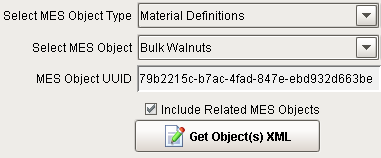
The Get Object(s) XML button shown in the figure above will export MES objects to XML using the following script.
Execute Export to XML
Python |
#Action performed event handler script for button #Select the type of MES object to export objTypeName = event.source.parent.getComponent('Dropdown').selectedStringValue #Select MES Object objName = event.source.parent.getComponent('MES Object Selector').selectedName #Select object uuid objUUID = event.source.parent.getComponent('MES Object Selector').selectedUUID #Create an object filter filter = system.mes.object.filter.createFilter() #Set the name pattern filter.setMESObjectNamePattern(objName) #Set the name of object type filter.setMESObjectTypeName(objTypeName) #Include or exclude dependencies filter.setIncludeRelated(event.source.parent.getComponent('CheckBox').selected) #Export to xml using MES Export Import Controller component event.source.parent.parent.getComponent('MES Export Import Controller').executeExportToXML(filter) |
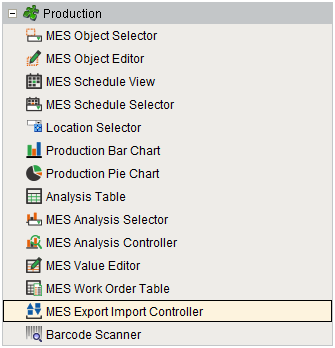
Component Palette
Includes Dependencies With Export

|
Including dependencies for export is handled but it is separate from the actual export. While exporting, the depended objects are also exported along with the requested MES objects. MES Object Filter is used to find the objects to export. Set setIncludeRelated property to True on the filter itself to get related objects. Then pass that object filter to system.mes.exportMESObjects(filter) and it would give back the XML string. If the export import controller component is used, then pass the filter in to executeExportToXML(filter) on the component. In other words, the export/import functionality does not worry about which objects to get and things like that. It just search with the object filter and export what is passed. By setting setIncludeRelated property to True, basically it will include all parent/child objects (the same ones can be retrieved by interacting with an MES Object and looking at the parent/child collections). It does not include objects that are related by properties/complex properties EXCEPT in one case which is for operations definitions, operations segments, and process segments. In this case, the properties are checked to figure out that the objects are related. Unfortunately this is not applicable for material or equipment references. ExampleMaterial Defs are children of Material Classes, so this means if an object filter is passed for a material def and included related, it would go and get the parent material class (and from there, it would sort of expand out and get any material class parents of that one, and also the child material defs, etc.). For both material def or material class, if it is include related, it will sort of get them all. If include related is set to True with an Operations Definition, the MES system will look into the properties/complex properties and find the associated Operations Segments, and also the Process Segment. The materials, supplemental equipment, etc. referenced by the operations definition is not retrieved though. |
Component Properties
Properties are provided that can be set to affect the operation and look of the component. They can be set through the Property Editor in the Designer or through scripting.
Example
Code |
|
Data
| Name | Scripting | Property Type | Description |
|---|---|---|---|
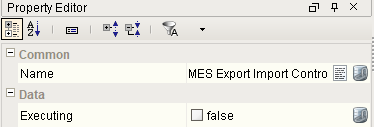
| Executing | executing | boolean | If true, then a request is currently executing. |
Event Handlers
Event handlers provide the ability to add custom script when a user interacts with a component.
propertyChange
propertyChange
Fires whenever a bindable property of the source component changes. This works for standard and custom (dynamic) properties.
| Property | Description |
|---|---|
| .source | The component that fired this event. |
| .newValue | The new value that this property changed to. |
| .oldValue | The value that this property was before it changed. Note that not all components include an accurate oldValue in their events. |
| .propertyName | The name of the property that changed. NOTE: Remember to always filter out these events for the property that you are looking for! Components often have many properties that change. |
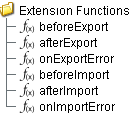
Extension Functions
beforeExport
- Description
Called just before an export request is executed.
- Parameters
self - A reference to the component that is invoking this function.
request - An ExecuteRequest object containing the export request settings and results.
- Return
Nothing
- Scope
Client
afterExport
- Description
Called after an export request has finished.
- Parameters
self - A reference to the component that is invoking this function.
request - An ExecuteRequest object containing the export request settings and results.
- Return
Nothing
- Scope
Client
onExportError
- Description
Called if a error occurred during exporting.
- Parameters
self - A reference to the component that is invoking this function.
request - An ExecuteRequest object containing the export request settings and results.
- Return
Nothing
- Scope
Client
beforeImport
- Description
Called just before an import request is executed.
- Parameters
self - A reference to the component that is invoking this function.
request - An ExecuteRequest object containing the import request settings and results.
- Return
Nothing
- Scope
Client
afterImport
- Description
Called after an import request has finished.
- Parameters
self - A reference to the component that is invoking this function.
request - An ExecuteRequest object containing the import request settings and results.
- Return
Nothing
- Scope
Client
onImportError
- Description
Called if a error occurred during importing.
- Parameters
self - A reference to the component that is invoking this function.
request - An ExecuteRequest object containing the import request settings and results.
- Return
Nothing
- Scope
Client
Custom Methods
Custom methods allow you to add your own component functions to a component that can be called through scripting. This is a useful and clean method of re-using script that is specific to the component (say you want to update a visual aspect of the component in the same way whether a user clicks on the component or a window property value changes).

Customizers
Custom Properties
The custom properties can be used to add user defined properties.
Component Functions
This component provide the following functions that can be called on it. If this component has been dropped onto the windows root container, the path and an example call would be event.source.parent.getComponent('MES Export Import Controller').executeImportFromFile(filePath).
executeImportFromFile(filePath)
- Description
Imports a file specified by the filePath parameter.
- Parameters
String filePath - Path of the file to import from.
- Return
Nothing
- Scope
Client
executeImportFromXML(xml)
- Description
Imports a file from XML.

|
The XML can be displayed on a window where user can make edits before importing. |
- Parameters
String xml - Path of the file to import from.
- Return
Nothing
- Scope
Client
executeExportToFile(exportFilter, filePath)
- Description
Exports a file to the given path.
- Parameters
MESObjectFilter exportFilter - The export filter to filter the results.
String filePath - Path of the file to export to.
- Return
Nothing
- Scope
Client
executeExportToXML(exportFilter)
- Description
Exports a file to XML.
- Parameters
MESObjectFilter exportFilter - The export filter to filter the results.
- Return
Nothing
- Scope
Client
Sepasoft MES Module Suite