Sepasoft MES Module Suite
MES Lot Filter
This object is used when searching for lots or sublots and is a parameter passed to certain functions. Lot or sublot search results can be limited by using the MESLotFilter object properties to narrow down the material lots returned when using the system.mes.getLotList() script function.
The MESLotFilter object doesn't have a option to set the lot sequence number. All functions using the MESLotFilter object return a list of lots and will include all lots that match the settings in the MESLotFilter object, not just the last lot.
The system.mes.loadMaterialLot() and system.mes.loadMaterialLotLink() script functions should be used to obtain a specific instance of a lot and will return the last lot if the lot sequence parameter is set to -1.
Object Functions
getBeginDate()
Get the beginning date and time to limit the results to return, in java.util.Date format.
getBeginDate()
None
Date beginDateTime - The beginning date and time to filter results (in java.util.Date format).
current_begin_time = lot_filter.getBeginDate()
hour_in_future = system.date.addHour(current_begin_time, 1)
|
getCustomPropertyValueFilter()
Get the list of MESPropertyValueFilter used to filter the results.
getCustomPropertyValueFilter()
None
List of MES Property Value Filter - The custom property value filter containing information about MESObjectTypes, propertyPath, etc .
getEndDate()
Get the ending date and time to limit the results to return, in java.util.Date format, not Calendar (see deprecated version below).
getEndDate()
None
Date endDateTime - The ending date and time to filter results (in java.util.Date format).
current_end_time = lot_filter.getEndDate()
hour_in_future = system.date.addHour(current_end_time, 1)
|
getLotEquipmentClassFilter()
Get the lot equipment class filter used to filter the results.
getLotEquipmentClassFilter()
None
String lotEquipClassFilter -The lot equipment class filter.
getLotEquipmentNameFilter()
Get the lot equipment name filter used to filter the results.
getLotEquipmentNameFilter()
None
String lotEquipNameFilter -The lot equipment name filter.
getLotNameFilter()
Get the lot name filter used to filter the results.
getLotNameFilter()
None
String lotNameFilter - The lot name filter.
getLotStatusFilter()
Get the custom lot status of results to return.
getLotStatusFilter()
None
String lotStatusFilter - The custom lot status value.
Get the material class filter used to filter the results.
getMaterialClassFilter()
None
String matClassFilter -The material class filter.
getMaterialNameFilter()
Get the material name filter used to filter the results.
getMaterialNameFilter()
None
String matNameFilter -The material name filter.
getMaxResults()
Get the maximum number of results to that will returned.
getMaxResults()
None
Integer maxResults -The maximum number of items to return.
1 2 3 | filter = system.mes.lot.filter.createFilter()
print filter.getMaxResults()
|
getModeName()
Get the type of results to return. It can be return results for lots (batches) of material or serialized items (sublots).
getModeName()
None
String mode Name - The name of the type of results to return.
1 2 3 4 | filter = system.mes.lot.filter.createFilter()
filter.setIncludeActiveLots(True)
print filter.getModeName()
|
getOperationNameFilter()
Get the operation name filter used to filter the results.
getOperationNameFilter()
None
String operationNameFilter -The operation name filter.
getPersonnelClassFilter()
Get the personnel class filter used to filter the results.
getPersonnelClassFilter()
None
String personnelClassFilter -The personnel class filter.
getPersonnelNameFilter()
Get the personnel name filter used to filter the results.
getPersonnelNameFilter()
None
String personnelNameFilter - The personnel name filter.
getSegmentEquipmentClassFilter()
Get the segment equipment class filter used to filter the results.
getSegmentEquipmentClassFilter()
None
String segEquipClassFilter -The segment equipment class filter.
getSegmentEquipmentNameFilter()
Get the segment equipment name filter used to filter the results.
getSegmentEquipmentNameFilter()
None
String segEquipNameFilter -The lot equipment name filter.
getSegmentNameFilter()
Get the segment name filter used to filter the results.
getSegmentNameFilter()
None
String segNameFilter -The segment name filter.
getSublotNameFilter()
Get the sublot name filter used to filter the results.
getSublotNameFilter()
None
String sublotNameFilter -The sublot name filter.
hasCustomPropertyValuefilter()
Checks to see if a custom property value filter exists for the given lot.
hasCustomPropertyValuefilter()
None
True, if there exist a custom property value filter .
All
includeActiveLots()
If True, lots or sublots currently being processed will be included in the results.
includeActiveLots()
None
Boolean If True, active lots will be returned in the results.
1 2 3 | filter = system.mes.lot.filter.createFilter()
filter.includeInactiveLots()
|
includeInactiveLots()
If True, lots or sublots that are complete will be included in the results.
includeInactiveLots()
None
Boolean - If True, completed lots will be return in the results.
1 2 3 | filter = system.mes.lot.filter.createFilter()
filter.includeInactiveLots()
|
setBeginDate(beginDate)
Set the beginning date and time to limit results to return, in java.util.Date format, not Calendar (see deprecated version below). This applies to lots or sublots that are completed or have a custom lot status.
setBeginDate(beginDate)
Date beginDate - Beginning date and time to filter results (in java.util.Date format).
Nothing
1 2 3 4 | filter = system.mes.lot.filter.createFilter()
begin = system.date.now()
filter.setBeginDate(begin)
|
setCustomPropertyValueFilter(customPropertyValueFilter)
Set the custom property filter expressions to filter the results. Multiple expressions can be included by separating them with commas. When this is done, all sub expressions must match for the overall expression to evaluate to true. Use system.mes.lot.filter.parseCustomPropertyValueFilter(filter) script function to create the list of MES Property Value Filter objects.
setCustomPropertyValueFilter(customPropertyValueFilter)
List of MES Property Value Filter customPropertyValueFilter - The custom property value list to filter the results.
Nothing
setEndDate(endDate)
Set the ending date and time to limit results to return, in java.util.Date format, not Calendar (see deprecated version below). This applies to lots or sublots that are completed or have a custom lot status.
setEndDate(endDate)
Date endDate - Ending date and time to filter results (in java.util.Date format).
Nothing
1 2 3 4 | filter = system.mes.lot.filter.createFilter()
endTime = system.date.now()
filter.setEndDate(endTime)
|
setForceEnclosedDateRange(forceEnclosedDateRange)
Forces the MESLotFilter's date range filtering to be less restrictive. The default setting is True.
Available in Stable Releases 3.81.9 and later
setForceEnclosedDateRange(forceEnclosedDateRange)
- Parameters
- Boolean forceEnclosedDateRange - If True, Lots must have began and ended between the specified Begin and End Date filters (inclusive). If False, Lots must have occurred at any point during the time range.
1 2 3 4 5 6 7 8 9 | filter = system.mes.lot.filter.createFilter()
end = system.date.now()
begin = system.date.addHours(end, -2)
filter.setEndDate(end)
filter.setBeginDate(begin)
filter.setForceEnclosedDateRange(False)
|
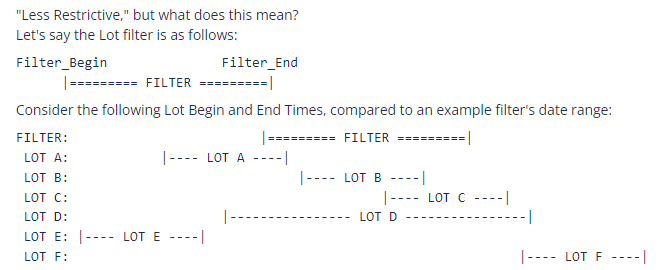
- If setForceEnclosedDateRange is True (which is the default value), Lots must have a Begin and End time range that falls in between the filter's date range (inclusive).
- This means the only Lot that will be returned is LOT B.
- LOT B's Begin time is strictly equal to or after the filter's begin time.
- LOT B's End time is strictly equal to or before the filter's end time.
- No other Lots in this example simultaneously satisfy both of the above conditions.
- If False, Lots touching the filter time range will be returned.
- Lots, A, B, C, and D will be returned.
- Each of these Lots have a begin time that is equal to or before the filter's end time.
- Each of these Lots have an end time that is equal to or after the filter's begin time.
- Lots E and F do not individually satisfy both of the above conditions at the same time.
- Lots E and F fail both conditions; neither will be returned in either case.
If the user does not call this function, the Default setting will be True. This is to protect backwards compatibility for upgrading customers that do not necessarily want/care about this new feature.
setIncludeActiveLots(includeActiveLots)
If set to True, lots or sublots that are actively being processed will be included in the results.
setIncludeActiveLots(includeActiveLots)
Boolean includeActiveLots - If True, include active lots or sublots in results.
Nothing
1 2 3 | filter = system.mes.lot.filter.createFilter()
filter.setIncludeActiveLots(True)
|
setIncludeInactiveLots(includeInactiveLots)
If set to True, lots or sublot that are completed will be included in the results.
setIncludeInactiveLots(includeInactiveLots)
Boolean includeActiveLots - If True, include completed lots or sublots in results.
Nothing
1 2 3 | filter = system.mes.lot.filter.createFilter()
filter.setIncludeInactiveLots(True)
|
setIncludeSupplementalEquipment(includeSupplementalEquipment)
If set to True, the lots in Supplemental Equipment will be included in the results. Default setting is False.
setIncludeSupplementalEquipment(includeSupplementalEquipment)
Boolean includeSupplementalEquipment - If True, the lots in Supplemental Equipment will be included in the results. Default setting is False.
Nothing
1 2 3 4 | filter = system.mes.lot.filter.createFilter()
filter.setIncludeSupplementalEquipment(True)
|
setLotAvailabilityFilter(availabilityStatus)
A setter for the availability criteria in the lot filter. If "Available" is provided in the filter, available lots will be returned. If "Used" is provided in the filter, lots that are not available, but used up, will be returned.
setLotAvailabilityFilter(availabilityStatus)
String availabilityStatus - A string, either "Available" or "Used", indicating which status lots to return in the results.
Nothing
1 2 3 | filter = system.mes.lot.filter.createFilter()
filter.setLotAvailabilityFilter('Available')
|
setLotEquipmentClassFilter(lotEquipmentClassFilter)
Set the lot equipment class filter to include lots that were stored in the equipment that belong to the equipment class that matches this property. It can contain wildcard characters including * or ?. The * character can be any characters and the ? character represents any single character.
setLotEquipmentClassFilter(lotEquipmentClassFilter)
String lotEquipmentClassFilter - The lot equipment class filter used to filter the results.
Nothing
1 2 3 | filter = system.mes.lot.filter.createFilter()
filter.setLotEquipmentClassFilter('Storage Tank')
|
setLotEquipmentNameFilter(lotEquipmentNameFilter)
Set the lot equipment name filter to include lots that were stored in the equipment with a name that matches this property. It can contain wildcard characters including * or ?. The * character can be any characters and the ? character represents any single character.
setLotEquipmentNameFilter(lotEquipmentNameFilter)
String lotEquipmentNameFilter - The lot equipment name filter used to filter the results.
Nothing
1 2 3 | filter = system.mes.lot.filter.createFilter()
filter.setLotEquipmentNameFilter('Vinegar Tank?')
|
setLotNameFilter(lotNameFilter)
Set the lot name to filter to include in the results. It can contain wildcard characters including * or ?. The * character can be any characters and the ? character represents any single character.
setLotNameFilter(lotNameFilter)
String lotNameFilter - The lot name filter used to filter the results.
Nothing
filter = system.mes.lot.filter.createFilter()
filter.setLotNameFilter('V100*')
|
setLotStatusFilter(lotStatusFilter)
Set the custom lot status of results to return. If the Final Lot Status property in a resource definition of a Process Segment or Operations Segment is set to a custom lot status, it can be filtered with this property.
setLotStatusFilter(lotStatusFilter)
String lotStatusFilter - Custom lot status value to filter results.
Nothing
1 2 3 | filter = system.mes.lot.filter.createFilter()
filter.setLotStatusFilter('Complete')
|
setMaterialClassFilter(materialClassFilter)
Set the material class filter to include lots that have material that belong to the material class that matches this property. It can contain wildcard characters including * or ?. The * character can be any characters and the ? character represents any single character.
setMaterialClassFilter(materialClassFilter)
String materialClassFilter - The material class filter used to filter the results.
Nothing
1 2 3 | filter = system.mes.lot.filter.createFilter()
filter.setMaterialClassFilter('* Vinegar')
|
setMaterialNameFilter(materialNameFilter)
Set the material definition name filter to include lots that have material with a name that matches this property. It can contain wildcard characters including * or ?. The * character can be any characters and the ? character represents any single character.
setMaterialNameFilter(materialNameFilter)
String materialNameFilter - The material definition name filter used to filter the results.
Nothing
1 2 3 | filter = system.mes.lot.filter.createFilter()
filter.setMaterialNameFilter('* Turkey')
|
setMaxResults(maxResults)
Set the maximum results to return. This prevents a large list from being returned which reduces database operations, memory usage and other resources when most of the time, the results are not used. If large results are needed, then this property can be increased.
setMaxResults(maxResults)
Integer maxResults - The maximum number of items to return.
Nothing
1 2 3 4 | filter = system.mes.lot.filter.createFilter()
filter.setMaxResults(200)
print filter.getMaxResults()
|
setModeName(modeName)
Set the type of results to return. It can be return results for lots (batches) of material or serialized items (sublots). Options are Lot and Sublot.
setModeName(modeName)
String modeName - The name of the mode for the type of results to return.
Nothing
1 2 3 | filter = system.mes.lot.filter.createFilter()
filter.setModeName('Sublot')
|
setOperationNameFilter(operationNameFilter)
Set the operation name filter to include lots that were processed by the operation with a name that matches this property. It can contain wildcard characters including * or ?. The * character can be any characters and the ? character represents any single character.
setOperationNameFilter(operationNameFilter)
String operationNameFilter - The operation name filter used to filter the results.
Nothing
1 2 3 | filter = system.mes.lot.filter.createFilter()
filter.setOperationNameFilter('Receive*')
|
setPersonnelClassFilter(personnelClassFilter)
Set the personnel class filter to include lots that were processed by personnel that belong to the personnel class that matches this property. It can contain wildcard characters including * or ?. The * character can be any characters and the ? character represents any single character.
setPersonnelClassFilter(personnelClassFilter)
String personnelClassFilter - The personnel class filter used to filter the results.
Nothing
1 2 3 | filter = system.mes.lot.filter.createFilter()
filter.setPersonnelClassFilter('Operator?')
|
setPersonnelNameFilter(personnelNameFilter)
Set the personnel name filter to include lots that were processed with a name that matches this property. It can contain wildcard characters including * or ?. The * character can be any characters and the ? character represents any single character.
setPersonnelNameFilter(personnelNameFilter)
String personnelNameFilter - The personnel name filter used to filter the results.
Nothing
1 2 3 | filter = system.mes.lot.filter.createFilter()
filter.setPersonnelNameFilter('Jo*')
|
setSegmentEquipmentClassFilter(segmentEquipmentClassFilter)
Set the segment equipment class filter to include lots that were processed at the equipment that belong to the equipment class that matches this property. It can contain wildcard characters including * or ?. The * character can be any characters and the ? character represents any single character.
setSegmentEquipmentClassFilter(segmentEquipmentClassFilter)
String segmentEquipmentClassFilter - The segment equipment class filter used to filter the results.
Nothing
1 2 3 | filter = system.mes.lot.filter.createFilter()
filter.setSegmentEquipmentClassFilter('* Tank')
|
setSegmentEquipmentNameFilter(segmentEquipmentNameFilter)
Set the segment equipment name filter to include lots that were processed at the equipment with a name that matches this property. It can contain wildcard characters including * or ?. The * character can be any characters and the ? character represents any single character.
setSegmentEquipmentNameFilter(segmentEquipmentNameFilter)
String segmentEquipmentNameFilter - The segment equipment name filter used to filter the results.
Nothing
1 2 3 | filter = system.mes.lot.filter.createFilter()
filter.setSegmentEquipmentNameFilter('Vinegar*')
|
setSegmentNameFilter(segmentNameFilter)
Set the segment name filter to include lots that were processed by the segment with a name that matches this property. It can contain wildcard characters including * or ?. The * character can be any characters and the ? character represents any single character.
setSegmentNameFilter(segmentNameFilter)
String segmentNameFilter - The segment name filter used to filter the results.
Nothing
1 2 3 | filter = system.mes.lot.filter.createFilter()
filter.setSegmentNameFilter('Receive*')
|
setSublotNameFilter(sublotNameFilter)
Set the sublot name to filter to include in the results. It can contain wildcard characters including * or ?. The * character can be any characters and the ? character represents any single character.
setSublotNameFilter(sublotNameFilter)
String sublotNameFilter - The sublot name filter used to filter the results.
Nothing
1 2 3 | filter = system.mes.lot.filter.createFilter()
filter.setSublotNameFilter('BB 100?')
|
Sepasoft MES Module Suite