Sepasoft MES Module Suite
Segment Selector
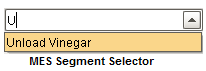
A component that is added to Ignition windows to display and select operations segments. The operations segments that are shown, are limited by those appropriate for the equipment specified in the equipment path property. The auto complete feature will include only appropriate operations definitions that start with what the user has typed. This is very useful so scrolling of large lists does not have to be done and the full name of the operations segment does not have to be typed in.
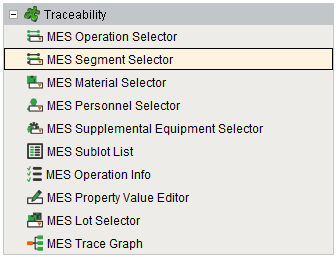
Component Palette
The MES Segment Selector component has two different modes.
Segment Mode
The Segment mode is used to select a Operations Segment to run based on an active Operations Response for the specified equipment. This is needed when there are multiple segments being used for an operation.
Definition Mode
If all that is needed is to run a single segment like Unload Vinegar then, the segment can automatically be selected when the operation is selected. The Definition mode enables this functionality and the MES Operations Selector can be left off the screen. In order for the MES Segment Selector to know which segment to select, one of two situations must exist. Either, there must only be one Operations Segment in the Operation Definition or the Operations Segment name must match the Operations Definition name.
Component Properties
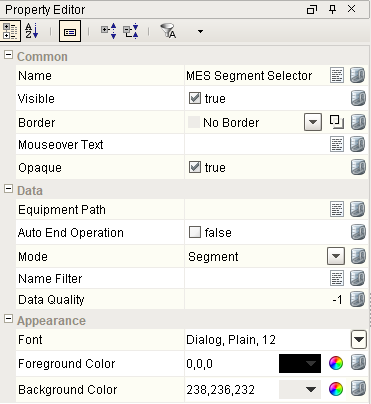
Properties are provided that can be set to affect the operation and look of the component. They can be set through the Property Editor in the Designer or through scripting.
Example
Code |
|
Data
| Name | Scripting | Property Type | Description |
|---|---|---|---|
| Equipment Path | equipmentPath | String | The equipment path within the production model to show available segments. |
| Auto End Operation | autoEndOperation | boolean | When true, automatically end the operation when the segment is ended. |
| Active | active | boolean | True if the selected segment is active. |
| Can Begin Segment | canBeginSegment | boolean | True if the selected segment can be started. |
| Can End Segment | canEndSegment | boolean | True if the selected segment is started and can be ended. |
| Can Update Segment | canUpdateSegment | boolean | True if the selected segment is started and and has been modified and can be updated. |
| Can Undo Segment | canUndoSegment | boolean | True if changes to the selected segment can be undone. |
| Selected UUID | selectedUUID | String | Selected unique identifier of the segment. |
| Selected Name | selectedName | String | Selected name of the segment. |
| Name Filter | nameFilter | String | Operation names to filter on. |
| Mode | mode | String | Determines whether the segment or both the segment and the Operation are selected. |
Event Handlers
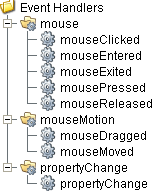
Event handlers provide the ability to add custom script when a user interacts with a component such as by clicking a mouse, selecting a menu item or when a component property changes.
mouse
mouseClicked
This event signifies a mouse click on the source component. A mouse click the combination of a mouse press and a mouse release, both of which must have occurred over the source component. Note that this event fires after the pressed and released events have fired.
| Property | Description |
|---|---|
| .source | The component that fired this event. |
| .button | The code for the button that caused this event to fire. |
| .clickCount | The number of mouse clicks associated with this event. |
| .x | The x-coordinate (with respect to the source component) of this mouse event. |
| .y | The y-coordinate (with respect to the source component) of this mouse event. |
| .popupTrigger | Returns True (1) if this mouse event is a popup trigger. What constitutes a popup trigger is operating system dependent, which is why this abstraction exists. |
| .altDown | True (1) if the Alt key was held down during this event, false (0) otherwise. |
| .controlDown | True (1) if the Ctrl key was held down during this event, false (0) otherwise. |
| .shiftDown | True (1) if the Shift key was held down during this event, false (0) otherwise. |
mouseEntered
This event fires when the mouse enters the space over the source component.
| Property | Description |
|---|---|
| .source | The component that fired this event. |
| .button | The code for the button that caused this event to fire. |
| .clickCount | The number of mouse clicks associated with this event. |
| .x | The x-coordinate (with respect to the source component) of this mouse event. |
| .y | The y-coordinate (with respect to the source component) of this mouse event. |
| .popupTrigger | Returns True (1) if this mouse event is a popup trigger. What constitutes a popup trigger is operating system dependent, which is why this abstraction exists. |
| .altDown | True (1) if the Alt key was held down during this event, false (0) otherwise. |
| .controlDown | True (1) if the Ctrl key was held down during this event, false (0) otherwise. |
| .shiftDown | True (1) if the Shift key was held down during this event, false (0) otherwise. |
mouseExited
This event fires when the mouse leaves the space over the source component.
| Property | Description |
|---|---|
| .source | The component that fired this event. |
| .button | The code for the button that caused this event to fire. |
| .clickCount | The number of mouse clicks associated with this event. |
| .x | The x-coordinate (with respect to the source component) of this mouse event. |
| .y | The y-coordinate (with respect to the source component) of this mouse event. |
| .popupTrigger | Returns True (1) if this mouse event is a popup trigger. What constitutes a popup trigger is operating system dependent, which is why this abstraction exists. |
| .altDown | True (1) if the Alt key was held down during this event, false (0) otherwise. |
| .controlDown | True (1) if the Ctrl key was held down during this event, false (0) otherwise. |
| .shiftDown | True (1) if the Shift key was held down during this event, false (0) otherwise. |
mousePressed
This event fires when a mouse button is pressed down on the source component.
| Property | Description |
|---|---|
| .source | The component that fired this event. |
| .button | The code for the button that caused this event to fire. |
| .clickCount | The number of mouse clicks associated with this event. |
| .x | The x-coordinate (with respect to the source component) of this mouse event. |
| .y | The y-coordinate (with respect to the source component) of this mouse event. |
| .popupTrigger | Returns True (1) if this mouse event is a popup trigger. What constitutes a popup trigger is operating system dependent, which is why this abstraction exists. |
| .altDown | True (1) if the Alt key was held down during this event, false (0) otherwise. |
| .controlDown | True (1) if the Ctrl key was held down during this event, false (0) otherwise. |
| .shiftDown | True (1) if the Shift key was held down during this event, false (0) otherwise. |
mouseReleased
This event fires when a mouse button is released, if that mouse button's press happened over this component.
| Property | Description |
|---|---|
| .source | The component that fired this event. |
| .button | The code for the button that caused this event to fire. |
| .clickCount | The number of mouse clicks associated with this event. |
| .x | The x-coordinate (with respect to the source component) of this mouse event. |
| .y | The y-coordinate (with respect to the source component) of this mouse event. |
| .popupTrigger | Returns True (1) if this mouse event is a popup trigger. What constitutes a popup trigger is operating system dependent, which is why this abstraction exists. |
| .altDown | True (1) if the Alt key was held down during this event, false (0) otherwise. |
| .controlDown | True (1) if the Ctrl key was held down during this event, false (0) otherwise. |
| .shiftDown | True (1) if the Shift key was held down during this event, false (0) otherwise. |
mouseMotion
mouseDragged
Fires when the mouse moves over a component after a button has been pushed.
| Property | Description |
|---|---|
| .source | The component that fired this event. |
| .button | The code for the button that caused this event to fire. |
| .clickCount | The number of mouse clicks associated with this event. |
| .x | The x-coordinate (with respect to the source component) of this mouse event. |
| .y | The y-coordinate (with respect to the source component) of this mouse event. |
| .popupTrigger | Returns True (1) if this mouse event is a popup trigger. What constitutes a popup trigger is operating system dependent, which is why this abstraction exists. |
| .altDown | True (1) if the Alt key was held down during this event, false (0) otherwise. |
| .controlDown | True (1) if the Ctrl key was held down during this event, false (0) otherwise. |
| .shiftDown | True (1) if the Shift key was held down during this event, false (0) otherwise. |
mouseMoved
Fires when the mouse moves over a component, but no buttons are pushed.
| Property | Description |
|---|---|
| .source | The component that fired this event. |
| .button | The code for the button that caused this event to fire. |
| .clickCount | The number of mouse clicks associated with this event. |
| .x | The x-coordinate (with respect to the source component) of this mouse event. |
| .y | The y-coordinate (with respect to the source component) of this mouse event. |
| .popupTrigger | Returns True (1) if this mouse event is a popup trigger. What constitutes a popup trigger is operating system dependent, which is why this abstraction exists. |
| .altDown | True (1) if the Alt key was held down during this event, false (0) otherwise. |
| .controlDown | True (1) if the Ctrl key was held down during this event, false (0) otherwise. |
| .shiftDown | True (1) if the Shift key was held down during this event, false (0) otherwise. |
propertyChange
propertyChange
Fires whenever a bindable property of the source component changes. This works for standard and custom (dynamic) properties.
| Property | Description |
|---|---|
| .source | The component that fired this event. |
| .newValue | The new value that this property changed to. |
| .oldValue | The value that this property was before it changed. Note that not all components include an accurate oldValue in their events. |
| .propertyName | The name of the property that changed. NOTE: Remember to always filter out these events for the property that you are looking for! Components often have many properties that change. |
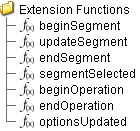
Extension Functions
beginSegment
- Description
Begin the specified response segment.
- Parameters
String responseSegment - The MESResponse segment object to begin. All required property values must be set prior to beginning.
- Return
Nothing
- Scope
Client
updateSegment
- Description
Update an active segment. If material, personnel, supplemental equipment resources or custom properties change during a production task, then the update script function is used to commit the changes.
- Parameters
String responseSegment - The MESResponse segment object to be updated.
- Return
Nothing
- Scope
Client
endSegment
- Description
End the specified response segment.
- Parameters
String responseSegment - The MESResponse segment object to end. All final property values must be set prior to ending.
- Return
Nothing
- Scope
Client
segmentSelected
- Description
Called after an MES Segment is selected. In this function, segments can be started provided the required lot, material, equipment and personnel properties have been set. This allows for operation to automatically start when the user selects a MES Segment.
- Parameters
String mesObjectLink - MES object containing the MES Segment details. Call mesObjectLink.getMESObject() to get the instance of the MESOperationSegment object.
- Return
Nothing
- Scope
Client
beginOperation
- Description
Called before an MES Operation begins. Return false to prevent the MES Operation from being started.
- Parameters
mesOperationResponse - The MESOperationResponse object itself. Core and custom properties can be set on the object before the operation begins.
- Return
True
- Scope
Client
endOperation
- Description
Called before an MES Operation ends. Return false to prevent the MES Operation from being ended.
- Parameters
mesOperationResponse - The MESOperationResponse object itself. Core and custom properties can be set on the object before the operation ends.
- Return
True
- Scope
Client
optionsUpdated
- Description
Called when the available options have been updated and currently there are no active segments.
- Parameters
mesObjectList - A list of MESObjectLink objects representing the segments that will appear in the drop down list.
- Return
Return the index of the option to select, otherwise return None to not select any.
- Scope
Client
Custom Methods
Custom methods allow you to add your own component functions to a component that can be called through scripting. This is a useful and clean method of re-using script that is specific to the component (say you want to update a visual aspect of the component in the same way whether a user clicks on the component or a window property value changes). See Component Custom Methods in the Ignition Help Manual for more information.
Customizers
This component does not have any custom properties.
Component Functions
This component provide the following function that can be called on it. If this component has been dropped onto the windows root container, the path and an example call would be event.source.parent.getComponent('MES Segment Selector').beginSegment().
beginSegment()
- Description
Invokes the beginSegment extension function.
- Parameters
None
- Return
Nothing
- Scope
Client
updateSegment()
- Description
Invokes the updateSegment extension function.
- Parameters
None
- Return
Nothing
- Scope
Client
executeSegment()
- Description
Executes the segment.
- Parameters
None
- Return
Nothing
- Scope
Client
endSegment()
- Description
Invokes the endSegment extension function.
- Parameters
None
- Return
Nothing
- Scope
Client
endAllSegments()
- Description
Invokes the endSegment extension function for each segments.
- Parameters
None
- Return
Nothing
- Scope
Client
undoChanges()
- Description
Undo the changes made to the segment.
- Parameters
None
- Return
Nothing
- Scope
Client
Sepasoft MES Module Suite