Sepasoft MES Module Suite
Parse Template
The Parse Template panel provides a visual way of defining the data points to be extracted from the raw text returned by the instrument interface. The text represents what is returned from an instrument and is displayed in a fixed character width. Parsing Boxes are used to define areas of text to extract meaningful values from. Multiple parsing boxes can be added within the Parse Template.
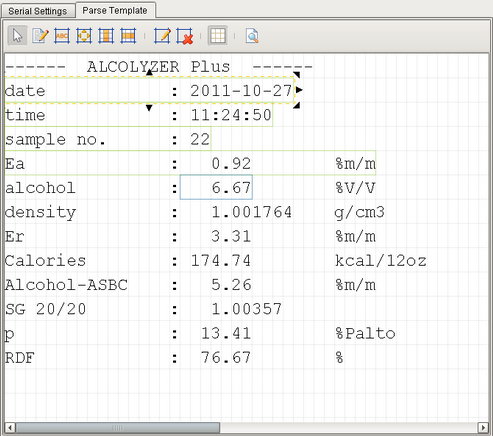
New templates are blank and you'll need to add text representing the output received from the instrument here so that parsing boxes can be applied. You can edit text in the template using the Edit Content Text tool and it can also be populated by using the Send to Template menu option of the Serial Controller and File Monitor Controller components.
The Parse Template configuration screen contains a toolbar palette with tools that allow interaction with the current parse template.
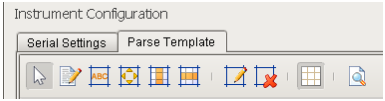
 Parsing Box Selector
Allows the user to select any existing parsing boxes in the template. The selected parsing box will be displayed with sizing arrows on all corners.
 Edit Content Text
Allows editing of the actual template text that the parsing operations will be applied to.

Find Label Parsing Box
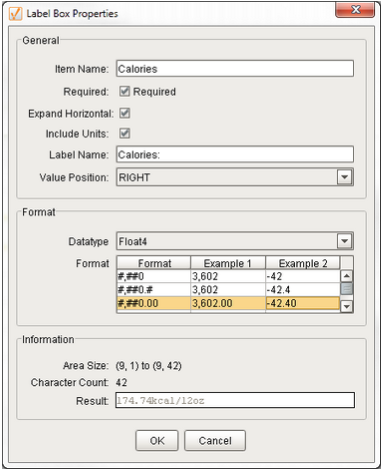
The parsed data will be linked to a label on the template so that the position of the label/value pair can appear at any location. After dragging a Find Label Parsing Box onto the Parse Template panel, right-click on the box to setup the parsing properties.
| Property | Data Type | Description | |||||||||||||||
|---|---|---|---|---|---|---|---|---|---|---|---|---|---|---|---|---|---|
| Item Name | String | Name of the Label Parsing Box | |||||||||||||||
| Required | boolean | If this property is checked then data will be invalid without the label box. If it is unchecked, data is considered valid even without the label box. | |||||||||||||||
| Expand Horizontal | boolean | If this property is checked, then the value after the label box is also read. If this property is unchecked, it will read only till the label box. | |||||||||||||||
| Include Units | boolean | If this property is checked then units are included and if it is unchecked units are ignored. | |||||||||||||||
| Label Name | String | The parsing box includes a label/value pair. The label text is defined here and used to determine the value position | |||||||||||||||
| Value Position | Integer |
The position of the value with respect to the Label Name. Allowable values are:
|
|||||||||||||||
| Data Type |
|
Datatype of the value portion of the label/value pair | |||||||||||||||
| Format |
|
Expected format of the value portion of the label/value pair |
The information panel shows the results of the parsing as setup.
 Fixed Position Parsing Box
The parsed data will be read from the template at the exact position the box is placed. The parsing properties are the same as for the Find Label Parsing Box.

CSV Column Parsing Box
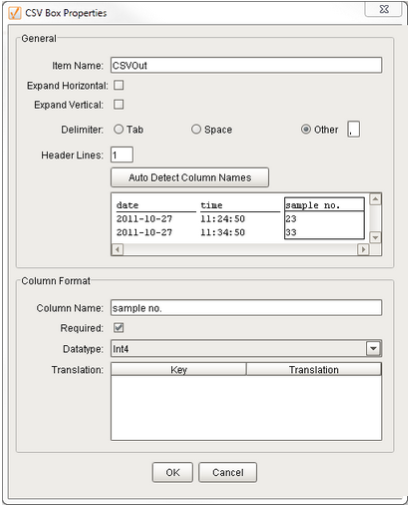
Will parse all data in the columns in a fashion similar to a CSV file. Rows of data contain repeating items.
Example:
date,time,sample no.
2011-10-27,11:24:50,23
2011-10-27,11:34:50,33

CSV Row Parsing Box
Will parse all data in the rows in a fashion similar to a CSV file. A group of rows will be repeated.
Example:
date,2011-10-27
time,11:24:50
sample no.,31
date,2011-10-27
time,11:34:50
sample no.,32
date,2011-10-27
time,11:44:50
sample no.,33
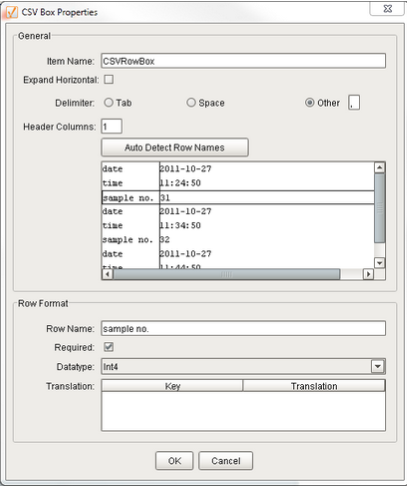
 Edit Parsing Box Properties
This will bring up the appropriate editor for the selected parsing box.
 Remove Parsing Box
The selected parsing box will be removed.
 Toggle Character Grid
A visible grid can be displayed to show the position of all characters.
 Parse and Preview Template
This will display a window showing the actual output of the template text after it has been parsed.
Sepasoft MES Module Suite