Perspective Chart Dataset Properties
Sepasoft MES Module Suite
SPC Perspective Chart Dataset Properties
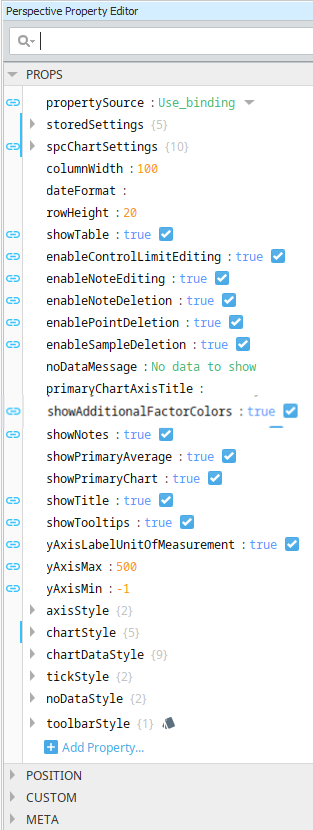
These properties are available in the Ignition Properties Palette for SPC Charts.
|
Property Source
|
propertySource
|
Sets the datasource mode. Toggle two options: Use_stored_settings | Use_binding
Included in Sepasoft Versions:

|
MES 3.81.7 RC1 and later
|
Use_stored_settings: Sets the chart to receive data from Stored Settings. To use this, enter property values under storedSettings, see below.
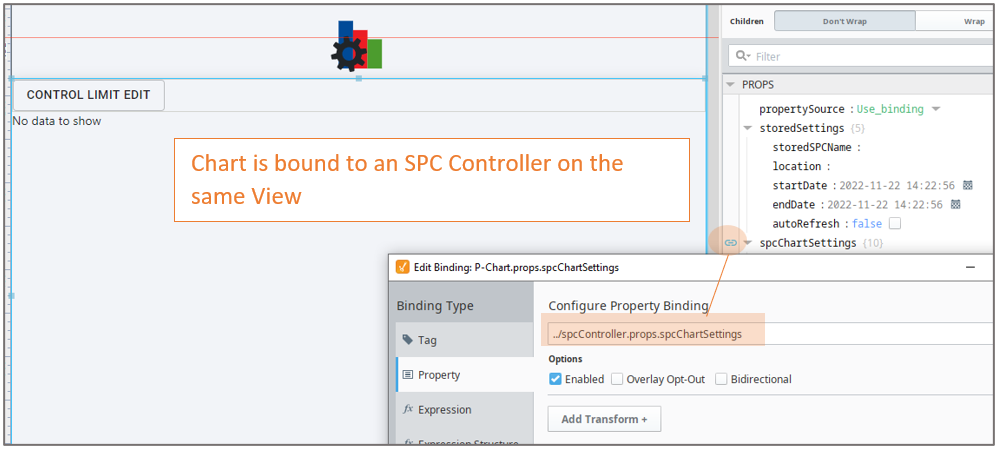
Use_binding: Sets the chart to receive data from an SPC Controller. To use this, bind to an SPC Controller under spcChartSettings, see below.
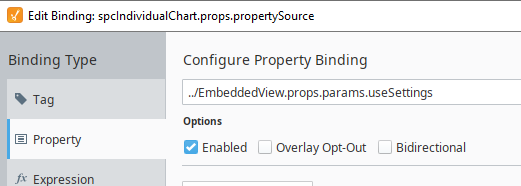
When clicking the binding icon on the left side of the propertySource, the Configure Property Binding dialog appears.
|
|
Stored Settings
|
storedSettings
|
Set property values here when propertySource is set to Use_stored_settings
|
|
|
|
Property Name
|
Data Type
|
Property Value Description
| |
storedSPCName
|
String
|
Required when propertySource = 'Use_stored_settings': Sets name of the Stored SPC Setting. The name must match exactly to the name you enter in Stored SPC Selector. | |
location
|
String
|
Optional: Filter on a Location that is defined in Equipment Manager. Enter the Equipment Path to the Location.
| |
startDate
|
Date
|
Required: Sets start date to filter SPC data on

|
Bind to form fields on the view to make dates selectable in runtime.
|
Required: Sets end date to filter SPC filter on
| |
endDate
|
Date
| |
autoRefresh
|
Boolean
|
True/False Required: True, refreshes data when sample or definition information changes. Set to True to use real-time data. |
|
|
SPC Chart Settings
|
|
spcChartSettings
Set property values here when propertySource is set to Use_Binding
Bind to the SPC Controller
|
|
|
|
Property Name
|
Data Type
|
Information
|
|
storedSPCName
|
String
|
Incoming property value from the SPC Controller > Stored Setting. |
|
startDate
|
Date
|
Sets start date to start filtering data on
|
|
endDate
|
Date
|
Sets end date to filter data on
|
|
autoUpdate
|
Boolean
|
Required True/False: True, updates data when a sample is taken. Use for realtime data.
|
|
autoRefresh
|
Boolean
|
Required True/False: True, refreshes data when sample or definition information changes. Use for realtime data.
|
|
|
|
settings
additionalFactors:
| String - Additional factors to include in the SPC chart.
| attributeName:
| String - Name of the sample attribute
| attributeUnits:
| String - Adds a label for the unit of measure for the sample
| boxAndWhiskerFilter Chart Specific
| String - Box and whisker filter items to filter on.
| controlLimits:
| String - Summarizes control limits to add to the chart
| definitionName:
| String - Name of the sample definition.
| filters:
| String - location: The Location Path defined in the Equipment Manager to filter on. factors: Properties >Additional Factor Filter on existing additional factors
| measurement:
| String - Measure number to filter on
| nonconformingFilter Chart Specific
| String - Nonconforming items to filters on
| nonconformityFilter Chart Specific
| String - Nonconformity items to filters on
| paretoFilter Chart Specific
| String - Items to include in a Pareto chart.
| rowLimit:
| String - The maximum number of samples to return in the results.
| signals
| String - Summarizes your signal selections in a string.
| spcDataFormat:
| String - SPC Data |
| Each chart type has specific settings. Select the correct chart from the dropdown menu. |
| useDefaultChartType:
| String - If true, uses the default chart type from the attribute definition.
| useDefaultChartType:
| String - If true, uses the default chart type .
| enableFutureLimitEditing:
| String -If true, you can set limits for future (non-existing) samples.
|
|
|
|
histogram
autoBarCount:
| Boolean - If true, the number of data bars that are displayed is calculated automatically.
| dataBarCount
| int - The number of data bars to display when autoBarCount is False.
| paddingBarCount
| int - The number of bars prior to and following the data bars to include in the histogram results.
|
|
|
|
dynamic When using an SPC Controller to populate a Perspective SPC Chart, these dynamic filters can be used to filter the data for display in a chart.
factor
| String - Additional factors that were recorded along with the sample.
| location
| String - The location path where the samples were collected.
| productCode
| String - Samples returned should have this Product Code if present.
| referenceNo
| String - Samples returned should have this Reference Number if present.
| sampleApprovedBy
| String - The username of the user that approved the samples.
| sampleTakenBy
| String - The username of the user that recorded the samples.
| shift
| String - A schedule shift during which the samples were taken.
|
|
|
|
spcResults SPC Results including data, measurement count, messages and calculated value information.
definitionUUI - calcValueList
- defaultChart
- measureFormat
- unit
measurementCount - messages
- errormessage
- warningMessage
spcData: dataset - The SPC data.
|
|
showTable
| Boolean
| Enable to display the data table. The table is updated as new data comes in. Table Chart Scroll LockingThe table chart scroll locking feature provides a user-controlled mechanism to either automatically navigate to the most recent data upon its arrival or maintain the current scroll position. The scroll lock feature operates in two distinct modes, each with specific UI indicators and behavioral responses to new data.
 |
This feature is available in versions: MES 3.81.11 SP7 and later MES 4.83.0 RC2 and later |
State | Detailed Description | Locked | UI: The lock icon in the taskbar appears closed and filled.
Behavior: The chart view is locked to the right, automatically jumping to the end of the table whenever new data is received.
Tooltip: Hovering over the icon displays the text: "Allow Free Scrolling". | Free Scrolling | UI: The lock icon in the taskbar appears open and unfilled.
Behavior: The chart maintains its current scroll position, even when new data is received.
Tooltip: Hovering over the icon displays the text: "Lock Scrolling". |
|
|
Sepasoft MES Module Suite