Sepasoft MES Module Suite
Process Cell in Batch Procedure
Batch Procedure extends the MES Production Equipment Model with the Process Cell and Unit objects. The Process Cell defines the boundaries of a production line. A Unit, under a Process Cell, connects to the equipment module(s) and control module(s) within a controller. These objects are added in the MES Equipment Manager .
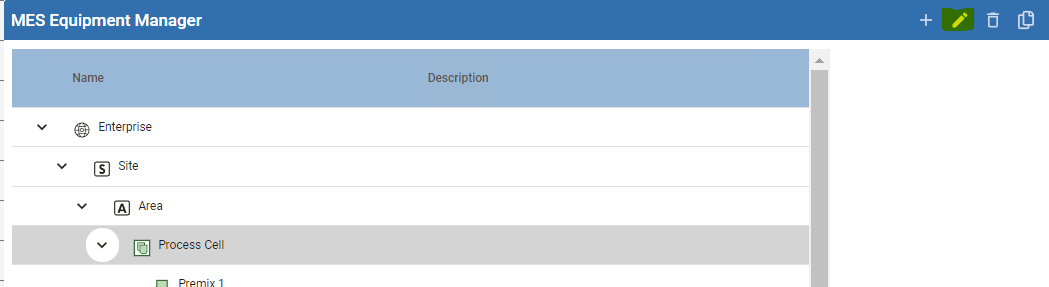
A Process Cell represents a production line of any type of manufacturing:
- Continuous Process
- Converting Line
- Discrete Manufacturing
- Packaging Line
Enterprise Server Requirements

|
Batch Procedure components run under a Process Cell in the Production Equipment Model. To sync and populate data across an MES Network, add the Process Cell structure in the Enterprise Server's Equipment Model via Equipment Manager or scripting. |
General
Settings
| Name | Description | ||
|---|---|---|---|
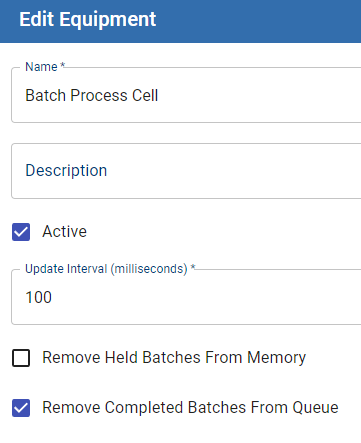
| Name | Name of the process cell. | ||
| Description | Available for a summary of the process cell. | ||
| Active | When True, activates the Process Cell in the Equipment Model. | ||
| Update Interval | Sets the SFC logic interval to a configurable value that allows between 25 to 1000ms. For configuration details, see Knowledge Base topic: Process Cell Setting Based on Recipe Size.
| ||
| Remove Held Batches From Memory | This is a performance feature that releases batches that are in the Held state within the Batch Command-State lifecycle from memory. When a batch is Restarted, the batch goes back into memory. When the reason for the Held batch is resolved, you need to Restart the Batch for the system to complete the batch. When set to False, the threads remain in memory when a Batch is in the HELD state. When set to True, the threads are removed from memory when a batch is in the HELD state. Version Specific
For details about a batch life-cycle, see Batch Command Life Cycle. | ||
| Remove Completed Batches From Queue | The batch queue can be viewed in the Batch List component. This option controls completed batches displaying in Batch List. When checked, set to True, the system removes batches that are in the Completed state within the Batch Command-State lifecycle. When set to False, the batch remains in Batch List when completed. See More:
|
Sepasoft MES Module Suite