Response Material Property

Sepasoft MES Module Suite

Response Material Property

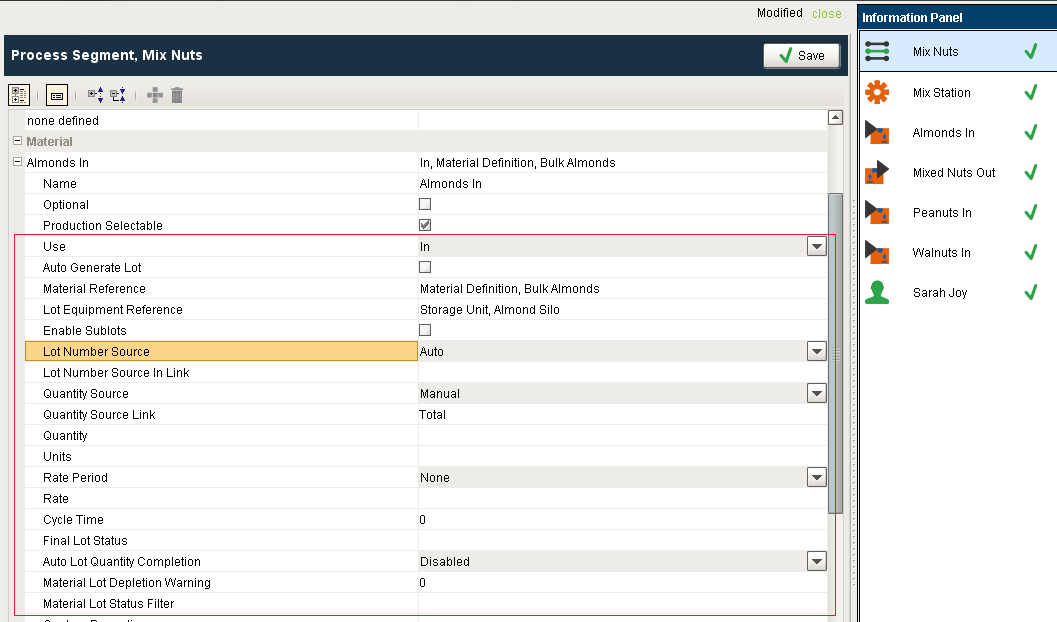
This object is added for every material resource property that is defined in the Operations Segment or Request Segment that the Response Segment is based on. It represents a lot supplying or lot output from the Response Segment. During the life of a Response Segment, multiple lot resource properties may be created for a single material resource property of the Operations Segment. This happens if a lot is changed as may be the case when a raw material tanks is emptied and changed to another tank. When an operation is executed, this object is created to store information about the material used in the operation. It is the related to the Material Resource Property object that defines the material that can be consumed or created by an operation.
Success This object is not derived from the MESAbstractObject. Instead it is derived from the AbstractMESComplexProperty and inherits all the exposed properties, methods and events for that object.

Object Properties

These properties are accessible through the MES Object Editor component and with the provided object functions, but not directly as obj.properties. The setting name is what appears in the MES Object Editor component and the script name is what is used to set or get the value using script.

See AbstractMESComplexProperty for details about accessing values using script. Property values can be accessed and changed for an object by using the getPropertyValue() and setPropertyValue() methods.

Name

Type
Scripting
Description
Lot.Resource.Name String   This is the name to refer to this lot resource by. Many response segments have multiple lot resources and this is a unique name displayed to the operator, shown in analysis and reports, and also internally used to reference this lot resource.
Lot.Reference.UUID String LotRefUUID The UUID of the Material Lot object that this lot resource is linked to.
Lot.Reference.Sequence   LotRefSequence The Material Lot object has a lot sequence property that is incremented every time a new Material Lot is created for a given lot number. This makes it unique as an unchanging lot number flows through a manufacturing facility.
Lot.Number.Source String LotNoSource

This determines the source of the lot number.

Options:
Manual - prompt the operator for the lot number. This is typically used when receiving raw materials or entering a lot number generated by an outside system.

Auto - automatically generated lot number. The internal lot number generator will generate a lot number and assign it automatically. This option can also be used if a different lot number format is used or lot numbers are provided by another system that is integrated with this system.

In Link - In cases where the lot number of output of a segment will be the same as the lot number of one of the inputs of the same segment, this setting will tie the two together. Segments can be configured with multiple material inputs and outputs and different lot number links can be configured.

Lot.Number.Source.Link String LotNoSourceLink If the Lot Number Source setting is set to In Link, then this is the name of the material resource to get the lot number from.
Lot.Manual.Lot.Number String LotManualLotNo The lot number, usually specified by the operator, to use when the new Material Lot object that is associated with this lot resource is created.
Lot.Auto.Generate.Lot boolean  LotAutoGenerate If true, a new lot will be generated for the material output of a segment. This is typically only done when receiving material that a lot doesn't already exists.
Lot.Material Reference.UUID String LotMaterialRefUUID The UUID of the Material Definition to assign to a new Material Lot when the auto generate lot setting is true.
Lot.Begin.Date.Time Date LotBeginDateTime The date and time that this lot resource started.
Lot.End.Date.Time Date  LotEndDateTime The date and time that this lot resource ended.
Lot Use String LotUse

This follows the Use setting of the Process Segment. 

Options
In - is used for material feeding into a segment that will be part of the finished goods.

Out - is used for material feeding out of a segment that is or will be part of the finished goods.

Consumable - is used for material feeding into a segment that is not part of the finished goods.

By-product - is used for material feeding out of a segment that is not part of the finished goods.

 Lot_Equipment_Reference Type String  LotEquipmentRefType  When a Material Lot is not referenced for this lot resource and a new Material Lot created, this setting will define the type of location of the new lot.
 Lot_Equipment_Reference-UUID String  LotEquipmentRefUUID  When a Material Lot is not referenced for this lot resource and a new Material Lot created, this setting is the UUID of the specific location of the new lot.
 Lot_Segment_Reference_UUID String  LotSegmentRefUUID  This is set to the UUID of the Operations Segment that this Response Segment is based on.
 Lot.Allocated.Quantity  Float8  LotAllocatedQuantity  Currently this is here for reference and is included to align with the ISA-95 standard and will become significant in the next phase of the Track and Trace Module.
 Lot Quantity  Float8  LotQuantity  The actual quantity for this lot resource. This can be the current quantity at anytime during the life of a Response Segment, but will equal the final production quantity when this lot resource is finalized.
 Lot.Quantity.Source String  LotQuantitySource  This setting determines the source of the quantity for this material resource.

Options
Available Lot Quantity - This option obtains the total quantity of the lot that is currently available. If multiple segments utilize a material lot, they each requisition a quantity leaving, potentially, some quantity remaining for use - this is the available lot quantity. The available lot quantity setting utilizes all of the available material, leaving none for other processes.

Link - This option allows the quantity to come from an input or output material resource of this segment. This eliminates the need to type in the quantity multiple times if they will always be the same as another material resource.

Manual - The operator will be prompted for the quantity. The quantity must be entered before the segment is ended.

Split - For segments that are splitting a lot into two or more streams, as is the case of separating good from bad product, this option can be used. It is used by having two or more material resources, that are segment outputs, linked to the same material resource. When the segment is ended, the system will ensure that the sum of the quantities of the linking material resources equal that of the linked material resources.

Sublots - The quantity will be automatically set based on the number of Material Sublot items belonging to the Material Lot. If sublots are used, then serial numbers, or other unique identification number, can be assigned to each sublot item.

For example, a Material Lot of batteries may have 25 individual batteries each with a serial number and each with their own test results. The quantity of the Material Lot will match the number of Material Sublot items of the Material Lot. Or, the number of batteries in the lot.

Combine - For segments that are combining two or more lots into one streams, as is the case of joining goods after tests are done to only a portion of a lot, this option can be used. It is used by having two or more material resources, that are segment inputs, linked to the same material resource output. When the segment is ended, the system will sum of the quantities of the linked material resources to that of the linking material resources.

Lot Quantity Source Link  String  LotQuantitySourceLink

 This is used when the Quantity Source setting is set to Link, Split or Combine. If the quantity value of an output material lot will be determined based on the quantity values of an input material lot or lots, the name provided here is used to either LinkSplit or Combine the values (based on the Quantity Source setting).

Lot Quantity Units String LotQuantityUnits  The units for the Lot Quantity value.
Lot Property Status String LotPropertyStatus

The status of the lot resource. The system changes this value through the life cycle of a lot resource property.

Options

Beginning - It is a new lot resource property.

Active - The lot resource is currently active.

Ending - The lot resource is ending and information will be finalized for it.

Complete - The lot resource is complete and is no longer begin used by the Response Segment.

Update_Sublots - The list of associated Material Sublot objects has changed and are being updated.

Lot Final Lot Status String LotFinalLotStatus

When a segment is started, the status of the Material Lots will be set to Active. When the segment is ended or a new lot is used for the material resource, the status will be set to Complete. Optionally, the value of this setting can be used instead of the default Complete. Please note, the Active status while the lot is active cannot be changed.

This is useful for setting a lot to Hold, In Process or anything that can be used to filter lots or sublots.

Lot Enable Sublots boolean LotEnableSublots

If this setting is selected, then sublot support will be enabled for the material resource. If sublots are used, then serial numbers, or other unique identification number, can be assigned to each sublot item.

For example, a Material Lot of batteries may have 25 individual batteries each with a serial number and each with their own test results.

Auto Lot Quantity Completion String MaterialAutoLotCompletion

This setting determines if all the items belonging to the lot are automatically consumed. Options are:

Disabled - Select this if the items in the lot should be used automatically.

Enabled - Select this if the items in the lot should not be used automatically.

Confirm - Set this if the lot quantity needs to be confirmed. This will check if the lot has reached its confirmation threshold or not.

Material Lot Depletion Warning Int4 MaterialLotDepletionWarning Sets the depletion warning in seconds.
Material Lot Status Filter String MaterialLotStatusFilter The material lot status can be set to any custom value here. This can be used to filter which material lots can be selected when this process segment is executed. The Material Lot Status Filter property accepts comma separated lot status values. By default, only lots with a lot status of Complete will be shown in the Material Selector. This can be changed to also include other lot status values such as Active by setting the Material Lot Status Filter to Complete, Active. It can also include user defined values as well.


Object Functions

This object provides the following functions:


getAllocatedQuantity()

Description

Gets the allocated quantity as double.

Syntax

getAllocatedQuantity()

  • Parameters

None

  • Returns

double value - Allocated quantity of the material lot.

  • Scope

All


getAutoGenerateLot()

Description

Gets a boolean indicating whether this response material property will automatically generate lots or not.

Syntax

getAutoGenerateLot()

  • Parameters

None

  • Returns

boolean autoGenerateLot - True, if the autoGenerateLot property is set to true and False otherwise.

  • Scope

All


getAutoLotCompletion()

Description

Gets the value of auto lot completion property associated with this response material property.

Syntax

getAutoLotCompletion()

  • Parameters

None

  • Returns

The value set for the auto lot completion property.

  • Scope

All


getBeginDateTime()

Description

Get the beginning date and time to limit the results to return.

Syntax

getBeginDateTime()

  • Parameters

None

  • Returns

Date beginDateTime - The date and time to filter the results.

  • Scope

All


getCycleTime()

Description

Gets the lot cycle time in seconds.

Syntax

getCycleTime()

  • Parameters

None

  • Returns

Integer value - The lot cycle time in seconds.

  • Scope

All


getDefaultQuantity()

Description

Gets the default quantity of the ResponseMaterial property.

Syntax

getDefaultQuantity()

  • Parameters

None

  • Returns

double value - The default quantity value.

  • Scope

All

 getEnableSublots()

Description

A Boolean indicating whether this response material property will enable sublots or not.

Syntax

getEnableSublots()

  • Parameters

None

  • Returns

boolean enableSublots - True, if sublots are enabled and False otherwise.

  • Scope

All


getEndDateTime()

Description

Get the end date and time to limit the results to return.

Syntax

getEndDateTime()

  • Parameters

None

  • Returns

Date endDateTime - The date and time to filter the results.

  • Scope

All


getEquipmentRef()

Description

Returns the reference of the equipment property.

Syntax

getEquipmentRef()

  • Parameters

None

  • Returns

MES Object Link mesObjectLink - The MESObjectLink representing the equipment.

  • Scope

All


getEquipmentRefProperty()

Description

Gets the equipment reference properties for this response material property.

Syntax

getEquipmentRefProperty()

  • Parameters

None

  • Returns

MESLotEquipmentRefProperty - The equipment reference properties. All those children properties to the MES response material property referring the equipment.

  • Scope

All


getEquipmentRefType()

Description

Gets the reference type of the equipment.

Syntax

getEquipmentRefType()

  • Parameters

None

  • Returns

String equipmentRefType - The type of equipment.

  • Scope

All


getEquipmentRefUUID()

Description

Gets the reference uuid of the equipment.

Syntax

getEquipmentRefUUID()

  • Parameters

None

  • Returns

String equipmentRefUUID - The uuid representing this equipment.

  • Scope

All


getEquipmentVersionRefUUID()

Description

Gets the uuid representing the equipment version.

Syntax

getEquipmentVersionRefUUID()

  • Parameters

None

  • Returns

String versionRefUUID - The uuid to refer the version of equipment.

  • Scope

All


getFinalLotStatus()

Description

Gets the final lot status of the response material.

Syntax

getFinalLotStatus()

  • Parameters

None

  • Returns

String finalLotStatus - The final status of material lot.

  • Scope

All


getLotBeginningQuantity()

Description

Gets the quantity set to begin the lot.

Syntax

getLotBeginningQuantity()

  • Parameters

None

  • Returns

double value - The quantity of material set at the beginning.

  • Scope

All


getLotCycleTime()

Description

Gets the lot cycle time in seconds.

Syntax

getLotCycleTime()

  • Parameters

None

  • Returns

 Integer cycleTime - Lot cycle time for this response material property.

  • Scope

All


getLotDepletionSeconds()

Description

Gets the depletion time of lot in seconds.

Syntax

getLotDepletionSeconds()


  • Parameters

None

  • Returns

Integer lotDepletionSeconds - The depletion time of the lot.

  • Scope

All

 
Description

Gets the warning of lot depletion in seconds.

Syntax

getLotDepletionWarning()


  • Parameters

None

  • Returns

Integer value - The depletion warning in seconds.

  • Scope

All


getLotMessageType()

Description

Gets the message type of the material lot.

Syntax

getLotMessageType()

  • Parameters

None

  • Returns

MESLotMessageTypes lotMessageType - The lot message type.

  • Scope

All


getLotNumberSource()

Description

Gets name of the lot number source.

Syntax

getLotNumberSource()


  • Parameters

None

  • Returns

String lotNoSource - Name of the lot number source.

  • Scope

All

 getLotNumberSourceLink()

Description

Gets the name of the lot number source link.

Syntax

getLotNumberSourceLink()

  • Parameters

None

  • Returns

String lotNoSourceLink - Name of the lot number source link.

  • Scope

All


getLotRate()

Description

Gets the lot rate for this response material property.

Syntax

getLotRate()

  • Parameters

None

  • Returns

double lotRate - The lot rate for this response material property.

  • Scope

All


getLotRatePeriod()

Description

Gets the lot rate period for this response material property.

Syntax

getLotRatePeriod()

  • Parameters

None

  • Returns

String lotRatePeriod - The lot rate period for this response material property.

  • Scope

All


getLotRefSequence()

Description

Gets the sequence number corresponding to the lot.

Syntax

getLotRefSequence()

  • Parameters

None

  • Returns

Integer value - The sequence number associated with the lot.

  • Scope

All


getLotStatusFilter()

Description

Get the custom lot status of results to return.

Syntax

getLotStatusFilter()

  • Parameters

None

  • Returns

String lotStatusFilter - The custom lot status value.

  • Scope

All

 getLotUUID()

Description

Gets the uuid corresponding to this material lot.

Syntax

getLotUUID()

  • Parameters

None

  • Returns

String uuid - The unique identifier for this lot.

  • Scope

All


getManualLotNo()

Description

Gets the manually entered lot number.

Syntax

getManualLotNo()

  • Parameters

None

  • Returns

String manualLotNum - The lot number entered by the user.

  • Scope

All


getMaterialLot()

Description

Gets the material lot associated with this response material property.

Syntax

getMaterialLot()

  • Parameters

None

  • Returns

MESMaterialLot materialLot - The material lot object.

  • Scope

All


getMaterialRef()

Description

Gets the MES object link corresponding to this response material property.

Syntax

getMaterialRef()

  • Parameters

None

  • Returns

MES Object Link mesObjectLink - The object link corresponding to the material.

  • Scope

All


getMaterialRefProperty()

Description

Gets the material reference properties for this response material property.

Syntax

getMaterialRefProperty()

  • Parameters

None

  • Returns

The material reference properties. All those children properties to MES response material property.

  • Scope

All


getMaterialRefType()

Description

Gets the reference type of the material.

Syntax

getMaterialRefType()

  • Parameters

None

  • Returns

String  materialRefType - The type of material reference.

  • Scope

All

 getMaterialRefUUID()

Description

Gets the uuid for the material reference.

Syntax

getMaterialRefUUID()

  • Parameters

None

  • Returns

 String  materialRefUUID - The unique identifier for material reference.

  • Scope

All

 getMaterialVersionRefUUID()

Description

Gets the version reference uuid for the material.

Syntax

getMaterialVersionRefUUID()

  • Parameters

None

  • Returns

String  uuid - The uuid which represent the version of the material.

  • Scope

All

 getQuantity()

Description

Gets the quantity set for the lot.

Syntax

getQuantity()

  • Parameters

None

  • Returns

double quantity - The actual quantity for this lot resource. This can be the current quantity at anytime during the life of a Response Segment, but will equal the final production quantity when this lot resource is finalized.

  • Scope

All


getQuantitySource()

Description

This setting determines the source of the quantity for this response material resource.

Syntax

getQuantitySource()

  • Parameters

None

  • Returns

String quantitySource - The name of the source of quantity.

  • Scope

All

 getQuantitySourceLink()

Description

Gets the name of the material resource to link to this segment. This is used when the Quantity Source setting is set to Link, Split or Combine.

Syntax

getQuantitySourceLink()

  • Parameters

None

  • Returns

String quantitySourceLink - The link to the quantity source.

  • Scope

All

 getQuantityUnits()

Description

Gets the quantity units for this response segment.

Syntax

getQuantityUnits()


  • Parameters

None

  • Returns

String quantityUnits - The units of lot quantity.

  • Scope

All

 getRate()

Description

Gets the lot rate for this response segment.

Syntax

getRate()


  • Parameters

None

  • Returns

double rate - The lot rate set for this response segment object.

  • Scope

All


getRatePeriod()

Description

Gets the material rate period.

Syntax

getRatePeriod()


  • Parameters

None

  • Returns

String ratePeriod - The material rate period.

  • Scope

All

 getReferenceOptions(mesObjectType, searchPattern)

Description

Get a list of the available options for the specified MES reference property specified by the object type and search pattern.

Syntax

getReferenceOptions(mesObjectType, searchPattern)


  • Parameters

MESObjectTypes mesObjectType - The MES object type of the links that represent the options.

String searchPattern - The search pattern to filter the results by. It can contain the * and ? wild card characters. 

  • Returns

A list of MES Object Link objects holding the options that are appropriate for the specified property. The list is returned as a MES List object that is a collection holding MES object links that represent the options.

  • Scope

All


getReferenceOptions(mesObjectType, searchPattern, maxLotReturnCount, lotDescriptionPattern)

Description

Get a list of the available options for the specified MES reference property specified by the parameters.

Syntax

getReferenceOptions(mesObjectType, searchPattern, maxLotReturnCount, lotDescriptionPattern)

  • Parameters

MESObjectTypes mesObjectType - The MES object type of the links that represent the options.

String searchPattern - The search pattern to filter the results by. It can contain the * and ? wild card characters. 

int maxLotReturnCount - The maximum number of lots.

String lotDescriptionPattern - This is a pattern to filter the lot descriptions.

  • Returns

A list of MES Object Link objects holding the options that are appropriate for the specified property. The list is returned as a MES List object that is a collection holding MES object links that represent the options.

  • Scope

All


getSegmentRefUUID()

Description

Gets the reference uuid of response segment.

Syntax

getSegmentRefUUID()


  • Parameters

None

  • Returns

String uuid - The reference uuid for response segment.

  • Scope

All

 getStatus()

Description

Gets the custom lot status.

Syntax

getStatus()


  • Parameters

None

  • Returns

String status - The previously set lot status.

  • Scope

All

 getUnits()

Description

Gets the units set to the quantity settings.

Syntax

getUnits()


  • Parameters

None

  • Returns

String units - The units of quantity.

  • Scope

All


getUse()

Description

Gets the material use types. Options are In, Out, Consumable, By-product.

Syntax

getUse()


  • Parameters

None

  • Returns

String lotUse - The lot use type for response material.

  • Scope

All


getZeroLotThresholdQty()

Description

Gets the value of the zero lot threshold quantity.

Syntax

getZeroLotThresholdQty()


  • Parameters

None

  • Returns

double value - The zero lot threshold quantity value.

  • Scope

All


hasBeginDateTime()

Description

Checks if the start date and time is set.

Syntax

hasBeginDateTime()


  • Parameters

None

  • Returns

boolean time - True, if the date and time to begin is set and False otherwise.

  • Scope

All

 hasEndDateTime()
Description

Checks whether the end date and time is set.

Syntax

hasEndDateTime()


  • Parameters

None

  • Returns

boolean time - True, if the end date and time is set and False otherwise.

  • Scope

All

 hasEquipmentRef()

Description

Checks for the existence of equipment reference.

Syntax

hasEquipmentRef()


  • Parameters

None

  • Returns

boolean True, if there exist any reference to equipment and False otherwise.

  • Scope

All


hasLotRef()

Description

Checks for the existence of lot reference.

Syntax

hasLotRef()


  • Parameters

None

  • Returns

boolean True, if there exist any reference to the lot and False otherwise.

  • Scope

All


hasMaterialRef()

Description

Checks whether there is any reference to the material.

Syntax

hasMaterialRef()


  • Parameters

None

  • Returns

boolean True, if there is material reference and False otherwise.

  • Scope

All


hasQuantity()

Description

Checks whether the quantity is set.

Syntax

hasQuantity()


  • Parameters

None

  • Returns

boolean True, if the quantity is specified for the response segment and False otherwise.

  • Scope

All


hasQuantityUnits()

Description

Checks if the quantity units is set or not.

Syntax

hasQuantityUnits()


  • Parameters

None

  • Returns

boolean True, if there exist a quantity unit setting and False otherwise.

  • Scope

All


hasSegmentRefUUID()

Description

Checks for a segment reference uuid.

Syntax

hasSegmentRefUUID()


  • Parameters

None

  • Returns

boolean True if there is a reference uuid for segment and False otherwise.

  • Scope

All

 isActive()

Description

Checks if the lot is active.

Syntax

isActive()


  • Parameters

None

  • Returns

boolean - True if the lot is active and False if it is inactive.

  • Scope

All


isEquipmentReadyToRun()

Description

Checks if the equipment reference is a valid type and ready to run.

Syntax

isEquipmentReadyToRun()


  • Parameters

None

  • Returns

boolean True if the equipment is ready to run and False otherwise.

  • Scope

All


isMaterialReadyToRun()

Description

Checks if the material reference is a valid type.

Syntax

isMaterialReadyToRun()


  • Parameters

None

  • Returns

boolean True if the material reference type is valid and False otherwise.

  • Scope

All


isOptional()

Description

Returns true if the lot is set as optional.

Syntax

isOptional()


  • Parameters

None

  • Returns

boolean True if the lot is set as optional and False otherwise.

  • Scope

All

 isOutUse()

Description

Checks if the material use type is out.

Syntax

isOutUse()


  • Parameters

None

  • Returns

boolean True if the material use type is out and False otherwise.

  • Scope

All

 isProductionSelectable()

Description

Checks if the material is selectable or not during production.

Syntax

isProductionSelectable()


  • Parameters

None

  • Returns

boolean True if the material is selectable during production and False otherwise.

  • Scope

All


setAllocatedQuantity(allocatedQuantity)

Description

Sets the allocated quantity in double.

Syntax

setAllocatedQuantity(allocatedQuantity)

  • Parameters

double allocatedQuantity - Quantity to allocate the material lot for.

  • Returns

Nothing

  • Scope

All


setAutoGenerateLot(autoGenerateLot)

Description

Sets a boolean indicating whether this response material property will automatically generate lots or not.

Syntax

setAutoGenerateLot(autoGenerateLot)


  • Parameters

boolean autoGenerateLot - True, if the autoGenerateLot property is set to true and False otherwise.

  • Returns

Nothing

  • Scope

All


setAutoLotCompletion(autoLotCompletion)

Description

Sets the value of auto lot completion property associated with this response material property.

Syntax

setAutoLotCompletion(autoLotCompletion)


  • Parameters

String autoLotCompletion - The value to set auto lot completion property for.

  • Returns

Nothing

  • Scope

All


setBeginDateTime(beginDateTime)

Description

Set the beginning date and time to limit the results to return.

Syntax

setBeginDateTime(beginDateTime)


  • Parameters

Date beginDateTime - The date and time to filter the results.

  • Returns

Nothing

  • Scope

All

 setCycleTime(cycleTime)

Description

Sets the lot cycle time in seconds.

Syntax

setCycleTime(cycleTime)


  • Parameters

Sets the lot cycle time in seconds.

  • Returns

Nothing

  • Scope

All


setDefaultQuantity(defaultQuantity)

Description

Sets the default quantity of the ResponseMaterial property.

Syntax

setDefaultQuantity(defaultQuantity)


  • Parameters

double defaultQuantity - The default quantity value.

  • Returns

Nothing

  • Scope

All

 
setEnableSublots(enableSublots)
Description

A boolean indicating whether this response material property will enable sublots or not.

Syntax

setEnableSublots(enableSublots)


  • Parameters

boolean enableSublots - True, if sublots are enabled and False otherwise.

  • Returns

Nothing

  • Scope

All


setEndDateTime(endDateTime)

Description

Set the end date and time to limit the results to return.

Syntax

setEndDateTime(endDateTime)


  • Parameters

Date endDateTime - The date and time to filter the results.

  • Returns

Nothing

  • Scope

All


setEquipmentRef(mesObjectLink)

Description

Sets the reference of the equipment.

Syntax

setEquipmentRef(mesObjectLink)

  • Parameters

MES Object Link mesObjectLink - The MESObjectLink representing the equipment.

  • Returns

Nothing

  • Scope

All


setEquipmentRefType(equipmentRefType)

Description
Sets the reference type of the equipment.
Syntax

setEquipmentRefType(equipmentRefType)


  • Parameters

String equipmentRefType - The type of the equipment.

  • Returns

Nothing

  • Scope

All

 setEquipmentRefUUID(equipmentRefUUID)

Description
Sets the reference uuid of the equipment.
Syntax

setEquipmentRefUUID(equipmentRefUUID)


  • Parameters

String equipmentRefUUID - The uuid representing this equipment.

  • Returns

Nothing

  • Scope

All

 setFinalLotStatus(finalLotStatus)

Description

This is useful for setting a lot to Hold, In Process or anything that can be used to filter lots or sublots. When a segment is started, the status of the Material Lots will be set to Active. When the segment is ended or a new lot is used for the material resource, the status will be set to Complete. Optionally, the value of this setting can be used instead of the default Complete. Please note, the Active status while the lot is active cannot be changed.

Syntax

setFinalLotStatus(finalLotStatus)


  • Parameters

String finalLotStatus - The status to set the lot for.

  • Returns

Nothing

  • Scope

All


setLotCycleTime(cycleTime)

Description

Sets the lot cycle time in seconds for the response material property.

Syntax

setLotCycleTime(cycleTime)


  • Parameters

 Integer cycleTime - Lot cycle time to set the property for.

  • Returns

 Nothing

  • Scope

All

 setLotDepletionSeconds(lotDepletionSeconds)

Description

Sets the depletion time of lot in seconds.

Syntax

setLotDepletionSeconds(lotDepletionSeconds)


  • Parameters

Integer lotDepletionSeconds - The depletion time of the lot.

  • Returns

Nothing

  • Scope

All


setLotDepletionWarning(lotDepletionWarningSeconds)

Description

Sets the warning of lot depletion in seconds.

Syntax

setLotDepletionWarning(lotDepletionWarningSeconds)


  • Parameters

Integer lotDepletionWarningSeconds - The depletion warning in seconds.

  • Returns

 Nothing

  • Scope

All


setLotMessageType(lotMessageType)

Description

Sets the message type of the material lot.

Syntax

setLotMessageType(lotMessageType)


  • Parameters

MESLotMessageTypes lotMessageType - The lot message type.

  • Returns

Nothing

  • Scope

All


setLotNetQuantity(lotNetQuantity)

Description

Sets the lot net quantity at the beginning.

Syntax

setLotNetQuantity(lotNetQuantity)


  • Parameters

double lotNetQuantity - The net quantity in double to set at the beginning.

  • Returns

Nothing

  • Scope

All

 setLotNumberSource(lotNoSource)

Description

Sets name of the lot number source.

Syntax

setLotNumberSource(lotNoSource)


  • Parameters

String lotNoSource - The name of the lot number source.

  • Returns

Nothing

  • Scope

All


setLotNumberSourceLink(lotNoSourceLink)

Description

Sets the name of the lot number source link.

Syntax

setLotNumberSourceLink(lotNoSourceLink)


  • Parameters

String lotNoSourceLink - Name of the lot number source link.

  • Returns

Nothing

  • Scope

All


setLotRate(lotRate)

Description

Sets the lot rate for this response material property.

Syntax

setLotRate(lotRate)


  • Parameters

double lotRate - The lot rate for this response material property.

  • Returns

 Nothing

  • Scope

All


setLotRatePeriod(lotRatePeriod)

Description

Sets the lot rate period for this response material property.

Syntax

setLotRatePeriod(lotRatePeriod)


  • Parameters

 String  lotRatePeriod - The lot rate period for this response material property.

  • Returns

Nothing 

  • Scope

All


setLotRefSequence(refSequence)

Description

Sets the sequence number corresponding to the lot.

Syntax

setLotRefSequence(refSequence)


  • Parameters

Integer refSequence - The sequence number associated with the lot.

  • Returns

Nothing

  • Scope

All


setLotStatusFilter(lotStatusFilter)

Description

Set the custom lot status of results to return.

Syntax

setLotStatusFilter(lotStatusFilter)


  • Parameters

String lotStatusFilter - The custom lot status value.

  • Returns

Nothing

  • Scope

All


setLotUUID(lotUUID)

Description

Sets the uuid corresponding to this material lot.

Syntax

setLotUUID(lotUUID)


  • Parameters

String uuid - The unique identifier for this lot.

  • Returns

Nothing

  • Scope

All


setManualLotNo(manualLotNum)

Description

Sets the manually entered lot number.

Syntax

setManualLotNo(manualLotNum)


  • Parameters

String manualLotNum - The lot number entered by the user.

  • Returns

Nothing

  • Scope

All


setMaterialRef(mesObjectLink)

Description

Sets the MES object link corresponding to this response material property.

Syntax

setMaterialRef(mesObjectLink)


  • Parameters

MES Object Link mesObjectLink - The link corresponding to the material.

  • Returns

Nothing

  • Scope

All


setMaterialRefType(materialRefType)

Description

Sets the reference type of the material.

Syntax

setMaterialRefType(materialRefType)


  • Parameters

String materialRefType - The type of the material reference.

  • Returns

Nothing

  • Scope

All


setMaterialRefUUID(materialRefUUID)

Description

Sets the uuid for the material reference.

Syntax

setMaterialRefUUID(materialRefUUID)


  • Parameters

String  materialRefUUID - The unique identifier for the material reference.

  • Returns

Nothing

  • Scope

All


setOptional(optional)

Description

Set the lot as an optional one.

Syntax

setOptional(optional)


  • Parameters

boolean optional - Set to True if this lot should be optional and False otherwise.

  • Returns

Nothing

  • Scope

All


setProductionSelectable(productionSelectable)

Description

Sets the boolean value for the production selectable property. User can select the production if set to True.

Syntax

setProductionSelectable(productionSelectable)

  • Parameters

boolean productionSelectable - Set to True if you need to enable this property and False otherwise.

  • Returns

Nothing

  • Scope

All


setQuantity(quantity)

Description

Sets the quantity set for the lot.

Syntax

setQuantity(quantity)


  • Parameters

double quantity - The actual quantity for this lot resource. This can be the current quantity at anytime during the life of a Response Segment, but will equal the final production quantity when this lot resource is finalized.

  • Returns

Nothing

  • Scope

All


setQuantitySource(quantitySource)

Description

This setting determines the source of the quantity for this response material resource.

Syntax

setQuantitySource(quantitySource)


  • Parameters

String quantitySource - The name of the source of the quantity.

  • Returns

Nothing

  • Scope

All


setQuantitySourceLink(quantitySourceLink)

Description
Sets the name of the material resource to link to this segment. This is used when the Quantity Source setting is set to Link, Split or Combine.
Syntax

setQuantitySourceLink(quantitySourceLink)


  • Parameters

String quantitySourceLink - The link to the quantity source.

  • Returns

Nothing

  • Scope

All

 setQuantityUnits(quantityUnits)

Description

 This property specifies the units for the quantity setting.

Syntax

setQuantityUnits(quantityUnits)


  • Parameters

String quantityUnits - The units of quantity.

  • Returns

Nothing

  • Scope

All


setRate(rate)

Description

Sets the rate for the response material lot.

Syntax

setRate(rate)


  • Parameters

double rate - The rate to set for.

  • Returns

Nothing

  • Scope

All


setRatePeriod(ratePeriod)

Description

This is used to set the material rate period.

Options

Min - For setting the rate in minutes.

Hour For setting the rate in hours.

Cycle For setting the rate in cycles.

Syntax

setRatePeriod(ratePeriod)


  • Parameters

String ratePeriod - The material rate period.

  • Returns

Nothing

  • Scope

All


setSegmentRefUUID(segmentRefUUID)

Description

Sets a reference uuid for the segment.

Syntax

setSegmentRefUUID(segmentRefUUID)


  • Parameters

String segmentRefUUID - The uuid to set the segment for.

  • Returns

Nothing

  • Scope

All


setStatus(status)

Description

Sets the lot property status for the response material property.

Syntax

setStatus(status)


  • Parameters

String status - The status to set the material property for.

  • Returns

Nothing

  • Scope

All


setUnits(units)

Description

Sets the units for the quantity setting.

Syntax

setUnits(units)


  • Parameters

String units - The units of quantity.

  • Returns

Nothing

  • Scope

All

 setUse(lotUse)

Description

Sets the material use types. Options are In, Out, Consumable, By-product.

Syntax

setUse(lotUse)


  • Parameters

String lotUse - The lot use type for the response material.

  • Returns

Nothing

  • Scope

All


setZeroLotThresholdQty(lotNetQuantity)

Description

Sets the zero lot threshold quantity for the response material lot.

Syntax

setZeroLotThresholdQty(lotNetQuantity)


  • Parameters

double lotNetQuantity - The net quantity to be set to the material lot.

  • Returns

Nothing

  • Scope

All

Sepasoft MES Module Suite