Sepasoft MES Module Suite
Response Segment
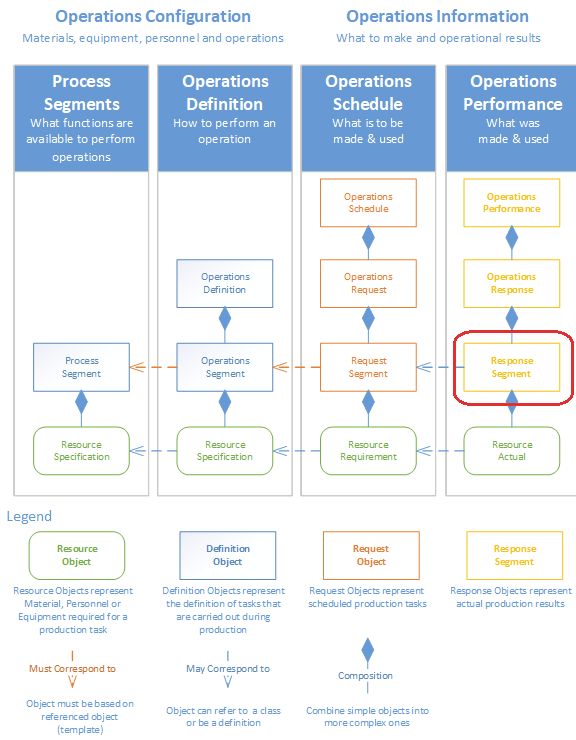
This object is created automatically whenever an Operations Segment or Request Segment is selected to begin or executed. It holds the actual production information that is used for traceability such as material consumed or created, personnel and equipment used. How the object is used is dependent upon how the process segment was defined in terms of what materials are consumed or created, where this operation can run and who can run it.
This object is derived from the AbstractMESObject and inherits all the exposed properties, methods and events for that object.
Object Creation
These script functions can be used to create the Response Segment object:
This method on the Operations Response object can be used to create the Response Segment object:
Use
The following script functions can be used to return this type of object:
The following object methods can be used to return this type of object:
Python |
eqPath = 'Dressings Inc\California\Raw Materials\Unload Station 1' #Get the current operation being run at the equipment oper = system.mes.getCurrentOperation(eqPath) #Get the active segment running under the operation segName = oper.getActiveSegmentName() seg = oper.getActiveSegment(segName) |
Core Properties
These properties are accessible with the provided object functions, but not directly as obj.properties. Property values can be accessed and changed for an object by using the getPropertyValue() and setPropertyValue() method (Refer to the Object Methods below).
|
Name |
Scripting
|
Description
|
| Begin.Date.Time | BeginDateTime | The date and time the operation started. This setting is set when the operation is started, and it will be automatically set to the date and time of the Ignition server. |
| End Date Time | EndDateTime | The date and time the operation ended. This setting is set when the operation is ended, and it will be automatically set to the date and time of the Ignition server. |
| Operation.Segment.Reference.Type | OperationSegmentRefType | This setting is automatically set and should not be changed. It will either be set to Operations Segment or Request Segment depending on how the operation was started. If the operation was scheduled prior to being run, then it will equal Request Segment, otherwise it will equal Operations Segment. |
| Operation.Segment.Reference.UUID | OperationSegmentRefUUID | This setting is automatically set and should not be changed. It refers to the UUID of the Operations Segment or Request Segment, depending on how the operation was started. If the operation was scheduled prior to being run, then it will equal the UUID of the Request Segment it is based on, otherwise it will equal the UUID of the Operations Segment it is based on. |
| Operations.Response.Reference.UUID | OperationsResponseRefUUID | This setting is automatically set and should not be changed. It refers to the UUID of the Operations Response this Response Segment is based on. |
| Running State | RunningState |
This is set by the system and should not be changed. The possible values and their meaning are as follows: OptionsIdle - Segment is not in use. Running - Segment is currently being used. Complete - Segment has completed and is used in the transition from RUNNING to IDLE. Action Needed - Some rectifiable error has occured, immediate action should be taken. Faulted - An unrecoverable error has occurred in the segment. |
Complex Properties
A response segment uses complex property objects to hold information about the resources that were or are being used by the operation. These complex properties are automatically created whenever an operation is started or through scripting with the AbstractMESObject.createComplexProperty() function.
|
Property Object
|
Description
|
|---|---|
|
Response Material Property |
Any material lots that were consumed or created during the operation can be accessed through this object.. |
|
Response Equipment Property |
The equipment that was used during the operation can be accessed through this object.. |
|
Response Supplemental Equipment Property |
Mobile equipment or die sets etc. used during this operation can be accessed through this object. |
|
Response Personnel Property |
Personnel associated with this operation can be accessed through this object. |
|
Response Production Settings Property |
Actual Production settings containing rate information used by the OEE module to calculate operational performance can be accessed through this object. |
| Response Trigger Segment Begin Property | This property holds information about what triggered the start of the operation. |
| Response Trigger Segment End Property | This property holds information about what caused the operation to end. |
Object Methods
- abort()
- addSublot
- addSublot(materialPropertyName, sublotName)
- addSublot(materialPropertyName, sublotName, customProperties)
- addSublots(materialPropertyName, countToAdd)
- begin()
- begin(bypassInventoryCheck)
- begin(date)
- begin(date, bypassInventoryCheck)
- changeLot(lotPropertyName)
- end()
- endWait()
- end(date)
- endWait(date)
- execute()
- execute(date)
- getAvailableMaterialLots(materialPropertyName, equipmentPathFilter)
- getEquipmentLink()
- getEquipmentProperty()
- getLot(lotPropertyName)
- getMaterialLot(materialPropertyName)
- getPerson(personnelPropertyName)
- getProductionSettingsProperty(equipmentPath)
- getSubLot(materialPropertyName, sublotName)
- getSupplementalEquipment(supplementalEquipmentPropertyName)
- removeSublot(materialPropertyName, sublotName)
- renameSublot(materialPropertyName, existingSublotName, newSublotName)
- setMaterial(materialPropertyName, quantity)
- setMaterial(materialPropertyName, quantity)
- setMaterial(materialPropertyName, lotNumber)
- setMaterial(materialPropertyName, lotNumber, quantity)
- setMaterial(materialPropertyName, lotNumber, lotSequenceNumber, quantity)
- setMaterial(materialPropertyName, lotNumber, lotSequenceNumber, quantity, customProperties)
- setMaterial(materialPropertyName, materialName, equipmentPath, quantity)
- setMaterial(materialPropertyName, materialName, equipmentPath, quantity, customProperties)
- setMaterial(materialPropertyName, materialName, equipmentPath, manualLotNumber, quantity)
- setMaterial(materialPropertyName, materialName, equipmentPath, manualLotNumber, quantity, customProperties)
- setMaterialByPassChecks(baseName, lotNumber)
- setPersonnel(personnelPropertyName, personName)
- setSupplementalEquipment(supplementalEquipmentPropertyName, equipmentName, customProperties)
- update()
abort()
IMPORTANT
Only use this function if you want to delete all history of this run happening.
Abort the segment. This will do an abrupt abort of the segments . The system will view this run as if it never happened. The operation the segment is running under and all other segments running under the operation will remain active.
Notice
This helper function should NOT be used in normal operations because the tracking data will not be validated or in many cases accurately recorded in the database.
For normal operations use the end segment, which will be accurately recorded in the database.
abort()
- Parameters
None
- Returns
Nothing
- Scope
All
addSublot
Usually, when production details are maintained for serialized items moving through production as groups, sublots are used. In cases where each item moves independently through production, then just material lots can be used for each serialized item.
Sublots may be added to a MaterialLot object that has been created by an active response segment. The different versions of the addSublot() function provide overloaded methods to do this. Sublots are represented by MaterialSublot objects which corresponds to the ISA-95 Material Sublot objects. MaterialSublot objects must be children of a MaterialLot object.
Notice
In order for material sublots to be added, the Enable Sublots setting of the segment material property must be set to true.
addSublot(materialPropertyName, sublotName)
addSublot(materialPropertyName, sublotName)
- Parameters
String materialPropertyName - The name of the material property item as defined for the segment.
String sublotName - The name of the sublot which is usually the serial number of the item.
- Returns
MESMaterialSublot - A new MESMaterialSublot object.
- Scope
All
Python |
#Create a new segment seg = system.mes.createSegment('Load Assembly Tray', 'Dressings Inc\California\Assembly\PS Assembly', False) #Assign the material resources seg.setMaterial('Housing', 'Housing', 'Assembly Tray 8') #Begin the segment seg.begin() #Because the reference to the segment is different than the one at the Ignition gateway after begin was executed, refresh it. seg = system.mes.getActiveSegment('[global]\Dressings Inc\California\Assembly\PS Assembly', 'Load Assembly Tray') #Create new sublots seg.addSublot('Housing', 'SN 1234') seg.addSublot('Housing', 'SN 2345') seg.update() |
addSublot(materialPropertyName, sublotName, customProperties)
This version of the addSublot script function functions the same as the addSublot(materialPropertyName, sublotName) script function above with the added support to assign new custom properties to the new material sublot at the same time.
addSublot(materialPropertyName, sublotName, customProperties)
- Parameters
String materialPropertyName - The name of the material property item as defined for the segment.
String sublotName - The name of the sublot which is usually the serial number of the item.
PyDictionary customProperties - A PyDictionary containing either name value pairs or complete custom property definitions. See Custom Properties for more information.
- Returns
MESMaterialSublot - A new MESMaterialSublot object.
- Scope
All
Python |
#Create a new segment seg = system.mes.createSegment('Load Assembly Tray', 'Dressings Inc\California\Assembly\PS Assembly', False) #Assign the material resources seg.setMaterial('Housing', 'Housing', 'Assembly Tray 8') #Begin the segment seg.begin() #Because the reference to the segment is different than the one at the Ignition gateway after begin was executed, refresh it. seg = system.mes.getActiveSegment('Dressings Inc\California\Assembly\PS Assembly', 'Load Assembly Tray') #Create new sublot #Add custom properties #Custom property definition format: {custom_property_name: [ignition_data_type, value, description, units, production_visible, required} cp = {'Width' : ['Int4', 1020, 'Width of housing', 'mm', True, True], 'Height' : ['Int4', 800, 'Height of housing', 'mm', True, True]} seg.addSublot('Housing', 'SN 1234', cp) #Create second sublot with different custom property values cp = {'Width' : ['Int4', 1025, 'Width of housing', 'mm', True, True], 'Height' : ['Int4', 790, 'Height of housing', 'mm', True, True]} seg.addSublot('Housing', 'SN 2345', cp) seg.update() |
addSublots(materialPropertyName, countToAdd)
These script functions are used to add multiple sublots to active segments and the different versions provide various methods to do so. Sublots are represented by MESMaterialSublot objects which corresponds to the ISA-95 Material Sublot objects. MESMaterialSublot objects must be children of a MESMaterialLot object, event though the lot information may not be needed. Usually, when production details are maintained for serialized items moving through production as groups, sublots are used. In cases where each item moves independently through production, then just material lots can be used for each serialized item.
Notice
In order for material sublots to be added, the Enable Sublots setting of the segment material property must be set to true.
This version of the addSublots script function is used to create a specified quantity of new material sublots. For each sublot object created, the CreateSerialNumber event of the MaterialSublot object will be executed and a serial number will automatically be assigned. This serial number, which is the name of the MaterialSublot object, can be changed prior updating the segment.
addSublots(materialPropertyName, countToAdd)
- Parameters
String materialPropertyName - The name of the material property item as defined for the segment.
Integer countToAdd - The number of sub lots to add.
- Returns
List<MESMaterialSublot> - A list of new MESMaterialSublot objects. The size of the list will match the countToAdd parameter.
- Scope
All
Python |
#Create a new segment seg = system.mes.createSegment('Load Assembly Tray', 'Dressings Inc\California\Assembly\PS Assembly', False) #Assign the material resources seg.setMaterial('Housing', 'Housing', 'Assembly Tray 8') #Begin the segment seg.begin() #Because the reference to the segment is different than the one at the Ignition gateway after begin was executed, refresh it. seg = system.mes.getActiveSegment('Dressings Inc\California\Assembly\PS Assembly', 'Load Assembly Tray') #Create new sublots sublotList = seg.addSublots('Housing', 5) for index in range(sublotList.size()): #Print the automatically generated serial number print sublotList.get(index).getName() seg.update() |
begin()
Begin the segment (record the including material, equipment, personnel, for the current process).
begin()
- Parameters
None
- Returns
MESResponseSegment seg - Returns the updated segment object.
- Scope
All
Python |
eqPath = 'Dressings Inc\California\Raw Materials\Unload Station 1' ##Create a new Response Segment at the specified equipment path. ##Note that this creates an Operations Response in the background. seg = system.mes.createSegment(eqPath, 'Inspect Steel', 0) #Assign material resources.... #Assign personnel resources.... #Assign supplemental resources.... #Assign custom properties.... ##Begin segment seg = seg.begin() |
begin(bypassInventoryCheck)
Begin the segment. Provides option to skip checking materials before beginning the segment.
begin(bypassInventoryCheck)
- Parameters
boolean bypassInventoryCheck - Set to True if you want to skip checking of materials before the begin segment and False otherwise.
- Returns
MESResponseSegment seg - Returns the updated segment.
- Scope
All
begin(date)
Begin the segment at a specified date.
begin(date)
- Parameters
Date date - The date to begin the segment.
- Returns
MESResponseSegment seg - Returns the updated segment object.
- Scope
All
Python |
eqPath = 'Your Enterprise\New Site\Receiving\Milk Unloading' matLocation = 'Your Enterprise\New Site\Receiving\Receiving Tanks\Whole Milk Tank 2' seg = system.mes.createSegment('Test Date Operation', eqPath, True) seg.setMaterial('Material In', 'Whole Milk', matLocation, 'Lot 23', 200.0) ## ... must set any other required segment properties before begin is called ... ## Begins the segment and sets all properties to the given date and time instead of the current date time from java.util import Calendar cal = Calendar.getInstance() ## set date to Dec 4, 2016 1:35pm ## Jan=0...Dec=11 cal.set(2016, 11, 4, 13, 35, 00) dateTime = cal.getTime() seg = seg.begin(dateTime) |
begin(date, bypassInventoryCheck)
Begin the segment at a specified date. Provides option to skip checking of materials before beginning the segment.
begin(date, bypassInventoryCheck)
- Parameters
Date date - The date to begin operation.
Boolean bypassInventoryCheck - Set to True if you want to skip checking of materials before the begin operation and False otherwise.
- Returns
MESResponseSegment seg - Returns the updated segment.
- Scope
All
changeLot(lotPropertyName)
Changes the lot to a new lot property. For example, the operation is putting output into Storage Bin 1, and now Storage Bin 1 is full and it is still working on the same segment. The lot can be changed to start outputting into Storage Bin 2.
changeLot(lotPropertyName)
- Parameters
String lotPropertyName - Name of the lot property to be changed.
- Returns
MESResponseMaterialProperty newLotProp - The new lot property.
- Scope
All
Python |
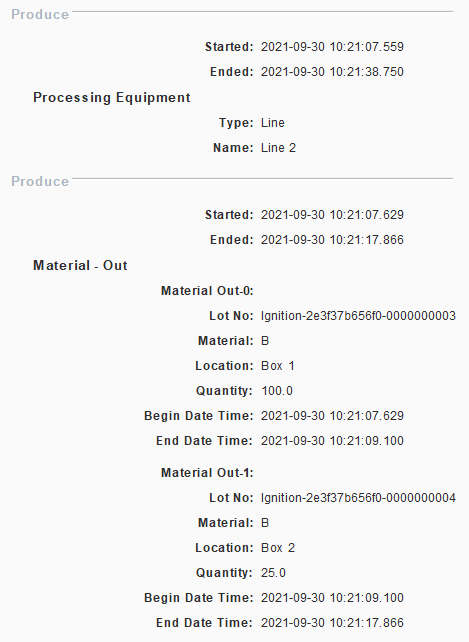
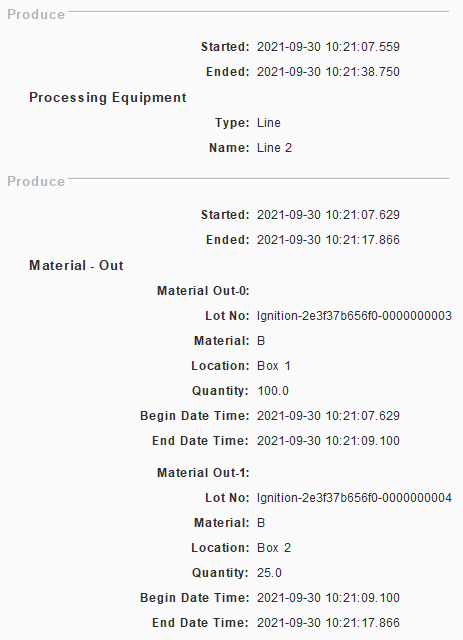
import time eq_path = 'Enterprise\Site 2\Area 1\Line 2' seg_name = 'Produce' material_name = 'B' material_prop_name = 'Material Out' equipment1 = 'Box 1' equipment2 = 'Box 2' # Create the segment resp = system.mes.createSegment(seg_name, eq_path, True) # Set the first lot and begin resp.setMaterial(material_prop_name, material_name, equipment1, 100) resp = resp.begin() # Wait time.sleep(1) # Time to change to the next lot, this marks the current lot as complete resp.changeLot(material_prop_name) resp.setMaterial(material_prop_name, material_name, equipment2, 25) # Update the segment resp = resp.update() # Finish resp.end() |
end()
End an active segment.
end()
- Parameters
None
- Returns
MESResponseSegment seg - The ended segment object is returned.
- Scope
All
Python |
eqPath = 'Dressings Inc\California\Raw Materials\Unload Station 1' #Get the current operation being run at the equipment oper = system.mes.getCurrentOperation(eqPath) #Get the active segment running under the operation segName = oper.getActiveSegmentName() seg = oper.getActiveSegment(segName) #End the segment seg=seg.end() |
endWait()
End an active segment. Will not return control to the calling script until the segment has ended (if segment doesn't end within 15 seconds, an exception will be returned).
endWait()
- Parameters
None
- Returns
MESResponseSegment seg - The ended segment object is returned.
- Scope
All
Python |
eqPath = 'Dressings Inc\California\Raw Materials\Unload Station 1' #Get the current operation being run at the equipment oper = system.mes.getCurrentOperation(eqPath) #Get the active segment running under the operation segName = oper.getActiveSegmentName() seg = oper.getActiveSegment(segName) #End the segment. Will not return control to the calling script until the segment has ended. seg=seg.endWait() |
end(date)
End an active segment at a specified date.
end(date)
- Parameters
Date date - The date to end the segment.
- Returns
MESResponseSegment seg - The ended segment object is returned.
- Scope
All
Python |
eqPath = 'Dressings Inc\California\Raw Materials\Unload Station 1' #Get the current operation being run at the equipment oper = system.mes.getCurrentOperation(eqPath) #Get the active segment running under the operation segName = oper.getActiveSegmentName() seg = oper.getActiveSegment(segName) #Sets all properties to the given date and time instead of the current date and time from java.util import Calendar cal = Calendar.getInstance() # set date to Dec 4, 2016 1:35pm cal.set(2016, 11, 4, 13, 35, 05)## Jan=0...Dec=11 dateTime = cal.getTime() #End the segment seg = seg.end(dateTime) |
endWait(date)
End an active segment at a specified date. Will not return control to the calling script until the segment has ended (if segment doesn't end within 15 seconds, an exception will be returned).
endWait(date)
- Parameters
Date date - The date to end the segment.
- Returns
MESResponseSegment seg - The ended segment object is returned.
- Scope
All
Python |
eqPath = 'Dressings Inc\California\Raw Materials\Unload Station 1' #Get the current operation being run at the equipment oper = system.mes.getCurrentOperation(eqPath) #Get the active segment running under the operation segName = oper.getActiveSegmentName() seg = oper.getActiveSegment(segName) #Sets all properties to the given date and time instead of the current date and time from java.util import Calendar cal = Calendar.getInstance() # set date to Dec 4, 2016 1:35pm cal.set(2016, 11, 4, 13, 35, 00)## Jan=0...Dec=11 dateTime = cal.getTime() #End the segment. Will not return control to the calling script until the segment has ended. seg = seg.endWait(dateTime) |
execute()
Execute a segment. For situations where a production task or event is happening at once, with no distinct begin and end times, the execute script function will begin and end a segment in one step. After the execute script function is called on a segment, the segment will be left in the inactive state and no further updates can be made.
execute()
- Parameters
None
- Returns
MESResponseSegment object
- Scope
All
execute(date)
Execute a segment at a specific time in the past. For situations where a production task or event happens in the past and needs to be recorded as one transaction without distinct begin and end times, this version of the execute script function will begin and end a segment in one step. After the execute script function is called on a segment, the segment will be left in the inactive state and no further updates may be made.
execute(date)
- Parameters
Date date - The date (in the past) to apply to the response segment as the timestamp for execution.
- Returns
Nothing
- Scope
All
getAvailableMaterialLots(materialPropertyName, equipmentPathFilter)
Gets the material lots which are currently available.
getAvailableMaterialLots(materialPropertyName, equipmentPathFilter)
- Parameters
String materialPropertyName - The name of the material property item as defined for the segment.
String equipmentPathFilter - Equipment path to filter results.
- Returns
MESList<MESObjectLink> - A list of MESObjectLink containing lot number or lot sequence number of available material lots.
- Scope
All
Python |
eqPath = 'Nuts Unlimited\Folsom\Receiving\Nut Unloading' #Create an operation oper = system.mes.createOperation('Unload Nuts', eqPath) oper.begin() #Create a segment seg = oper.createSegment('Unload Nuts') seg.setMaterial('Received Nuts', 'Bulk Almonds', 'Nuts Unlimited\Folsom\Receiving\Nut Storage Silos\Almond Silo') #Gets the available material lots availLot = seg.getAvailableMaterialLots('Received Nuts', 'Nuts Unlimited\Folsom\Receiving\Nut Storage Silos\Almond Silo') #Returns the lot number of the available material lot for ndx in range(availLot.size()): availLotNumber = availLot.get(ndx) print availLotNumber |
OperationsResponse (3b7d2e8d-ca90-4e8f-9682-c364fd2ec991, Unload Nuts, 0 parents, 0 children, 0 custom properties, 1 complex properties)
A 2234
|
getEquipmentLink()
Return the link to the equipment MES object associated with the segment. This will be the same equipment that is associated with the operation that the segment is running under.
getEquipmentLink()
- Parameters
None
- Returns
A MES Object Link object containing details of the equipment that is associated with the segment.
- Scope
All
Python |
eqPath = 'Dressings Inc\California\Raw Materials\Unload Station 1' #Get the current operation being run at the equipment oper = system.mes.getCurrentOperation(eqPath) #Get the active segment running under the operation segName = oper.getActiveSegmentName() seg = oper.getActiveSegment(segName) #Get the MES object link of where the operation is running eqLink = seg.getEquipmentLink() #Print the UUID and the type of equipment print eqLink.getMESObjectUUID() print eqLink.getMESObjectType() #Get the full MES object for the equipment eqObj = eqLink.getMESObject() print eqObj.getName() |
508ebebc-8f19-4521-b018-a3e177028981
Response Line
Unload Station 1
|
getEquipmentProperty()
Return the complex property of the equipment MES object associated with the segment. This will be the same equipment that is associated with the operation that the segment is running under.
getEquipmentProperty()
- Parameters
None
- Returns
The MESEquipmentProperty representing the equipment.
- Scope
All
getLot(lotPropertyName)
Returns the response material object corresponding to the given name parameter.
getLot(lotPropertyName)
- Parameters
String lotPropertyName - The property associated with the lot to return for.
- Returns
MESResponseMaterialProperty - The name of the response material object corresponding to the given lotPropertyName parameter.
- Scope
All
Python |
path = 'Enterprise\Site 1\Area 1\Line 1' seg = system.mes.getActiveSegment(path, 'Test Segment') lot = seg.getLot('Material Out') print lot.getQuantity() |
ResponseSegment (62772673-fddc-4b01-9437-23a8ff1248a8, Test Segment, 0 parents, 0 children, 0 custom properties, 7 complex properties)
50.0
getMaterialLot(materialPropertyName)
Return the material lot MES object associated the specified material property of a segment. Material lots is represented by MESMaterialLot objects and correspond to ISA-95 Material Lot objects. MESMaterialLot objects are automatically created by the Sepasoft MES system when segments are began, updated, executed or ended. In cases where additional information is attached to the material lot, this script function provides an easy method of getting the actual MESMaterialLot object.
getMaterialLot(materialPropertyName)
- Parameters
String materialPropertyName - The name of the material property item as defined for the segment.
- Returns
A MESMaterialLot object that is associated with the specified material property for segment.
- Scope
All
Python |
""" Execute segment and save the response segment that it returns Retrieve the created lot from the response segment Set lot status to active Save changes to lot """ response = segment.execute() material_lot = response.getMaterialLot('name_of_material_property_item') material_lot.setPropertyValue('LotStatus','Active') system.mes.saveMESObject(material_lot) |
getPerson(personnelPropertyName)
Return the person MES object associated with the specified personnel property of a segment. People is represented by MESPerson objects and correspond to ISA-95 Person objects. The MESResponsePerson object isolates changes made to a MESPerson object and production history. In cases where additional information is attached the the person, this script function provides an easy method of getting the actual MESResponsePerson object.
getPerson(personnelPropertyName)
- Parameters
String personnelPropertyName - The name of the personnel property item as defined for the segment.
- Returns
A MESResponsePerson object that is associated with the specified personnel property for segment.
- Scope
All
Python |
eqPath = 'Dressings Inc\California\Raw Materials\Unload Station 1' #Get the current operation being run at the equipment oper = system.mes.getCurrentOperation(eqPath) #Get the active segment running under the operation segName = oper.getActiveSegmentName() seg = oper.getActiveSegment(segName) #Get the material lot object associated with the Housing material property of the segment person = seg.getPerson('Inspector') #Add custom properties to the person object #Custom property definition format: {custom_property_name: [ignition_data_type, value, description, units, production_visible, required} cp = {'Backup' : True} person.setCustomPropertyValues(cp) #Remember to save the material lot object system.mes.saveMESObject(person) |
getProductionSettingsProperty(equipmentPath)
Returns the production settings property.
getProductionSettingsProperty(equipmentPath)
- Parameters
String equipmentPath - The path of equipment to return the production settings for.
- Returns
MESResponseProductionSettingsProperty productionSettings - The production settings corresponding to the specified equipment path.
- Scope
All
Python |
eqPath = 'Enterprise\Site\Area\Line 4' operSeg = system.mes.loadMESObject('Basil-Enterprise:Site:Area:Line 4', 'OperationsSegment') rspSeg = system.mes.createSegment(operSeg, eqPath) print type(rspSeg) prop = rspSeg.getProductionSettingsProperty(eqPath) print prop.getOEERate() |
getSubLot(materialPropertyName, sublotName)
Get an existing sublot that is associated with a segment. Sublots are represented by MESMaterialSublot objects and correspond to the ISA-95 Material Sublot objects.
getSublot(materialPropertyName, sublotName)
- Parameters
String materialPropertyName - The name of the material property item as defined for the segment.
String sublotName - The name of an existing sublot to return.
- Returns
MESMaterialSublot - The MESMaterialSublot object.
- Scope
All
Python |
eqPath = 'Dressings Inc\California\Raw Materials\Unload Station 1' #Get the current operation being run at the equipment oper = system.mes.getCurrentOperation(eqPath) #Get the active segment running under the operation segName = oper.getActiveSegmentName() seg = oper.getActiveSegment(segName) #Get the sublot with serial number SN1823 sublot = seg.getSublot('Housing', 'SN1823') #Do something with the sublot sublot.setPropertyValue('Width', '1002') #Don't forget to save the changes to the sublot system.mes.saveMESObject(sublot) |
getSupplementalEquipment(supplementalEquipmentPropertyName)
Return the supplemental equipment MES object associated with the specified supplemental equipment property of a segment. Supplemental equipment is represented by MESEquipment objects and correspond to ISA-95 Equipment objects. The MESResponseEquipment object isolates changes made to a MESEquipment object and production history. In cases where additional information is attached to the supplemental, this script function provides an easy method of getting the actual MESResponseEquipment object.
getSupplementalEquipment(supplementalEquipmentPropertyName)
- Parameters
String supplementalEquipmentPropertyName - The name of the supplemental equipment property item as defined for the segment.
- Returns
MESResponseEquipment - A MESResponseEquipment object that is associated with the specified supplemental equipment property for segment.
- Scope
All
Python |
eqPath = 'Dressings Inc\California\Raw Materials\Unload Station 1' #Get the current operation being run at the equipment oper = system.mes.getCurrentOperation(eqPath) #Get the active segment running under the operation segName = oper.getActiveSegmentName() seg = oper.getActiveSegment(segName) #Get the supplemental equipment object with property name "Die" as configured for the segment supEq = seg.getSupplementalEquipment('Die') #Add custom properties to the supplemental equipment object #Custom property definition format: {custom_property_name: [ignition_data_type, value, description, units, production_visible, required} cp = {'Wear' : 12} supEq.setCustomPropertyValues(cp) #Remember to save the material lot object system.mes.saveMESObject(supEq) |
removeSublot(materialPropertyName, sublotName)
Remove an existing sublot that is associated with a segment. Sublots are represented by MESMaterialSublot objects and correspond to the ISA-95 Material Sublot objects.
removeSublot(materialPropertyName, sublotName)
- Parameters
String materialPropertyName - The name of the material property item as defined for the segment.
String sublotName - The name of an existing sublot to remove.
- Returns
The MESMaterialSublot object that was removed.
- Scope
All
Python |
eqPath = 'Dressings Inc\California\Raw Materials\Unload Station 1' #Get the current operation being run at the equipment oper = system.mes.getCurrentOperation(eqPath) #Get the active segment running under the operation segName = oper.getActiveSegmentName() seg = oper.getActiveSegment(segName) #Remove the sublot with serial number SN1823 seg.removeSublot('Housing', 'SN1823') |
renameSublot(materialPropertyName, existingSublotName, newSublotName)
Rename an existing sublot that is associated with a segment. Sublots are represented by MESMaterialSublot objects and correspond to the ISA-95 Material Sublot objects.
renameSublot(materialPropertyName, existingSublotName, newSublotName)
- Parameters
String materialPropertyName - The name of the material property item as defined for the segment.
String existingSublotName - The existing name of the sublot, which is usually the serial number of the item, to rename.
String newSublotName - The new name for the sublot.
- Returns
The MESMaterialSublot object that was renamed.
- Scope
All
Python |
eqPath = 'Dressings Inc\California\Raw Materials\Unload Station 1' #Get the current operation being run at the equipment oper = system.mes.getCurrentOperation(eqPath) #Get the active segment running under the operation segName = oper.getActiveSegmentName() seg = oper.getActiveSegment(segName) #Change the sublot serial number from SN9823 to SN1823 seg.renameSublot('Housing', 'SN9823', 'SN1823') |
setMaterial(materialPropertyName, quantity)
These script functions are used to set the material resources for a segment. There are different versions depending on if a lot is being referenced, a new lot is being created, etc. These script functions can be used before or after the begin script function is called on the segment. If they are used for an active segment, then they will update the material resources information. This is common when changing to a different lot of material or other material related information during a production run.
Existing Lot (Auto Generate Lot = False)
setMaterial(materialPropertyName, quantity)
This version of the setMaterial script function is used for setting just the quantity for a material reference belonging to a segment. If the lot or material have already been assigned, then this provides a method to update the quantity.
setMaterial(materialPropertyName, quantity)
- Parameters
String materialPropertyName - The name of the material property item as defined for the segment.
Double quantity - The quantity of material.
- Returns
Nothing
- Scope
All
Python |
eqPath = 'Dressings Inc\California\Raw Materials\Unload Station 1' #Create and begin a new operation at the specified equipment path oper = system.mes.createOperation('Receive Steel', eqPath) oper.begin() #Create new segment seg = oper.createSegment('Inspect Steel') #Assign material resources.... seg.setMaterial('In Steel Type', 1045) #Begin segment seg.begin() |
setMaterial(materialPropertyName, lotNumber)
This version of the setMaterial script function is used for setting the lot number for a material reference belonging to a segment. The material lot must already exist for the lot number at the equipment location as defined in the material reference. If the lot has already been assigned, then this provides a method to change the lot.
setMaterial(materialPropertyName, lotNumber)
- Parameters
String materialPropertyName - The name of the material property item as defined for the segment.
String lotNumber - The lot number that must match the name of an existing MESMaterialLot object.
- Returns
Nothing
- Scope
All
Python |
eqPath = 'Dressings Inc\California\Raw Materials\Unload Station 1' #Create and begin a new operation at the specified equipment path oper = system.mes.createOperation('Receive Steel', eqPath) oper.begin() #Create new segment seg = oper.createSegment('Inspect Steel') #Assign material resources.... seg.setMaterial('In Steel Type', 'SL1285') #Begin segment seg.begin() |
setMaterial(materialPropertyName, lotNumber, quantity)
This version of the setMaterial script function is used for setting the lot number and quantity for a material reference belonging to a segment. The material lot must already exist for the lot number at the equipment location as defined in the material reference. If the lot has already been assigned, then this provides a method to change the lot and update the quantity at the same time.
setMaterial(materialPropertyName, lotNumber, quantity)
- Parameters
String materialPropertyName - The name of the material property item as defined for the segment.
String lotNumber - The lot number that must match the name of an existing MESMaterialLot object.
Double quantity - The quantity of material.
- Returns
Nothing
- Scope
All
Python |
eqPath = 'Dressings Inc\California\Raw Materials\Unload Station 1' #Create and begin a new operation at the specified equipment path oper = system.mes.createOperation('Receive Steel', eqPath) oper.begin() #Create new segment seg = oper.createSegment('Inspect Steel') #Assign material resources.... seg.setMaterial('In Steel Type', 'SL1285', 1000.0) #Begin segment seg.begin() |
setMaterial(materialPropertyName, lotNumber, lotSequenceNumber, quantity)
This version of the setMaterial script function is used for setting the lot number with a lot sequence number and quantity for a material reference belonging to a segment. The material lot and lot sequence number combination must already exist for the lot number at the equipment location as defined in the material reference. If the lot has already been assigned, then this provides a method to change the lot and update the quantity at the same time.
Material lots are represented by MESMaterialLot objects which corresponds to the ISA-95 Material Lot objects. Because more that one MESMaterialLot object can existing for a given lot number, each one is assigned a unique lot sequence number making it unique. Normally this is not required provided that only one lot number (MESMaterialLot object) exists at an equipment locations. If more than one MESMaterialLot object with the same lot number exists at an equipment location, then the lot sequence number can be used to specify which one to use. If more than one do exist and the lot sequence number is not specified, then the one used is determined by the Lot Handling Mode the equipment location is configured for.
setMaterial(materialPropertyName, lotNumber, lotSequenceNumber, quantity)
- Parameters
String materialPropertyName - The name of the material property item as defined for the segment.
String lotNumber - The lot number that must match the name of an existing MESMaterialLot object.
Integer lotSequenceNumber - The lot sequence number of the desired existing MESMaterialLot object. If it is less than zero, then the lot holding the maximum value is returned and if the same lot number is used for multiple segments, each lot with the same lot number will be assigned a different lot sequence number. It could be obtained by using getLotSequence() script function. For more details see MES Lot Quantity Summary Item.
Double quantity - The quantity of material.
- Returns
Nothing
- Scope
All
Python |
eqPath = 'Dressings Inc\California\Raw Materials\Unload Station 1' #Create and begin a new operation at the specified equipment path oper = system.mes.createOperation('Receive Steel', eqPath) oper.begin() #Create new segment seg = oper.createSegment('Inspect Steel') #Get the lot sequence number. equipLotSummary = system.mes.getLotInventoryByEquipment('My Enterprise\California\Storage\Vinegar Tanks\Vinegar Tank 1') for lotSummary in equipLotSummary: lotSeq = lotSummary.getLotSequence() #Assign material resources.... seg.setMaterial('In Steel Type', 'SL1285', lotSeq, 1000.0) #Begin segment seg.begin() |
setMaterial(materialPropertyName, lotNumber, lotSequenceNumber, quantity, customProperties)
This version of the setMaterial script function functions the same as the setMaterial(materialPropertyName, lotNumber, lotSequenceNumber, quantity) script function above with the added support to assign custom properties for the material resource reference at the same time.
setMaterial(materialPropertyName, lotNumber, lotSequenceNumber, quantity, customProperties)
- Parameters
String materialPropertyName - The name of the material property item as defined for the segment.
String lotNumber - The lot number that must match the name of an existing MESMaterialLot object.
Integer lotSequenceNumber - The lot sequence number of the desired existing MESMaterialLot object. If it is less than zero, then the lot holding the maximum value is returned and if the same lot number is used for multiple segments, each lot with the same lot number will be assigned a different lot sequence number. It could be obtained by using getLotSequence() script function. For more details see MES Lot Quantity Summary Item .
Double quantity - The quantity of material.
PyDictionary customProperties - A PyDictionary containing either name value pairs or complete custom property definitions.
- Returns
Nothing
- Scope
All
Python |
eqPath = 'Dressings Inc\California\Raw Materials\Unload Station 1' #Create and begin a new operation at the specified equipment path oper = system.mes.createOperation('Receive Steel', eqPath) oper.begin() #Create new segment seg = oper.createSegment('Inspect Steel') #Get the lot sequence number equipLotSummary = system.mes.getLotInventoryByEquipment('My Enterprise\California\Storage\Vinegar Tanks\Vinegar Tank 1') for lotSummary in equipLotSummary: lotSeq = lotSummary.getLotSequence() #Assign material resources.... #Assign values to existing custom properties cp = {'Thickness' : 5.5} seg.setMaterial('In Steel Type', 'SL1285', lotSeq, 1000.0, cp) #Begin segment seg.begin() |
eqPath = 'Dressings Inc\\California\\Raw Materials\\Unload Station 1'
#Create and begin a new operation at the specified equipment path
oper = system.mes.createOperation('Receive Steel', eqPath)
oper.begin()
#Create new segment
seg = oper.createSegment('Inspect Steel')
#Get the lot sequence number
equipLotSummary = system.mes.getLotInventoryByEquipment('My Enterprise\\California\\Storage\\Vinegar Tanks\\Vinegar Tank 1')
for lotSummary in equipLotSummary:
lotSeq = lotSummary.getLotSequence()
#Assign material resources....
#Add custom properties
#Custom property definition format: {custom_property_name: [ignition_data_type, value, description, units, production_visible, required}
cp = {'Thickness' : ['Float8', 5.5, 'Thickness of steel', '1/1000th', True, True]}
seg.setMaterial('In Steel Type', 'SL1285', lotSeq, 1000.0, cp)
#Begin segment
seg.begin()
|
Non-existent Lot (Auto Generate Lot = True)
setMaterial(materialPropertyName, materialName, equipmentPath, quantity)
This version of the setMaterial script function is used for setting the material name and location equipment to use the material from, or place the material at for a material reference belonging to a segment. For cases when a material lot does already exist, this script function is used and allows for updating the quantity at the same time. With this version of the setMaterial script function, the lot number is automatically generated in the CreateLotNumber event of the MESMaterialLot object.
The material name must match the name of an existing MESMaterialDef object which corresponds to the ISA-95 Material Definition object. The equipment path must match a valid line, line cell, line cell group or storage unit defined in the production model. (If Supplemental Equipment is used for the lot location, use the Supplemental Equipment item's name rather than an equipment path.) See Custom Properties for more information.
setMaterial(materialPropertyName, materialName, equipmentPath, quantity)
- Parameters
String materialPropertyName - The name of the material property item as defined for the segment.
String materialName - The material name that must match an existing MESMaterialDef object.
String equipmentPath - The equipment path that must match the path to equipment defined in the production model. If Supplemental Equipment is used for the lot location, use the Supplemental Equipment item's name rather than the equipment path.
Double quantity - The quantity of material.
- Returns
Nothing
- Scope
All
Python |
eqPath = 'Dressings Inc\California\Raw Materials\Unload Station 1' #Create and begin a new operation at the specified equipment path oper = system.mes.createOperation('Receive Steel', eqPath) oper.begin() #Create new segment seg = oper.createSegment('Unload Steel') #Assign material resources.... seg.setMaterial('In Steel Type', 'Pre-inspected Hardened Steel', 'Inspection Staging', 1000.0) #Begin segment seg.execute() |
setMaterial(materialPropertyName, materialName, equipmentPath, quantity, customProperties)
This version of the setMaterial script function functions the same as the setMaterial(materialPropertyName, materialName, equipmentPath, quantity) script function above with the added support to assign custom properties for the material resource reference at the same time.
setMaterial(materialPropertyName, materialName, equipmentPath, quantity, customProperties)
- Parameters
String materialPropertyName - The name of the material property item as defined for the segment.
String materialName - The material name that must match an existing MESMaterialDef object.
String equipmentPath - The equipment path that must match the path to equipment defined in the production model. If Supplemental Equipment is used for the lot location, use the Supplemental Equipment item's name rather than the equipment path.
Double quantity - The quantity of material.
PyDictionary customProperties - A PyDictionary containing either name value pairs or complete custom property definitions.
- Returns
Nothing
- Scope
All
Python |
eqPath = 'Dressings Inc\California\Raw Materials\Unload Station 1' #Create and begin a new operation at the specified equipment path oper = system.mes.createOperation('Receive Steel', eqPath) oper.begin() #Create new segment seg = oper.createSegment('Unload Steel') #Assign material resources.... #Assign values to existing custom properties cp = {'Thickness' : 5.5} seg.setMaterial('In Steel Type', 'Pre-inspected Hardened Steel', 'Inspection Staging', 1000.0, cp) #Begin segment seg.execute() |
Python |
eqPath = 'Dressings Inc\California\Raw Materials\Unload Station 1' #Create and begin a new operation at the specified equipment path oper = system.mes.createOperation('Receive Steel', eqPath) oper.begin() #Create new segment seg = oper.createSegment('Unload Steel') #Assign material resources.... #Assign values to existing custom properties #Add custom properties #Custom property definition format: {custom_property_name: [ignition_data_type, value, description, units, production_visible, required} cp = {'Thickness' : ['Float8', 5.5, 'Thickness of steel', '1/1000th', True, True]} seg.setMaterial('In Steel Type', 'Pre-inspected Hardened Steel', 'Inspection Staging', 1000.0, cp) #Begin segment seg.execute() |
setMaterial(materialPropertyName, materialName, equipmentPath, manualLotNumber, quantity)
This version of the setMaterial script function is used for setting the material name and location equipment to use the material from, or place the material at for a material reference belonging to a segment. For cases when a material lot doesn't already exist, this script function is used and allows for naming the new lot and updating the quantity at the same time. Instead of automatically generating a new lot number, the system with use the manual lot number provided in the manualLotNumber parameter.
The material name must match the name of an existing MESMaterialDef object which corresponds to the ISA-95 Material Definition object. The equipment path must match a valid line, line cell, line cell group or storage unit defined in the production model. See the custom properties for more information.
setMaterial(materialPropertyName, materialName, equipmentPath, manualLotNumber, quantity)
- Parameters
String materialPropertyName - The name of the material property item as defined for the segment.
String materialName - The material name that must match an existing MESMaterialDef object.
String equipmentPath - The equipment path that must match the path to equipment defined in the production model. If Supplemental Equipment is used for the lot location, use the Supplemental Equipment item's name rather than the equipment path.
String manualLotNumber - The lot number to name to the new MESMaterialLot object
Double quantity - The quantity of material.
- Returns
Nothing
- Scope
All
Python |
eqPath = 'Dressings Inc\California\Raw Materials\Unload Station 1' #Create and begin a new operation at the specified equipment path oper = system.mes.createOperation('Receive Steel', eqPath) oper.begin() #Create new segment seg = oper.createSegment('Unload Steel') #Assign material resources.... seg.setMaterial('In Steel Type', 'Pre-inspected Hardened Steel', 'Inspection Staging', 'SL8923', 1000.0) #Begin segment seg.execute() |
setMaterial(materialPropertyName, materialName, equipmentPath, manualLotNumber, quantity, customProperties)
This version of the setMaterial script function functions the same as the setMaterial(materialPropertyName, materialName, equipmentPath, manualLotNumber, quantity) script function above with the added support to assign custom properties for the material resource reference at the same time.
setMaterial(materialPropertyName, materialName, equipmentPath, manualLotNumber, quantity, customProperties)
- Parameters
String materialPropertyName - The name of the material property item as defined for the segment.
String materialName - The material name that must match an existing MESMaterialDef object.
String equipmentPath - The equipment path that must match the path to equipment defined in the production model. If Supplemental Equipment is used for the lot location, use the Supplemental Equipment item's name rather than the equipment path.
String manualLotNumber - The lot number to name to the new MESMaterialLot object
Double quantity - The quantity of material.
PyDictionary customProperties - A PyDictionary containing either name value pairs or complete custom property definitions.
- Returns
Nothing
- Scope
All
Python |
eqPath = 'Dressings Inc\California\Raw Materials\Unload Station 1' #Create and begin a new operation at the specified equipment path oper = system.mes.createOperation('Receive Steel', eqPath) oper.begin() #Create new segment seg = oper.createSegment('Unload Steel') #Assign material resources.... #Assign values to existing custom properties cp = {'Thickness' : 5.5} seg.setMaterial('In Steel Type', 'Pre-inspected Hardened Steel', 'Inspection Staging', 'SL8923', 1000.0, cp) #Begin segment seg.execute() |
Python |
eqPath = 'Dressings Inc\California\Raw Materials\Unload Station 1' #Create and begin a new operation at the specified equipment path oper = system.mes.createOperation('Receive Steel', eqPath) oper.begin() #Create new segment seg = oper.createSegment('Unload Steel') #Assign material resources.... #Add custom properties #Custom property definition format: {custom_property_name: [ignition_data_type, value, description, units, production_visible, required} cp = {'Thickness' : ['Float8', 5.5, 'Thickness of steel', '1/1000th', True, True]} seg.setMaterial('In Steel Type', 'Pre-inspected Hardened Steel', 'Inspection Staging', 'SL8923', 1000.0, cp) #Begin segment seg.execute() |
setMaterialByPassChecks(baseName, lotNumber)
Sets the lot for the segment's material reference bypassing inventory checks.
Click here to read the Knowledge base article for bypassing inventory checks.
Info
Method Options
setMaterialByPassChecks(baseName, lotNumber)
- Parameters
String baseName - The base name for the complex property.
String lotNumber - The lot number that must match the name of an existing MESMaterialLot object.
- Returns
Nothing
- Scope
All
setMaterialBypassChecks(baseName, lotSequenceNumber, lotNumber)
- Parameters
String baseName - The base name for the complex property.
String lotSequenceNumber - The lot sequence number corresponding to the material lot object. If it is less than zero, then the lot holding the maximum value is returned and if the same lot number is used for multiple segments, each lot with the same lot number will be assigned a different lot sequence number.
String lotNumber - The lot number that must match the name of an existing MESMaterialLot object.
- Returns
Nothing
- Scope
All
setMaterialBypassChecks(baseName, lotNumber, quantity)
- Parameters
String baseName - The base name for the complex property.
String lotNumber - The lot number that must match the name of an existing MESMaterialLot object.
Double quantity - The quantity of material.
- Returns
Nothing
- Scope
All
setMaterialBypassChecks(baseName, lotNumber, lotSequenceNumber, quantity)
- Parameters
String baseName - The base name for the complex property.
String lotNumber - The lot number that must match the name of an existing MESMaterialLot object.
String lotSequenceNumber - The lot sequence number corresponding to the material lot object. If it is less than zero, then the lot holding the maximum value is returned and if the same lot number is used for multiple segments, each lot with the same lot number will be assigned a different lot sequence number.
Double quantity - The quantity of material.
- Returns
Nothing
- Scope
All
setMaterialBypassChecks(baseName, lotNumber, lotSequenceNumber, quantity, customProperties)
- Parameters
String baseName - The base name for the complex property.
String lotNumber - The lot number that must match the name of an existing MESMaterialLot object.
String lotSequenceNumber - The lot sequence number corresponding to the material lot object. If it is less than zero, then the lot holding the maximum value is returned and if the same lot number is used for multiple segments, each lot with the same lot number will be assigned a different lot sequence number.
Double quantity - The quantity of material.
PyDictionary customProperties - A PyDictionary containing either name value pairs or complete custom property definitions.
- Returns
Nothing
- Scope
All
setPersonnel(personnelPropertyName, personName)
These script functions are used to set the personnel resources for a segment. There are different versions detailed below. These script functions can be used before or after begin script function is called on the segment. If they are used for an active segment, then they will update the personnel resources information. This is common when changing to different personnel during a production run.
setPersonnel(personnelPropertyName, personName)
- Parameters
String personnelPropertyName - The name of the personnel property item as defined for the segment.
String personName - The name of the person. The name of the person is derived from the last and first name from the Ignition user list.
- Returns
Nothing
- Scope
All
Python |
eqPath = 'Dressings Inc\California\Raw Materials\Unload Station 1' #Create and begin a new operation at the specified equipment path oper = system.mes.createOperation('Receive Steel', eqPath) oper.begin() #Create new segment seg = oper.createSegment('Inspect Steel') #Assign peronnel resources.... seg.setPersonnel('Inspector', 'Smith, Sue') #Begin segment seg.begin() |
setSupplementalEquipment(supplementalEquipmentPropertyName, equipmentName, customProperties)
This version of the setSupplementalEquipment script function functions the same as the setSupplementalEquipment(supplementalEquipmentPropertyName, equipmentName) script function above with the added support to assign custom properties for the supplemental equipment resource reference at the same time.
setSupplementalEquipment(supplementalEquipmentPropertyName, equipmentName, customProperties)
- Parameters
String supplementalEquipmentPropertyName - The name of the supplemental equipment property item as defined for the segment.
String equipmentName - The name of the supplemental equipment.
PyDictionary customProperties - A PyDictionary containing either name value pairs or complete custom property definitions.
- Returns
Nothing
- Scope
All
Python |
eqPath = 'Enterprise\Site\Pressing\Press 1' #Create and begin a new operation at the specified equipment path oper = system.mes.createOperation('Press Door', eqPath) oper.begin() #Create new segment seg = oper.createSegment('Press Door') #Assign supplemental equipment resources.... #Add custom properties #Custom property definition format: {custom_property_name: [ignition_data_type, value, description, units, production_visible, required} cp = {'Wear mm' : ['Int4', 10, 'Amount of wear', 'mm', True, True]} seg.setSupplementalEquipment('Press Die', 'LH Door Die 129', cp) #Begin segment seg.begin() |
Python |
eqPath = 'Enterprise\Site\Pressing\Press 1' #Create and begin a new operation at the specified equipment path oper = system.mes.createOperation('Press Door', eqPath) oper.begin() #Create new segment seg = oper.createSegment('Press Door') #Assign supplemental equipment resources.... #Set existing custom properties cp = {'Wear mm' : 11} seg.setSupplementalEquipment('Press Die', 'LH Door Die 129', cp) #Begin segment seg.begin() |
update()
Update an active segment. If material, personnel, supplemental equipment resources or custom properties change during a production task, then the update script function is used to commit the changes. For resources, these changes are time stamped and save for the segment. This allows for an accurate history of multiple lots, personnel and supplemental equipment that were used during a production task.
If after updating the MES Object you wish to view the changes or make further changes with the .update() function, you should load the object again to ensure that you get the updated object.
update()
- Parameters
None
- Returns
MESResponseSegment seg - Returns the updated segment.
- Scope
All
Python |
eqPath = 'Enterprise\Site\Raw Materials\Unload Station 1' #Get the current operation being run at the equipment oper = system.mes.getCurrentOperation(eqPath) #Get the active segment running under the operation segName = oper.getActiveSegmentName() seg = oper.getActiveSegment(segName) #Make changes to material resources.... #Make changes personnel resources.... #Make changes supplemental resources.... #Commit the changes seg = seg.update() |
This object inherits the AbstractMESObject functions...
Object Events
Objects have events associated with them that allow for custom scripts to be added whenever the event occurs. Refer to MES Object Events for more information.|
Event Name
|
Description
|
|---|---|
| BeforeAutoBegin |
The event is fired before the automatic begin of a Response Segment. If no script is entered, then the default handler will be executed. To execute the default handler from within the script entered here, add a script line: event.runDefaultHandler() |
| BeforeAutoEnd |
The event is fired before the automatic end of a Response Segment. If no script is entered, then the default handler will be executed. To execute the default handler from within the script entered here, add a script line: event.runDefaultHandler() |
| BeforeBegin | The event is fired just before a Response Segment object starts. |
| BeforeEnd | The event is fired just before a Response Segment object ends. |
| BeginTrace | This event is run every time a Response Segment object starts. This event provides a method to perform tasks when a Response Segment begins. Information about the MES object is passed to the event in a MES Script Event object. |
| EndTrace | This event is run every time a Response Segment object ends. This event provides a method to perform tasks when a Response Segment ends. Information about the MES object is passed to the event in a MES Script Event object. |
| New |
The event is fired when a new instance of an Response Segment object is created. If no script is entered, then the default handler will be executed. To execute the default handler from within the script entered here, add a script line: event.runDefaultHandler() |
| SetRecipe |
The event is fired when a recipe is set on the Response Segment. If no script is entered, then the default handler will be executed. To execute the default handler from within the script entered here, add a script line: event.runDefaultHandler() |
| UpdateProgress | This event is run at an interval defined by the Update Event Interval in the Operations Definition. The Enable Update Event setting must also be set to true. This event provides a method to update production counts or other information associated with an active Response Segment. Information about the MES object is passed to the event in a MES Script Event object. |
This object inherits the AbstractMESObject Events.
Sepasoft MES Module Suite