Sepasoft MES Module Suite
Quality Vision Component | Sample Entry
A component used to display and enter sample measurement data. The entry fields are dynamically created based on attributes defined in the sample definition. Additionally, the number of measurements are defined by the measurement count setting in the sample definition. The Up Down Traversal property can be used to change the field tab order between column and row. When saving, the measurement data is validated, and if any validation errors exists a message is displayed to the user.
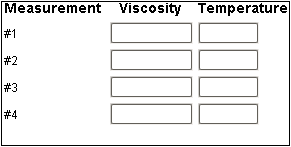
Multiple Measurement Sample Entry
Component Palette
Depending on the measurement count defined in the sample definition, the orientation of the edit fields will change. If the measurement count is greater than 1, then there will be a row for each measurement with the attributes appearing horizontally. If the measurement count is equal to 1, then the attributes appear vertically in separate rows. This reduces the need for the user to have to scroll while entering sample data if there are a number of attributes.
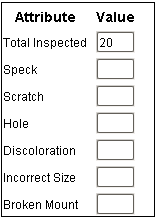
Single Measurement Sample Entry
Component Properties
Properties are provided that can be set to affect the operation and look of the component. They can be set through the Property Editor in the Designer or through scripting.
Example
Code |
|
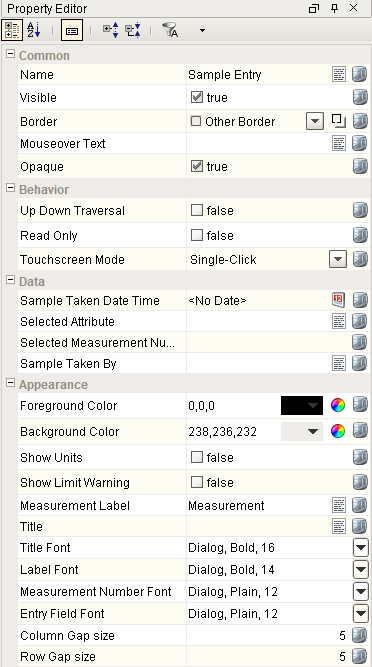
Behavior
| Name | Scripting | Property Type | Description |
|---|---|---|---|
| Up Down Traversal | upDownTraversal | boolean | Traverse from top to bottom as values are entered. |
| Show Units | showUnits | boolean | Shows the units values for each attribute. |
| Read Only | readOnly | boolean | Prevent entering or changing sample values. |
| Touchscreen Mode | touchscreenMode | int | Controls when this input component responds if touchscreen mode is enabled. |
Data
| Name | Scripting | Property Type | Description |
|---|---|---|---|
| Sample Taken Date Time | sampleTakenDateTime | DateTime | Date and time the sample was taken. |
| Selected Attribute | selectedAttribute | String | The selected attribute. |
| Selected Measurement Number | selectedMeasNo | Int4 | The selected attribute measurement number. |
| Sample Taken By | sampleTakenBy | String | Name of the user that is recording the sample. |
Appearance
| Name | Scripting | Property Type | Description |
|---|---|---|---|
| Foreground Color | foregroundColor | Color | Foreground color of the component. |
| Background Color | backgroundColor | Color | Background color of the component. |
| Measurement Label | measurementLabel | String | Text to display for the measurement label. |
| Title | title | String | Title of the test. |
| Title Font | titleFont | Font | Font for the title. |
| Label Font | labelFont | Font | Font for the label. |
| Measurement Number Font | numberFont | Font | Font for the measurement number. |
| Entry Field Font | fieldFont | Font | Font for the data entry fields. |
| Column Gap size | gapx | int | Size of gap between column fields in pixels. |
| Row Gap size | gapy | int | Size of gap between row fields in pixels. |
| Show Limit Warning | showLimitWarning | boolean | Shows the the warning symbol when entered value is outside of limits. |
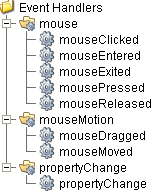
Event Handlers
mouse
mouseClicked
This event signifies a mouse click on the source component. A mouse click the combination of a mouse press and a mouse release, both of which must have occurred over the source component. Note that this event fires after the pressed and released events have fired.
| Property | Description |
|---|---|
| .source | The component that fired this event. |
| .button | The code for the button that caused this event to fire. |
| .clickCount | The number of mouse clicks associated with this event. |
| .x | The x-coordinate (with respect to the source component) of this mouse event. |
| .y | The y-coordinate (with respect to the source component) of this mouse event. |
| .popupTrigger | Returns True (1) if this mouse event is a popup trigger. What constitutes a popup trigger is operating system dependent, which is why this abstraction exists. |
| .altDown | True (1) if the Alt key was held down during this event, false (0) otherwise. |
| .controlDown | True (1) if the Ctrl key was held down during this event, false (0) otherwise. |
| .shiftDown | True (1) if the Shift key was held down during this event, false (0) otherwise. |
mouseEntered
This event fires when the mouse enters the space over the source component.
| Property | Description |
|---|---|
| .source | The component that fired this event. |
| .button | The code for the button that caused this event to fire. |
| .clickCount | The number of mouse clicks associated with this event. |
| .x | The x-coordinate (with respect to the source component) of this mouse event. |
| .y | The y-coordinate (with respect to the source component) of this mouse event. |
| .popupTrigger | Returns True (1) if this mouse event is a popup trigger. What constitutes a popup trigger is operating system dependent, which is why this abstraction exists. |
| .altDown | True (1) if the Alt key was held down during this event, false (0) otherwise. |
| .controlDown | True (1) if the Ctrl key was held down during this event, false (0) otherwise. |
| .shiftDown | True (1) if the Shift key was held down during this event, false (0) otherwise. |
mouseExited
This event fires when the mouse leaves the space over the source component.
| Property | Description |
|---|---|
| .source | The component that fired this event. |
| .button | The code for the button that caused this event to fire. |
| .clickCount | The number of mouse clicks associated with this event. |
| .x | The x-coordinate (with respect to the source component) of this mouse event. |
| .y | The y-coordinate (with respect to the source component) of this mouse event. |
| .popupTrigger | Returns True (1) if this mouse event is a popup trigger. What constitutes a popup trigger is operating system dependent, which is why this abstraction exists. |
| .altDown | True (1) if the Alt key was held down during this event, false (0) otherwise. |
| .controlDown | True (1) if the Ctrl key was held down during this event, false (0) otherwise. |
| .shiftDown | True (1) if the Shift key was held down during this event, false (0) otherwise. |
mousePressed
This event fires when a mouse button is pressed down on the source component.
| Property | Description |
|---|---|
| .source | The component that fired this event. |
| .button | The code for the button that caused this event to fire. |
| .clickCount | The number of mouse clicks associated with this event. |
| .x | The x-coordinate (with respect to the source component) of this mouse event. |
| .y | The y-coordinate (with respect to the source component) of this mouse event. |
| .popupTrigger | Returns True (1) if this mouse event is a popup trigger. What constitutes a popup trigger is operating system dependent, which is why this abstraction exists. |
| .altDown | True (1) if the Alt key was held down during this event, false (0) otherwise. |
| .controlDown | True (1) if the Ctrl key was held down during this event, false (0) otherwise. |
| .shiftDown | True (1) if the Shift key was held down during this event, false (0) otherwise. |
mouseReleased
This event fires when a mouse button is released, if that mouse button's press happened over this component.
| Property | Description |
|---|---|
| .source | The component that fired this event. |
| .button | The code for the button that caused this event to fire. |
| .clickCount | The number of mouse clicks associated with this event. |
| .x | The x-coordinate (with respect to the source component) of this mouse event. |
| .y | The y-coordinate (with respect to the source component) of this mouse event. |
| .popupTrigger | Returns True (1) if this mouse event is a popup trigger. What constitutes a popup trigger is operating system dependent, which is why this abstraction exists. |
| .altDown | True (1) if the Alt key was held down during this event, false (0) otherwise. |
| .controlDown | True (1) if the Ctrl key was held down during this event, false (0) otherwise. |
| .shiftDown | True (1) if the Shift key was held down during this event, false (0) otherwise. |
mouseMotion
mouseDragged
Fires when the mouse moves over a component after a button has been pushed.
| Property | Description |
|---|---|
| .source | The component that fired this event. |
| .button | The code for the button that caused this event to fire. |
| .clickCount | The number of mouse clicks associated with this event. |
| .x | The x-coordinate (with respect to the source component) of this mouse event. |
| .y | The y-coordinate (with respect to the source component) of this mouse event. |
| .popupTrigger | Returns True (1) if this mouse event is a popup trigger. What constitutes a popup trigger is operating system dependent, which is why this abstraction exists. |
| .altDown | True (1) if the Alt key was held down during this event, false (0) otherwise. |
| .controlDown | True (1) if the Ctrl key was held down during this event, false (0) otherwise. |
| .shiftDown | True (1) if the Shift key was held down during this event, false (0) otherwise. |
mouseMoved
Fires when the mouse moves over a component, but no buttons are pushed.
| Property | Description |
|---|---|
| .source | The component that fired this event. |
| .button | The code for the button that caused this event to fire. |
| .clickCount | The number of mouse clicks associated with this event. |
| .x | The x-coordinate (with respect to the source component) of this mouse event. |
| .y | The y-coordinate (with respect to the source component) of this mouse event. |
| .popupTrigger | Returns True (1) if this mouse event is a popup trigger. What constitutes a popup trigger is operating system dependent, which is why this abstraction exists. |
| .altDown | True (1) if the Alt key was held down during this event, false (0) otherwise. |
| .controlDown | True (1) if the Ctrl key was held down during this event, false (0) otherwise. |
| .shiftDown | True (1) if the Shift key was held down during this event, false (0) otherwise. |
propertyChange
propertyChange
Fires whenever a bindable property of the source component changes. This works for standard and custom (dynamic) properties.
| Property | Description |
|---|---|
| .source | The component that fired this event. |
| .newValue | The new value that this property changed to. |
| .oldValue | The value that this property was before it changed. Note that not all components include an accurate oldValue in their events. |
| .propertyName | The name of the property that changed. NOTE: Remember to always filter out these events for the property that you are looking for! Components often have many properties that change. |
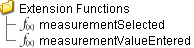
Extension Functions
measurementSelected
- Description
Called for each measurement when selected. Do not block, sleep, or execute any I/O; called on painting thread.
- Parameters
self - A reference to the component that is invoking this function.
attributeName - The selected attribute name.
measurementNumber - The measurement number selected.
value - The value of this measurement.
attribute - The attribute.
attrLimits - A dataset containing the attribute control and spec limits.
- Return
Nothing
- Scope
Client
measurementValueEntered
- Description
Called for each measurement after a value is entered. Do not block, sleep, or execute any I/O; called on painting thread.
- Parameters
self - A reference to the component that is invoking this function.
attributeName - The selected attribute name.
measurementNumber - The measurement number selected.
value - The value of this measurement.
attribute - The attribute.
isWithinLimits - True if this value is within limits.
attrLimits - A dataset containing the attribute control and spec limits.
- Return
Nothing
- Scope
Client
Custom Methods
Custom methods allow you to add your own component functions to a component that can be called through scripting. This is a useful and clean method of re-using script that is specific to the component (say you want to update a visual aspect of the component in the same way whether a user clicks on the component or a window property value changes). See Component Custom Methods in the Ignition Help Manual for more information.
Customizers
This component does not have any custom properties.
Component Functions
This component provide the following functions that can be called on it. If this component has been dropped onto the windows root container, the path and an example call would be event.source.parent.getComponent('Sample Entry').save().
getSample()
- Description
Returns an existing sample. (See Sample section for more information).
- Parameters
None
- Return
Sample sample - An existing Sample.
- Scope
Client
getSampleUUID()
- Description
Returns the uuid of existing sample. (See Sample section for more information).
- Parameters
None
- Return
String sampleUUID - The uuid of the existing Sample.
- Scope
Client
save()
- Description
Save changes made to the measurement values. This method also records the current product code and reference number for the production location.
- Parameters
None
- Return
String Message of any errors that may have occurred during the save operation.
- Scope
Client
save(productCode, refNo)
- Description
Save changes made to the measurements values along with a product code and reference number specified in the parameters.
- Parameters
String productCode - Product code to record along with the measurement values.
String refNo - Reference number to record along with the measurement values.
- Return
String Message of any errors that may have occurred during the save operation.
- Scope
Client
populateMeasurements(measurementValues)
- Description
Populate the list of measurement values.
- Parameters
Map<String, List<Object>> measurementValues - The list of measurement values to be populated.
- Return
Nothing
- Scope
Client
populateMeasurement(attributeName, measurementNo, value)
- Description
Populate the measurement into the sample entry component.
- Parameters
String attributeName - Name of the attribute to return the measurement value for.
Integer measurementNo - The measurement number associated with the sample.
Object value - The value of the measurement.
- Return
Nothing
- Scope
Client
populateMeasurement(attributeName, value, moveToNextMeasurement)
- Description
Populate the measurement into the sample entry component.
- Parameters
String attributeName - Name of the attribute to return the measurement value for.
Object value - The value of the measurement.
Boolean moveToNextMeasurement - True if the value moved to the next measurement.
- Return
Nothing
- Scope
Client
populateMeasurement(value, moveToNextMeasurement)
- Description
Populate the measurement into the sample entry component.
- Parameters
Object value - The value of the measurement.
boolean moveToNextMeasurement - True if the value moved to the next measurement.
- Return
Nothing
- Scope
Client
selectMeasurement(attributeName, measurementNo)
- Description
Selects the measurement specified by the attributeName and measurementNo.
- Parameters
String attributeName - Name of the attribute to select the measurement for.
Integer measurementNo - The measurement number associated with the sample.
- Return
Nothing
- Scope
Client
clearMeasurementValues()
- Description
Removes all the measurement values.
- Parameters
None
- Return
Nothing
- Scope
Client
undo()
- Description
Any changed measurement values will be restored to their original values.
- Parameters
None
- Return
Nothing
- Scope
Client
approve()
- Description
Approve the current sample.
- Parameters
None
- Return
String Message of any errors that may have occurred during the approve operation.
- Scope
Client
unapprove()
- Description
Unapprove the current sample.
- Parameters
None
- Return
String Message of any errors that may have occurred during the unapprove operation.
- Scope
Client
exclude(sampleUUID)
Description
Excludes the sample specified by uuid parameter.
- Parameters
String sampleUUID - The UUID to an existing sample to exclude.
- Return
String Message of any errors that may have occurred during the operation.
- Scope
Client
include(sampleUUID)
- Description
Includes the sample specified by uuid parameter.
- Parameters
String sampleUUID - The UUID to an existing sample to include.
- Return
String Message of any errors that may have occurred during the operation.
- Scope
Client
showEditNotePopup()
- Description
Show the note popup to allow the user to add or edit the note tied to the currently selected sample.
- Parameters
None
- Return
String Message of any errors that may have occurred during the show note operation.
- Scope
Client
validateMeasurementLimits()
- Description
Checks if the measurement values are within the spec or control limit.
- Parameters
None
- Return
String Message of any errors that may have occurred during the validation.
- Scope
Client
Sepasoft MES Module Suite