Sepasoft MES Module Suite
Serial Settings
The Instrument Interface Module is perfect for serial devices – such as analyzers, measurement gauges, barcode readers and many more – where values are sent when the operator presses the send button or a request is sent to the device to read the values. The serial support built into the Instrument Interface Module includes polling the device for new data, receiving unsolicited data from the device, or requesting the new data from the device based on an event in Ignition. It gracefully handles timeouts and other communication issues that are common with serial communications and also includes the flexibility of controlling every byte sent or received using script.
This page configures the serial port communications settings of this Instrument Interface.
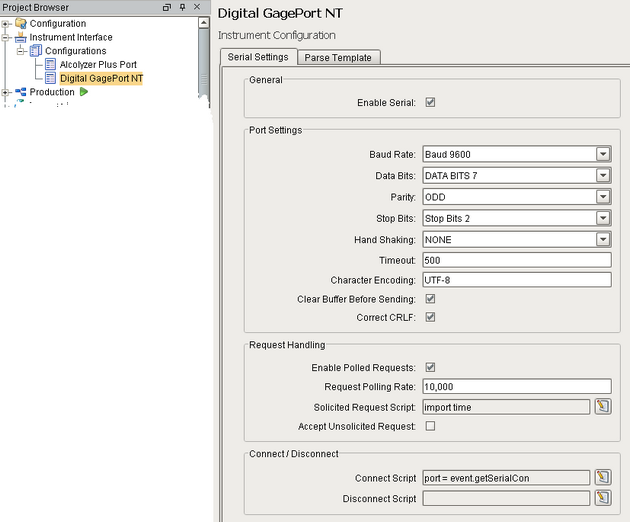
Serial Settings Configuration
General
| Enable Serial | If checked, these port settings will be applied to the Serial Controller component when this Instrument Interface is assigned to its Instrument Interface Name property. |
Port Settings
| Baud Rate | Serial Communication baud rate. Select from the following:
|
| Data Bits | Serial communication data bits. Select from the following:
|
| Parity | Serial communication parity. Select from the following:
|
| Stop Bits | Serial communication number of stop bits. Select from the following:
|
| Hand Shaking | Serial communication flow control methods. Select from the following:
|
| Timeout | The default number of milliseconds to wait while reading data. |
| Character Encoding | Character encoding of the data. |
| Clear Buffer Before Sending | If checked, clears the receive buffer before sending data. |
| Correct CRLF | If checked, corrects any combination of end of line characters to carriage return (CR) and line feed (LF). |
Request Handling
| Enable Polled Requests | If checked, the port will be polled at the requested rate. | ||
| Request Polling Rate | The rate in milliseconds to poll the port. | ||
| Solicited Request Script | The script to run for each polled request. When writing scripts you can use the "event" object to reference methods in the Serial Controller component that this Instrument Interface is assigned. Code Snippet
| ||
| Accept Unsolicited Request | If checked, the port will can accept requests without being solicited. |
Sepasoft MES Module Suite