Sepasoft MES Module Suite
Set Parameter Phase
The Set Parameter Phase is used to set any parameter value within a recipe. The parameter value can be at any level including the Procedure, Unit Procedure, Operation, and phase step.
The Set Parameter Phase is available in Recipe Editor under Built-In Phases.
For syntax, see Referencing Parameters in Batch Recipes.
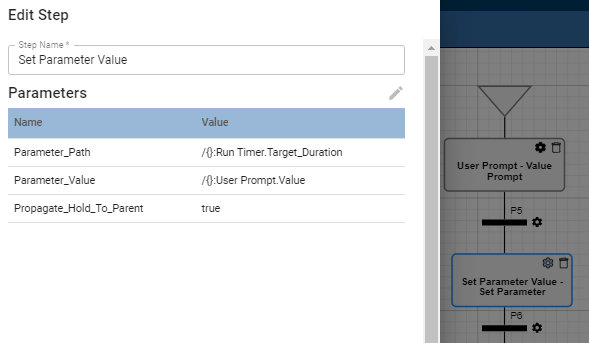
Phase Parameters
See Properties Common to All Phase Parameters
| Parameter Name | Data Type | Description | Default Value Source | Default Recording Type |
| Parameter_Path | String | This is the parameter path to assign the value to. | Recipe | All to History |
| Parameter_Value | String | The value to assign to the parameter path. Calculation Supported. | Recipe and Execution | All to History |
| Propagate_Hold_To_Parent | Boolean | When set to True, the batch queue command Hold is sent up to the phase above this one. Default is True. Keep in mind that when you restart the unit procedure or operation, the batch is not restarted. Restart the batch from Batch Controller or Batch Monitor. | Recipe | Changes Not Saved |
Sepasoft MES Module Suite