Sepasoft MES Module Suite
Setpoint Value Inheritance
All Production items below the Area level can be configured to inherit their recipe values from the parent production item or to use their own recipe value based on the Inherit Recipe Values Mode setting.
Continuing the Line Speed example, after it was added to the Packaging line 1, it also became available for cells under that line. The Ignition tag associated with the recipe value at the line level is not propagated to the child recipe value and only the recipe values that have Ignition tags assigned to them will appear in the recipe editor. So, if a propagated recipe value is not relevant to the child production item, the recipe value tag property can be left blank.
If the Line Speed recipe value at the filler cell is now given a tag path, it will show up in the recipe editor as a recipe parameter that can be set. The Inherit Recipe Values mode allows us to configure how the actual recipe value is obtained.
Inherit Recipe Values Mode
"Parent", in this context, is referring to the Equipment's parent, and "Recipe" is referring to the parent Equipment's collection of Default Setpoint entries. The term does not refer to a Recipe object, nor does it refer to a Recipe object's parent. When set to Parent Recipe, the value of the Line Speed Recipe Values setting passed to the Filler recipe tag will be set to the value of the Line Speed setting set for the Line in the recipe editor.
"Parent", in this context, is referring to the Equipment's parent, and "Recipe" is referring to the parent Equipment's collection of Default Setpoint entries. The term does not refer to a Recipe object, nor does it refer to a Recipe object's parent. When set to Parent Recipe, the value of the Line Speed Recipe Values setting passed to the Filler recipe tag will be set to the value of the Line Speed setting set for the Line in the recipe editor.
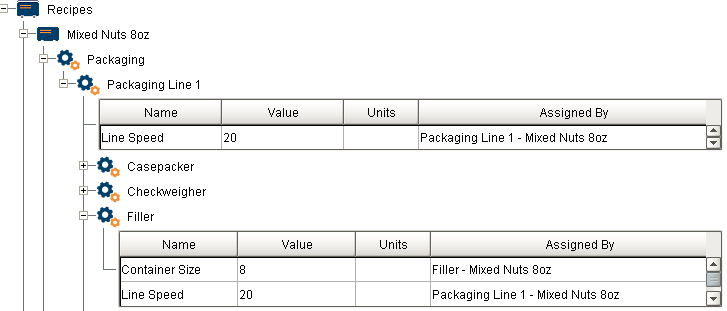
When set to Equipment Default values will be inherited directly from the Default Setpoints on that particular Equipment. The value of the Line Speed Recipe Values setting will be set to the value of the Line Speed setting set for the Filler in the recipe editor.
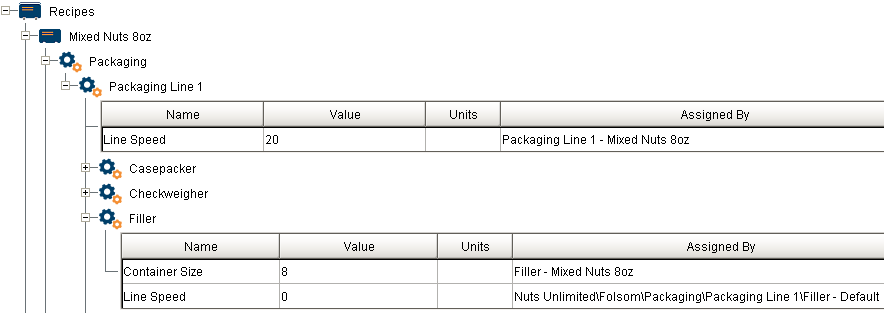
In either case, the value of the Line Speed parameter can be over-written using the Recipe Editor component by simply clicking on and assigning it a value.
Descendant Recipes will always inherit their values from their parent Master Recipe, and the Value Inheritance Settings ("Parent Recipe" and "Equipment Default") tells us where the root Master Recipe gets its values from.
Example Scenario
Consider the following Equipment and their Value Inheritance Modes:
- Enterprise/Site/Area/Line1 [Equipment Default]
- Cell1 [Equipment Default]
- Cell2 [Parent Recipe]
And consider the following Master/Descendant Recipe hierarchy and Item Recipes:
- Recipe A
- Line1
- Cell1
- Cell2
- Recipe B
- Line1
- Cell1
- Cell2
- Recipe C
- Line1
- Cell1
- Cell2
- Line1
- Line1
- Line1
Note the following terms:
- The Item Recipes under each individual Recipe share their names with their associated Equipment.
- Recipe A and Recipe B are Master Recipes, because they have at least 1 child Recipe.
- Recipe B and Recipe C are Descendant Recipes, because they have a parent Recipe.
- Note how Recipe B qualifies as both.
- Recipe A can further be describe as a root Recipe; it has no parent Recipe at all.
In general Descendant Recipes will inherit their parent Master Recipe's values, (if not manually overridden of course).
To see how Value Inheritance Modes come into play, we should focus on Recipe A alone. This is important, because we can clearly see that Recipe A does not have any parent Recipe to inherit values from, but it needs to get them from somewhere. This is when we go to directly to the Equipment, and lookup the Default Recipe Values.
Notice how in our example, Cell1 is set to Equipment Default, and Cell2 is on Parent Recipe. This means that Cell1 will always just use whatever is immediately defined as a Setpoint on the Equipment Cell1. Meanwhile, Cell2 will try to look up to Line1 to inherit values it is missing. This is how Recipe A is able to determine its setting values despite not having a parent Master Recipe to inherit values from.
Sepasoft MES Module Suite