Sepasoft MES Module Suite
Perspective Settings Tree Editor
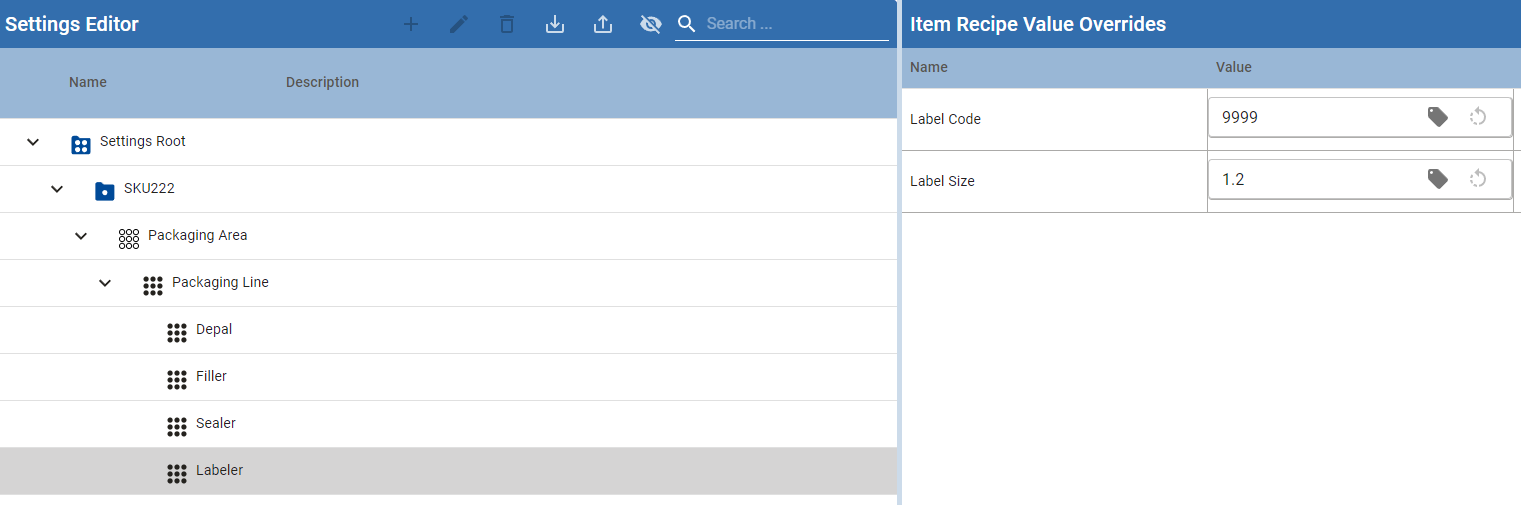
The Settings Tree Editor is the Perspective component used to manage Settings & Changeover (SCO) machine recipes, equipment bindings, and setpoint values. Import and export of those setting values is built into this component: operators and engineers can download an XML snapshot of selected recipes, or load an XML file to create or update recipes, equipment bindings, and setpoint values.
Use import/export when you need to back up setting values, copy a recipe hierarchy between gateways or environments, or bulk-apply setpoint changes without editing each row in the tree.
Installed with the Production module (Settings and Changeover).
Find this component under the Ignition Designer Perspective Component Palette in the Settings and Changeover category, named Settings Tree Editor.
Import and export toolbar actions are shown only when props.enableRecipeEditing is true (the default). Set that property to false for a read-only tree that cannot import or export.

|
Recipe value definitions (the setpoint definitions on equipment, including tags) are not created by this import. Those definitions are configured on equipment in the Designer. Import applies values to existing setpoint definitions. Equipment paths in the file must already exist. |
How import/export works
Export writes an XML file from the Gateway for the recipes, equipment, and setpoints that match the export filters. The browser downloads that file. Each exported recipe is recorded in the Settings changelog as a recipe export event.
Import reads an XML file from the operator’s workstation, then creates or updates matching recipes, equipment bindings, and setpoint values on the Gateway. Each imported recipe is recorded in the Settings changelog as a recipe import event.
The tree selection does not decide where imported recipes are stored. Placement comes from the file (recipe paths) plus the import options Parent Setting Name and Keep Import Hierarchy.
Existing Settings Tree Editor behavior is unchanged when import/export is not used.
Capabilities
Capability | Description |
|---|---|
Export setting values | Download an XML file of machine recipes, bound equipment, and setpoint values. |
Filter the export | Limit the file by setting (recipe) name, equipment path, and setpoint name. * and ? wildcards are supported. |
Import setting values | Load an XML file to create missing recipes, bind equipment, and set setpoint values. |
Preserve or flatten hierarchy | Keep parent/child recipe relationships from the file, or attach imported recipes under a chosen parent (or the recipe root). |
Skip inherited values | Optionally import only values assigned by the recipe itself, not values inherited from a parent recipe. |
Change notes | When props.requireChangeNote is true, a change note is required before import or export can run. Notes are stored in the Settings changelog. |
Bulk create/update | One file can include multiple recipes and multiple equipment paths. Missing recipes and item recipes are created; existing setpoint values are overwritten. |
Changelog | Import and export are logged as recipe import / recipe export events and can be reviewed in Settings Changelog. |
What import/export does not do:
Create equipment or setpoint definitions (tags, units, data types). Those must already exist.
Delete recipes, equipment bindings, or setpoints that are absent from the file.
Export or import Vision-style CSV from the Perspective file picker (the picker accepts .xml).
How to use
Export setting values
Place a Settings Tree Editor on a Perspective view and launch a session (or Preview).
Select a node in the tree:
Recipe root — default filters include all settings and all equipment (*).
Setting (recipe) — default setting-name filter is that recipe name; equipment path is *.
Equipment (item recipe) — default setting-name filter is the parent recipe name; equipment path is that equipment path plus *.
Click the Export toolbar button. Export is enabled when a recipe root, recipe, or item recipe is selected and the component is not busy.
In Export Setting Values, review or change:
File Name (required) — default is scoValuesExport_yyyyMMdd_HHmmss.xml.
Setting Name Filter (required) — recipe names to include. * and ? wildcards are allowed.
Equipment Path Filter (required) — production equipment paths to include. * and ? wildcards are allowed.
Setpoint Name Filter (required) — setpoint names to include. * and ? wildcards are allowed (*Weight* matches Min Weight, Max Weight, Target Weight).
Change Note — required when props.requireChangeNote is true.
Confirm export. The Gateway builds XML for matching values and the browser downloads the file. The export drawer then closes.
If no values match the filters, export fails with an error and no file is downloaded.
Import setting values
Click the Import toolbar button (shown when recipe editing is enabled). Tree selection is not required; it only pre-fills Parent Setting Name when a recipe (not the root) is selected.
Choose an .xml file produced by this component (or by system.recipe.exportRecipeXML).
In Import Setting Values, set:
Parent Setting Name — optional. If set, that recipe must already exist and is used as the parent for recipes in the file that have no parent. If blank, those recipes attach to the recipe root.
Keep Import Hierarchy — default on. Uses each recipe’s path in the file to attach it under its parent recipe when that parent exists. When off, imported recipes attach under Parent Setting Name (or the root) instead of restoring the file hierarchy.
Skip Inherited Values — default off. When on, setpoints whose AssignedBy is not the recipe itself are skipped (inherited parent values are not written as overrides).
Change Note — required when props.requireChangeNote is true.
Confirm import. The tree refreshes after a successful import.
Recipes named in the file are created if they do not exist (name, description, state, and group are applied). Equipment bindings (item recipes) are created if they do not exist. Setpoint values are created or updated when the equipment already has a matching setpoint definition.
Equipment paths that do not exist are skipped (logged on the Gateway). Missing recipe paths in the file are skipped. Import does not stop the whole file for a single skipped equipment path.
Component Properties
Properties can be set in the Perspective Property Editor or through scripting. The section prefix is included before the property name (props, position, custom, or meta).
Example
Python |
self.getSibling("SettingsTreeEditor").props.requireChangeNote = True self.getSibling("SettingsTreeEditor").props.enableRecipeEditing = True |
Component properties that affect import/export
Name | Scripting | Property Type | Description |
|---|---|---|---|
Enable Recipe Editing | enableRecipeEditing | Boolean | When true (default), recipes can be created, modified, and deleted, and the Import/Export toolbar actions are shown. When false, the tree is read-only and import/export is hidden. |
Require Change Note | requireChangeNote | Boolean | When true, a change note is required before import, export, or other saves. Defaults to false. |
Other Settings Tree Editor properties
These properties control what the tree shows and what can be edited. They do not change the XML format, but they can limit which nodes operators select before export.
Name | Scripting | Property Type | Description |
|---|---|---|---|
Orientation | orientation | String | Split pane direction: Vertical (default) or Horizontal. |
Enable Equipment Paging | enableEquipmentPaging | Boolean | When true (default), equipment selection options are returned in pages of fixed size. |
Enable Group Creation | enableGroupCreation | Boolean | When true (default), new recipe group labels may be created. |
Enable Recipe Paging | enableRecipePaging | Boolean | When true (default), recipes are returned in pages of fixed size. |
Enable State Creation | enableStateCreation | Boolean | When true (default), new recipe state labels may be created. |
Enable Value Editing | enableValueEditing | Boolean | When true (default), setpoint value overrides may be modified and reverted. Does not hide import/export. |
Include Recipe Page Parents | includeRecipePageParents | Boolean | When true (default), parent entities remain visible when navigating between pages. |
Equipment Path Filter | equipmentPathFilter | String | Optional production equipment filter to limit shown recipes. |
Group Filter | groupFilter | String | Optional group label filter to limit shown recipes. |
Recipe Name Filter | recipeNameFilter | String | Optional recipe name filter to limit shown recipes. |
Setpoint Name Filter | setpointNameFilter | String | Optional setpoint name filter to limit shown setpoints. |
State Filter | stateFilter | String | Optional state label filter to limit shown recipes. |
Hide Descendant Recipes | hideDescendantRecipes | Boolean | When true, hides recipes that have parent recipes. Defaults to false. |
Hide Item Recipes | hideItemRecipes | Boolean | When true, hides production equipment under settings. Defaults to false. |
Hide Master Recipes | hideMasterRecipes | Boolean | When true, hides recipes that have child recipes. Defaults to false. |
Hide Setpoints | hideSetpoints | Boolean | When true, hides setpoints and their values. Defaults to false. |
Style | style | Style Object | Perspective style applied to the component. Refer to the Ignition Style Reference for classes, colors, fonts, and related settings. |
Additional style objects are available for buttons, checkboxes, dialogs, inputs, menus, tables, toolbars, and tooltips (buttonStyle, checkboxStyle, dialogStyle, inputStyle, toolbarStyle, and others).
Export Setting Values fields
These fields appear in the export drawer. They are not Designer props.
Field | Required | Description |
|---|---|---|
File Name | Required | Download file name. Default: scoValuesExport_yyyyMMdd_HHmmss.xml. |
Setting Name Filter | Required | Recipe names to export. * matches all; ? matches one character. Pre-filled from the tree selection. |
Equipment Path Filter | Required | Equipment paths to export. * and ? wildcards are allowed. Pre-filled from the tree selection. |
Setpoint Name Filter | Required | Setpoint names to export. * and ? wildcards are allowed. Defaults to *. |
Change Note | When requireChangeNote is true | Stored on the recipe export changelog events. |
Import Setting Values fields
These fields appear in the import drawer after a file is chosen. They are not Designer props.
Field | Required | Description |
|---|---|---|
Parent Setting Name | Optional | Existing recipe to use as parent for imported recipes that have no parent. Pre-filled from the selected recipe when it is not the root. Leave blank to attach those recipes to the recipe root. |
Keep Import Hierarchy | Optional (default on) | When on, restore parent/child relationships from recipe paths in the file. When off, attach imported recipes under Parent Setting Name (or the root). |
Skip Inherited Values | Optional (default off) | When on, skip setpoints whose assigned-by recipe is not the recipe being imported. |
Change Note | When requireChangeNote is true | Stored on the recipe import changelog events. |
Position, Custom, and Meta Properties
Position — Component layout properties. Refer to Ignition Perspective Component Properties for details.
Custom — New user-defined custom properties can be created in this section. Best practice: if user-defined properties are required, create them here rather than under Meta.
Meta — Contains the name and visibility properties for the component.
Runtime Behavior
Toolbar enablement
Action | Shown when | Enabled when |
|---|---|---|
Import | enableRecipeEditing is true | The component is not loading. |
Export | enableRecipeEditing is true | The component is not loading and the selection is the recipe root, a recipe, or an item recipe (equipment under a setting). |
Default export filters from selection
Selection | Setting Name Filter | Equipment Path Filter |
|---|---|---|
Recipe root | * | * |
Setting (recipe) | that recipe’s name | * |
Equipment (item recipe) | parent setting name | that equipment path + * |
Setpoint Name Filter always defaults to *. Operators can widen or narrow any filter before confirming export.
What is written to the export
For each matching recipe and bound equipment, the file includes:
Recipe path, description, state, and group
Equipment path
Each matching setpoint: name, data type, value, assigned-by, and description
Assigned-by reflects where the effective value comes from:
The recipe name, when that recipe overrides the value
A parent recipe name, when the value is inherited
{equipment path} - Default, when the equipment default is used
Equipment that is not bound in the recipe hierarchy is not exported for that recipe.
What import applies
Object | If missing | If present |
|---|---|---|
Recipe (setting) | Created with name, description, state, and group from the file | Description, state, and group updated; values applied |
Item recipe (equipment binding) | Created for the equipment path | Existing binding kept; values applied |
Setpoint value | Created on the item recipe when the equipment has a matching default definition | Value overwritten |
Parent Setting Name, if set, must resolve to an existing recipe. If it does not, import fails and nothing is saved for that run.
Keep Import Hierarchy uses the recipe path in the file. If the parent recipe named in that path exists (in the file or already in MES), the imported recipe is attached there. Otherwise it attaches under Parent Setting Name or the recipe root.
Skip Inherited Values compares assigned-by to the recipe name. Values assigned by a parent recipe (or by equipment default naming) are skipped when this option is on.
Changelog
Successful export flags each included recipe with a recipe export event and the change note (if provided). Successful import flags each imported recipe with a recipe import event. Review these in Settings Changelog.
Errors operators may see
Situation | Result |
|---|---|
Export with a blank file name | Error; no file downloaded |
Export with no matching values | Error; no file downloaded |
Import file empty or too small | Import does not start |
Parent Setting Name does not exist | Import fails |
Change note required but blank or invalid | Import/export blocked until a valid note is entered |
Equipment path in the file does not exist | That equipment’s values are skipped; other recipes continue |
Setpoint has no matching definition on the equipment | That setpoint is skipped (logged on the Gateway) |
Exported XML format
Perspective export produces XML (version 1). A typical file looks like this:
XML |
<RecipeRoot> <Version>1</Version> <Recipe> <Path>Mixed Nuts 8oz</Path> <Description></Description> <State></State> <Group></Group> <ItemRecipe> <Path>Nuts Unlimited\Folsom\Packaging\Packaging Line 1</Path> <RecipeValue> <Name>Line Speed</Name> <Type>Int4</Type> <Value>20</Value> <AssignedBy>Mixed Nuts 8oz</AssignedBy> <Description></Description> </RecipeValue> </ItemRecipe> </Recipe> </RecipeRoot> |
Element | Meaning |
|---|---|
RecipeRoot | File root. Includes Version. |
Recipe | One machine setting. Path is the recipe path (name is the last segment). Optional Description, State, and Group. |
ItemRecipe | Equipment bound to that setting. Path is the production equipment path. |
RecipeValue | One setpoint: Name, Type, Value, AssignedBy, Description. |
Import expects this same structure (the format returned by this component and by system.recipe.exportRecipeXML). A version mismatch is logged as a warning; import still proceeds.
Use cases
Example 1 — Backup all settings from a line
Select the recipe root (or a line-level equipment node), export, and keep the default * setpoint filter. Narrow Equipment Path Filter to the line, for example:
Field | Example value |
|---|---|
File Name | scoValuesExport_PackagingLine1.xml |
Setting Name Filter | * |
Equipment Path Filter | Enterprise\Site\Packaging\Packaging Line 1* |
Setpoint Name Filter | * |
Store the file as a backup or attach it to a change record. Restore later with Import.
Example 2 — Copy a master setting to another gateway
On the source Gateway, select the master setting and export (setting name filter = that recipe; equipment path * or the target line).
Copy the XML to the destination environment.
Confirm equipment paths and setpoint definitions already exist there.
Import. Leave Keep Import Hierarchy on so descendants stay under the master. Set Parent Setting Name only if the recipes should attach under an existing parent instead of the root.
Example 3 — Apply only explicit overrides (skip inherited values)
When promoting a descendant recipe, turn Skip Inherited Values on so parent-assigned setpoints are not written as local overrides. Only values whose assigned-by is that recipe are imported.
Example 4 — Flatten imported recipes under one parent
To bring several recipes in as children of an existing setting (ignoring paths in the file):
Field | Example value |
|---|---|
Parent Setting Name | Standard Line Settings |
Keep Import Hierarchy | off |
Skip Inherited Values | off |
Recipes in the file that have no parent attach under Standard Line Settings. Standard Line Settings must already exist.
Example 5 — Export a subset of setpoints
Use a setpoint name filter such as *Speed* or *Weight* to export only related values for analysis or a controlled update.
Example 6 — Require a change note on every import/export
Property | Example value |
|---|---|
requireChangeNote | true |
enableRecipeEditing | true |
Operators must enter a change note in the import and export drawers. The note is stored with the changelog events.
Example 7 — Read-only tree (no import/export)
Property | Example value |
|---|---|
enableRecipeEditing | false |
enableValueEditing | false |
Import and export toolbar actions are hidden. Use this on operator screens that should only view settings.
Related scripting
The same XML import/export used by the component is available from Gateway or client scripts:
Python |
# Export all settings / equipment / setpoints xml = system.recipe.exportRecipeXML(recipeNameFilter='*', equipmentPathFiler='*', valueNameFilter='*', changeNote='Nightly backup') system.file.writeFile("C:/Temp/scoValuesExport.xml", xml, False) # Import that XML xml = system.file.readFileAsString("C:/Temp/scoValuesExport.xml") system.recipe.importRecipeXML(xmlData=xml, changeNote='Restored from backup') |
Import/Export Machine Recipes
XML |
<RecipeRoot> <Version>1</Version> <Recipe> <Path>Kettle Recipe</Path> <Description/> <State>Dev</State> <Group>AZ1</Group> <ItemRecipe> <Path>Enterprise\Site\Area\Dark Chocolate Line\Kettle Line Cell</Path> <RecipeValue> <Name>Temp</Name> <Type>Int4</Type> <Value>110</Value> <AssignedBy>Enterprise\Site\Area\Dark Chocolate Line\Kettle Line Cell - Default</AssignedBy> <Description/> </RecipeValue> </ItemRecipe> <ItemRecipe> <Path>Enterprise\Site\Area\Dark Chocolate Line\Temperer Line Cell</Path> <RecipeValue> <Name>Temper 77</Name> <Type>Int4</Type> <Value>38</Value> <AssignedBy>Enterprise\Site\Area\Dark Chocolate Line\Temperer Line Cell - Default</AssignedBy> <Description/> </RecipeValue> </ItemRecipe> </Recipe> </RecipeRoot> |
See:
Settings and Changeover Objects
Function | Description |
|---|---|
system.recipe.exportRecipeXML() | Returns an XML string of setting values. Filters support * and ?. Optional change note. |
system.recipe.importRecipeXML() | Imports XML in the same format as the component export. Optional change note. Uses default import options (keep hierarchy on, skip inherited off, parent = recipe root). |
system.recipe.exportRecipe() | CSV export of setting values (Vision / scripting format). |
system.recipe.importRecipe() | CSV import of setting values. |
Scripted importRecipeXML does not expose Parent Setting Name, Keep Import Hierarchy, or Skip Inherited Values; those options are available in the Settings Tree Editor import drawer.
Sepasoft MES Module Suite