Sepasoft MES Module Suite
Settings and Changeover Changelog Viewer
This component displays value changes in a table.
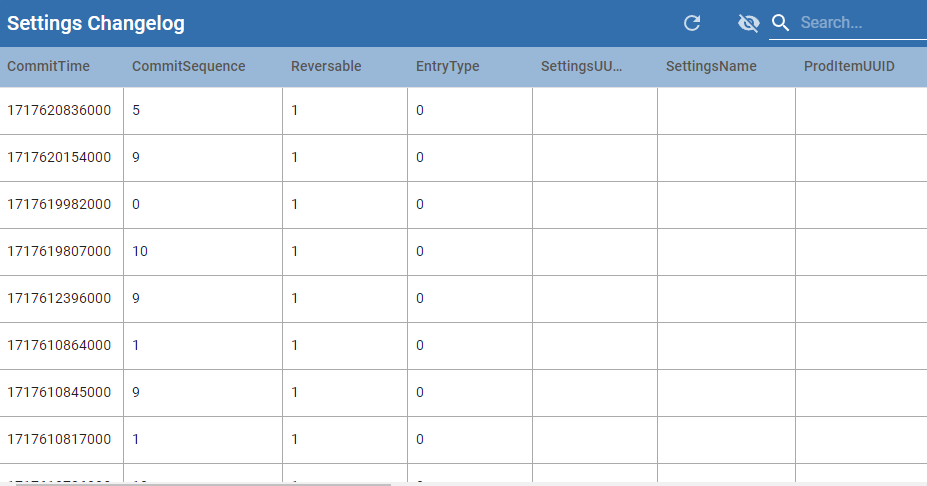
Table Properties
Name
| Description
|
|---|
autoRefresh
| When True, automatically fetches date.
|
beginDate
| Begin time cutoff
|
| endDate | End time cutoff
|
| recipeNameFilter | Optionally limits the results by recipe name.
|
subRecipeNameFilter
| Optionally limits the results by sub-recipe name.
|
| equipmentPathFilter | Optionally limits the results by equipment path.
|
| setpointNameFilter | Optionally limits the results by setpoint name.
|
| userFilter | Optionally limits the results to changes made by a specific user.
|
| showRecipeChanges | Show changes to recipes.
|
showDefaultSetPointChanges
| Show changes to default setpoints.
|
orderBy
| Comma delimited string for sorting data
|
rowLimit
| Limits the records returned in changelog table.
|
data
| The change history data
|
searchEnabled
| Allows searching on column values.
|
tableColumns
|
Provides formatting and customization for each column. 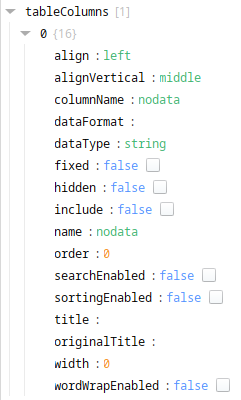
- align: list of options: left, center, right.
- alignVertical: list of options: top, middle, bottom
- columnName: auto-populated
- dataFormat: auto-populated
- dataType: auto-populated
- fixed: Sets the column width to fixed or auto based on the content.
- hidden: Boolean; if set to True, the column does not display on the page but does display in the list of columns provided when clicking the eye icon at the top of the table where you can unhide columns.
- include: Boolean, if set to True, the column does not display on the page nor in the list of columns provided when clicking the eye icon at the top of the table.
- name: This name displays in the client browser. You can set wordWrapEnabled to True to wrap the name text.
- order: Sets the order of the columns left to right.
- searchEnabled: Boolean; when set to True, the system searches the column values.
- sortingEnabled: Boolean; when set to True, the column can be sorted in ascending or descending order.
- title: Sting; Sets the column title in the table.
- originalTitle: auto-populated
- width: Int; sets the column width in pixels
- wordWrapEnabled: Boolean; allows word wrapping when enabled.
|
Sepasoft MES Module Suite