Sepasoft MES Module Suite
system.mes.bc.executeChart
These two script functions are used to execute (run) Business Connector charts. They are asynchronous and therefore will not wait for the chart to complete execution before returning control to the calling script.

|
For synchronous versions of these script functions, refer to: system.mes.bc.executeChartSynchronous |
Method Options
- executeChart(chartPath)
- Simple Chart Execution (no parameters)
- executeChart(chartPath, chartParameters)
executeChart(chartPath)
Execute a Business Connector Chart. No Chart Parameter values are passed or returned. This function does not wait for the chart to complete execution.
Syntax
executeChart(chartPath)
- Parameters
String chartPath - The path of the Chart in the Business Connector section of the Ignition Project Browser.
- Returns
Nothing
- Scope
All
Simple Chart Execution (no parameters)
- The chart location is set in the variable chartPath (its path in the hierarchy tree of the Business Connector section of the Ignition Project Browser).
- The chart is not expecting to receive or return any Chart Parameters. The chart, in essence, is a self-contained sequence of actions triggered to run by the calling script.
- This variation of the function does not wait for the chart to complete execution.
Code Snippet
Python |
#This script is in an Ignition Button #Execute the 'Basic Materials' chart in the 'Materials Charts' folder in Business Connector. #No Chart Parameter values are passed into the chart. chartPath = 'Materials Charts/Basic Materials' system.mes.bc.executeChart(chartPath) |
executeChart(chartPath, chartParameters)
Execute a Business Connector Chart. Passes a Python dictionary of Chart Parameter value(s) into the chart. This function does not wait for the chart to complete execution.
Syntax
executeChart(chartPath, chartParameters)
Parameters
String chartPath - The path of the Chart in the Business Connector section of the Ignition Project Browser.
Object chartParameters - A Python dictionary of Chart Parameter name(s) and value(s) to pass into the chart (may be a subset of all available Chart Parameters for the chart). The Chart Parameters must be defined in the chart's Start Block or an exception will be thrown.
Returns
Nothing
Scope
All
Code Example: Chart Execution With Parameters Passed In
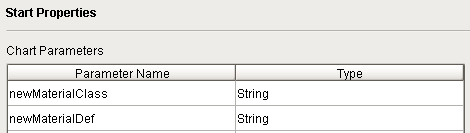
- This chart receives two Chart Parameter values from the calling script (newMaterialClass = 'Flour' and newMaterialDef = 'Whole Wheat').
- A Script Block in the chart writes those values to Tags x1 and x2.
Chart Parameters Defined in Start Block
Code Snippet -- from a chart Script Block
Python |
#This script is in a Business Connector chart Script Block def executeScript(chart): #Write the incoming chart parameter values (sent from a button press) to tags x1 and x2 system.tag.writeSynchronous('[default]x1', chart.getParameterValue('@newMaterialClass'), 45) system.tag.writeSynchronous('[default]x2', chart.getParameterValue('@newMaterialDef'), 45) return |
Example: from a Button
Python |
#This script is in an Ignition Button #Business Connector chart name chart = 'Working with Parameters' #Python dictionary of chart parameters to pass values to extraClassAndMaterial = {'newMaterialClass':'Flour', 'newMaterialDef':'Whole Wheat'} #Execute the chart (pass in two chart parameter values) system.mes.bc.executeChart(chart, extraClassAndMaterial) |
Output
Code |
Tags x1 and x2 were written by a Business Connector chart's Script Block (chart parameter values passed into the chart) (see tags below) |
Ignition Tags

Sepasoft MES Module Suite