Sepasoft MES Module Suite
system.mes.scheduleOperations
These script functions are used to schedule the operations.
The two functions represent different scheduling needs.
- For fixed duration (example: schedule an operation for an entire shift), the first signature which defines a begin and end time is appropriate.
- To utilize the scheduling engine's capability for estimating (example: incorporating scheduled down time for the line, etc.), the second signature which defines just a preferred start time is appropriate.

|
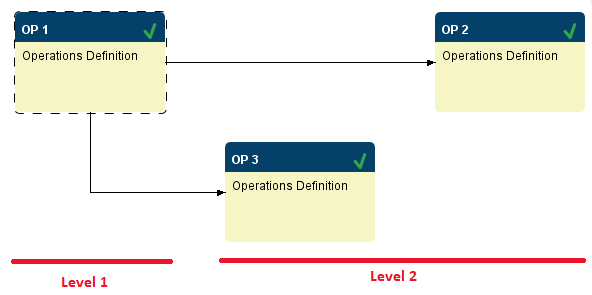
Operation Levels:
For operations that have more than one segment, the duration of the operation is the total of all the segments. For example, if an operation has 2 segments in series that both have a Trigger Segment End property set to Fixed Duration mode, then the duration of the operation will be the total of the fixed duration of each segment. |
system.mes.scheduleOperations(mesObjectList, begin, end, allowOverlapping, category)
Schedule the operations schedule and associated operations request and request segment objects contained in the mesObjectList parameter. The scheduled duration of each request segment will be based on the target quantity.
Note that the beginning and end time are set in this function call and will override schedule rates.
Syntax
system.mes.scheduleOperations(mesObjectList, begin, end, allowOverlapping, category)
- Parameters
MESObjectList mesObjectList - A list containing the operations schedule and associated operations request and request segment objects to schedule.
Date begin - The date to schedule the first operations request for.
Date end - The date to complete the last operations request at.
Boolean allowOverlapping - If True, allow schedule entries to overlap if needed.
String category - The category to use when scheduling. Active and Actual are reserved for currently active and completed respectively. Custom categories are also acceptable, but an empty string '' will cause a null error to be thrown.
- Returns
The list containing the operations schedule and associated operations requests and request segments objects that have been scheduled. The list is returned as a MES Object List object that is a collection holding MES objects.
- Scope
All
Code Example
Python |
#This code will print the list of operations that are scheduled. from java.util import Calendar beginCal = Calendar.getInstance() beginCal.add(Calendar.DAY_OF_MONTH, -30) preferredStart = beginCal.getTime() objList = system.mes.loadSchedule('14850859-fe9e-4aa8-a9d2-856022ef1bb3') scheduleList = system.mes.scheduleOperations(objList, preferredStart, True, 'Actual') for ndx in range(scheduleList.size()): scheduleOperations = scheduleList.get(ndx) print scheduleOperations |
Output
Python |
OperationsSchedule (14850859-fe9e-4aa8-a9d2-856022ef1bb3, Receive Steel (1) Schedule, 0 parents, 0 children, 0 custom properties, 1 complex properties) OperationsRequest (9ce541f3-6b9a-47f2-8ca5-59f0bdad81e8, Receive Steel (1), 0 parents, 0 children, 0 custom properties, 2 complex properties) RequestSegment (b8c416b2-17a3-4f04-8842-b24854511d89, Receive Steel (1), 0 parents, 0 children, 0 custom properties, 6 complex properties) |
A second example is more practical, along with print statements for debugging.
Code Example
Python |
path = 'Enterprise\El Dorado Hills\Packaging Area\Packaging Line 3' qty = 10000 matName = 'IPA' opDef = system.mes.getMESObjectLinkByName('OperationsDefinition', matName + '-' + path.replace('\',':')).getMESObject() schedule = system.mes.createSchedule(opDef) startDate = system.date.getDate(2024, 4, 16) startDate = system.date.setTime(startDate, 8, 15, 0) includeWorkOrder = True workOrderName = 'order-19-111' for i in range(schedule.size()): obj = schedule.get(i) objTypeName = obj.getMESObjectType().getName() ##Set the schedule production count on the Operations Schedule object if objTypeName == 'OperationsSchedule': obj.setScheduleProductionCount(qty) ##Set the reference to the Work Order on the Operations Request elif objTypeName == 'OperationsRequest' and includeWorkOrder: woObj = system.mes.workorder.getMESWorkOrder(workOrderName) obj.setPropertyValue('WorkOrderRefUUID', woObj.getUUID()) ##Set the Material Qty on the Production Request Segment elif objTypeName == 'RequestSegment' and (obj.getComplexPropertyCount('ResponseMaterial') > 0): if obj.getAvailableMaterialOptions('Material Out').size() > 0: obj.setMaterial('Material Out', matName, path, qty) print 'set work order scheduled qty', obj scheduleList = system.mes.scheduleOperations(schedule, startDate, False, 'Active') for i in range(scheduleList.size()): obj = scheduleList.get(i) objTypeName = obj.getMESObjectType().getName() print objTypeName if objTypeName == 'OperationsRequest': print 'Start Time: ', obj.getPropertyValue('BeginDateTime') print 'End Time: ', obj.getPropertyValue('EndDateTime') elif objTypeName == 'RequestSegment': print 'Start Time: ', obj.getPropertyValue('BeginDateTime') print 'End Time: ', obj.getPropertyValue('EndDateTime') system.mes.saveSchedule(scheduleList) |
Example 2 Output
Python |
set work order scheduled qty RequestSegment (6629175d-3f03-4ac6-b795-010ec12dcfc9, IPA-Enterprise:El Dorado Hills:Packaging Area:Packaging Line 3, 0 parents, 0 children, 0 custom properties, 9 complex properties, 0 artifacts) OperationsSchedule OperationsRequest Start Time: Thu May 16 13:47:03 PDT 2024 End Time: Thu May 16 17:58:03 PDT 2024 RequestSegment Start Time: Thu May 16 13:47:03 PDT 2024 End Time: Thu May 16 13:48:03 PDT 2024 RequestSegment Start Time: Thu May 16 13:48:03 PDT 2024 End Time: Thu May 16 17:58:03 PDT 2024 |
system.mes.scheduleOperations(mesObjectList, preferredStart, allowOverlapping, category)
Schedule the operations schedule and associated operations request and request segment objects contained in the mesObjectList parameter. The scheduled duration of each request segment will be based on the target quantity and the configured segment's schedule rate.
Syntax
system.mes.scheduleOperations(mesObjectList, preferredStart, allowOverlapping, category)
- Parameters
MESObjectList mesObjectList - A list containing the operations schedule and associated operations request and request segment objects to schedule.
Date preferredStart - The date of the preferred start time to schedule the first operations request for.
Boolean allowOverlapping - If True, allow schedule entries to overlap if needed.
String category - The category to use when scheduling. Active and Actual are reserved for currently active and completed respectively. Custom categories are also acceptable, but an empty string '' will cause a null error to be thrown.
- Returns
The list containing the operations schedule and associated operations requests and request segments objects that have been scheduled. The list is returned as a MES Object List object that is a collection holding MES objects.
All
Code Examples
Python |
#This code will print the list of operations that are scheduled. from java.util import Calendar beginCal = Calendar.getInstance() beginCal.add(Calendar.DAY_OF_MONTH, -30) preferredStart = beginCal.getTime() objList = system.mes.loadSchedule('14850859-fe9e-4aa8-a9d2-856022ef1bb3') scheduleList = system.mes.scheduleOperations(objList, preferredStart, True, 'Actual') for ndx in range(scheduleList.size()): scheduleOperations = scheduleList.get(ndx) print scheduleOperations |
Output
Python |
OperationsSchedule (14850859-fe9e-4aa8-a9d2-856022ef1bb3, Receive Steel (1) Schedule, 0 parents, 0 children, 0 custom properties, 1 complex properties) OperationsRequest (9ce541f3-6b9a-47f2-8ca5-59f0bdad81e8, Receive Steel (1), 0 parents, 0 children, 0 custom properties, 2 complex properties) RequestSegment (b8c416b2-17a3-4f04-8842-b24854511d89, Receive Steel (1), 0 parents, 0 children, 0 custom properties, 6 complex properties) |
Sepasoft MES Module Suite