Sepasoft MES Module Suite
User Message Phase
Use the Message Phase to expose messages to the operator
Acknowledgement can be set to be required.
- Requires Acknowledgement = False: subsequent Transition controls the flow to the next step.
- Requires Acknowledgement = True: User Message Phase State runs until the message is acknowledged. A User Prompt Phase and the State runs and automatically is acknowledged when the user enters a value.
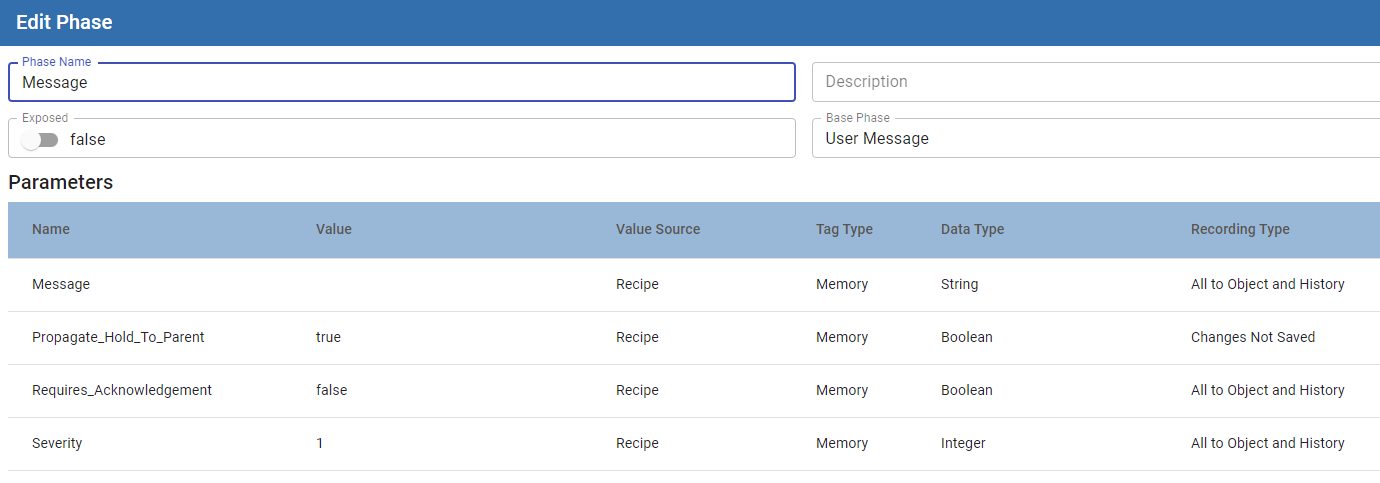
Parameters
| Message | Message exposed to the operator. Calculation supported. Calculation added when building a phase based on this User message phase. Calculation values entered in the Phase Manager always override any value entered in the Recipe Editor. |
| Message_Date_Time | Date stamp of message display |
| Message_Requires_Ack | True/False to require the acknowledgement of a message. |
| Message_Ack_By | Who acknowledged the message by Ignition user roles. |
| Message_Ack_Date_Time | Time stamp of when the message was acknowledged. |
| Message_Ack_Confirm | Confirmation flag that the message was acknowledged. |
Custom User Message Type

|
In MES 3.81.12 SP1 and MES 4.83.1 SP1 and later: Custom User Message Phases have editable Recording Type fields in the Phase Manager. |
In Batch Phase Manager, you can edit the Recording Type for a custom User Message phase.
Recording Type Behaviors:
| Recording Type | Expected Behavior |
|---|---|
| All to History | All value changes are recorded to EBR |
| All to Object and History | All value changes are recorded to EBR |
| Last to History | Only the final state of the value is recorded to the EBR after the step completes. No EBR value is reported before the step completes. |
| All to Object and Last to History | Only the final state of the value is recorded to the EBR after the step completes. No EBR value is reported before the step completes. |
| All to Object | EBR will not show value changes |
| No Changes Saved | EBR will not show value changes |
Script Examples
Get Messages by Unit Path
The use case for this script function is when an operator oversees multiple Units that can be running various batch recipes. It will return all messages for Batch Recipes that are active for the specified Unit(s).
Python |
msgList = system.mes.batch.queue.getMessages('Enterprise\Site\Area\Process Cell\Unit ?') for m in msgList: print(m) |
The unit path can contain * for multiple character wildcard or ? for single character wildcard.
The unit path can contain multiple paths.
For example:
'Enterprise\Site\Area\Process Cell\Unit 1, Enterprise\Site\Area\Process Cell\Unit 2'
Get Messages by Batch Recipe
The use case for this script function is when an operator oversees or is just interested in viewing messages for a single batch recipe at a time. It will return all the messages for a single Batch Recipe that is active.
Python |
qList = system.mes.batch.queue.getEntries(0, 1000, '') for q in qList: msgList = system.mes.batch.queue.getMessages(q) for m in msgList: print(m) |
Acknowledge a Message
Python |
qList = system.mes.batch.queue.getEntries(0, 1000, '') for q in qList: msgList = system.mes.batch.queue.getMessages(q) for m in msgList: if m.getStepName() == 'O6' and not m.hasAckBy(): m.setAckBy('Tom') system.mes.batch.queue.acknowledgeMessage(m) break |
Sepasoft MES Module Suite