Sepasoft MES Module Suite
Updating Parameter Values within a Phase
In this configuration, a phase can be added multiple times and stay in the Running state as parameter values are updated. This is useful when controlling agitation speeds and temperatures, or to update any parameter values as the batch executes.

|
Equipment Phases with Exposed set to True have Disable_Complete parameters that are considered within the command-state sequence. Keep in mind that Exposed set to True when creating a phase, adds additional parameters that are exposed in the Ignition Tag Browser. Disable_Complete parameter Boolean values: True and False. Disable_Complete = False by default.
|
Setting Up for PLI-State Bypass
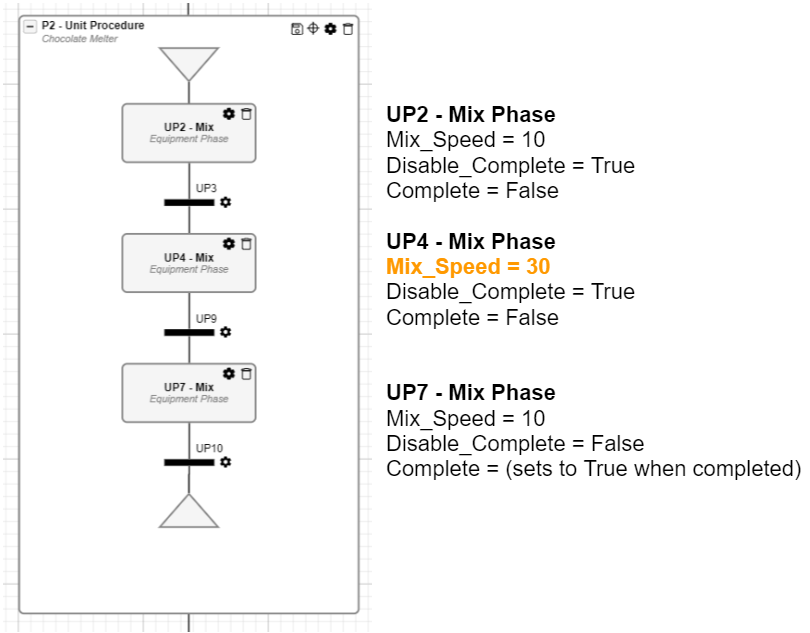
Below the Disable_Complete paremeter is set to True on all phase instances before the last instance. This parameter is set to False on the last phase instance.
Control Parameter Values within Phase Instances
For this example, the Mix_Speed parameter value is set to ‘10’ in the phase configuration, and in Recipe Editor, the Mix_Speed is set to ‘30’ in only one phase instance.
Notice below:
- First two phase instance(s) are configured with Disable_Complete = True
- Last phase instance set to Disable_Complete = False
Command-State Legend
For more information, see Batch Command-State Sequence.
Command = Command Number
| State Number = State
|
Sepasoft MES Module Suite