Sepasoft MES Module Suite
Variance Logging
If Variance Logging is set, then a tag is monitored for changes after a machine recipe is selected for a production item.
A value change is compared to Low and High Variance Thresholds. If the value is outside these thresholds, it is logged. If the threshold are not defined, all value changes are logged.
Low Variance Threshold
The Low Variance Threshold setting is used to define the lower limit before recipe variances are triggered for this recipe value. The variance threshold can be defined as a percentage of the recipe value or a fixed amount.
High Variance Threshold
The High Variance Threshold setting is used to define the upper limit before recipe variances are triggered for this recipe value. The variance threshold can be defined as a percentage of the recipe value or a fixed amount.
Example
Both the low and high variance thresholds can be defined by percentage of the recipe value or a fixed offset around the recipe value or just fixed values. The image shows the Fill Weight recipe value with an upper variance threshold of -10%. The upper threshold value is calculated by starting with the recipe value of 50.2 and adding 10%. The lower threshold is calculated in the same manner. When the Ignition tag value changes, a check is done to see if the current value is between the upper and lower threshold values and in this case as shown, we see that the current value of 51.0 is between 55.22 and 47.69. As a result, no variance will be logged.
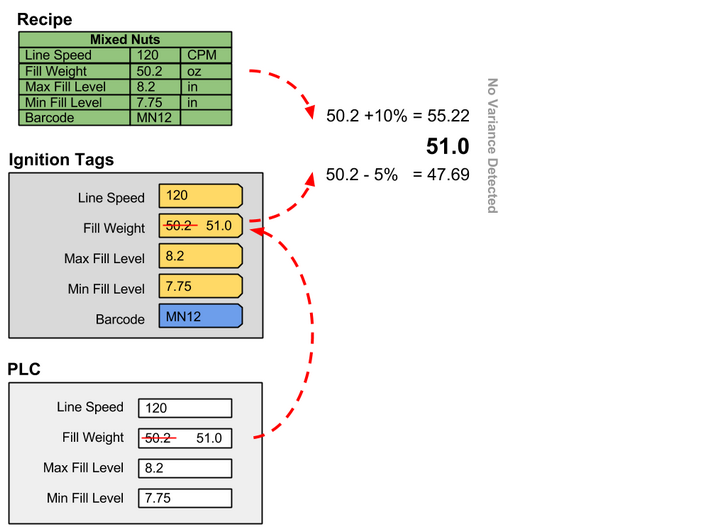
Example:
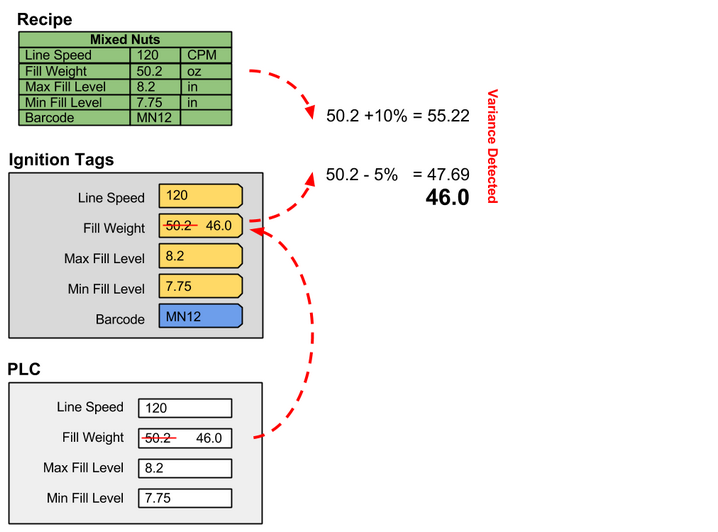
An example case where the current value is 46.0. The value 46.0 is less than the lower threshold and a variance is logged.
The example shows the upper and lower threshold values being calculated as a percentage of the recipe value, but they can also be a fixed offset around the recipe value. To configure a recipe value for a fixed offset around the recipe value, an upper variance threshold setting of -<offset> is used. An example is a variance threshold offset of -7.5 were the upper threshold is calculated by adding 7.5 to the recipe value. Using the recipe value from above of 50.2 and adding 7.5 to it will give us an upper threshold of 57.7. The lower variance threshold works the same way.
Instead of the thresholds being calculated as a percentage or fixed offset around the recipe value, fixed values can also be used. For example, a recipe value can be configured with an upper variance threshold of 52.0. In this case, the upper threshold will always be 52.0 regardless of the recipe value.
Evaluate Variance Script
Script can be used instead of using the Low Variance Threshold and High Variance Threshold settings to determine if the recipe value is outside of an allowable range. When the Recipe Values tag value changes, the variance state is evaluated using the Low Variance Threshold and High Variance Threshold settings. Then, if an Evaluate Variance Script has been entered for the recipe value, the script will be executed, and the state can be changed. See Evaluate Variance Script for more information.
Python |
upperValue = system.tag.read("[Default]SomeOtherTag") recipeValue = event.getRecipeTag().getCurrentValue() if recipeValue > upperValue.value: event.setLogVariance(True) else: event.setLogVariance(False) |
The script is passed on Evaluate Variance Script object that allows accessing the current tag information and also allows setting the log variance flag. In the script above, a tag called SomeOtherTag is read and compared to the current value of the tag associated with the recipe value where this script was defined. If the current value is greater than the value of the SomeOtherTag, then the setLogVariance method is called with True meaning the recipe value is in a variance state.
See Enable Variance Monitoring section for details about configuring recipe values.
Variance Status
Variances are logged to the database and can be viewed in the Recipe Variance Viewer component, analysis and reports. The Recipe Variance Time Stamp, Recipe Set Point Value and Recipe Value To data points can be used in analysis to detect when a setpoint is in variance. Each line, cell, cell group and location production items has one or more associated setpoints.
Sepasoft MES Module Suite