Edit Work Order Counts
Editing work order counts involves editing raw counts, updating an operation associated with those counts, and refreshing the work order object.
The OEE Module will constantly collect and increment counts in the database ensuring data is not missed during production periods.
You can find more information about how counters work on the Production Counters documentation page.
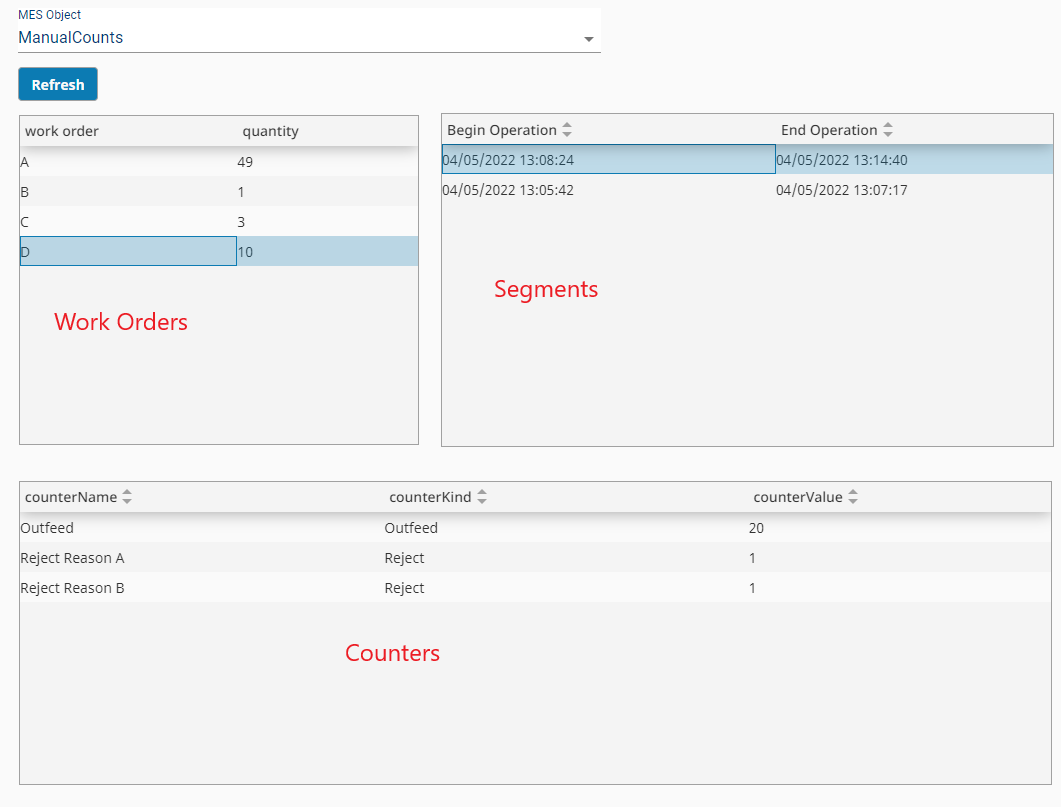
Attached to this KB is an example screen with count adjustments where all counters exist on a line. Pay careful attention to your configuration as you will want to adjust Infeed/Outfeed counters as defined by the Material Production settings for the operation linked to the work order.
See Below:
- Refresh Button
- Work Order - onRowClick
- Segments - onRowClick
- Counters - onRowClick
- WorkOrder Adjustment Screen
Functions touched in the example screen:
| Object | Description |
|---|---|
| Analysis Script | Retrieving all work orders executed over a period of time for a given Line. |
| Work Order Objects | The actual quantity produced against a work order and remaining quantity is calculated based on the sum of quantities from operations associated with the work order ref UUID. |
| Operations Response | Holds basic information about an executed operation, including a link to a work order. |
| Response Segment | Holds actual production information such as quantity. |
| Tag Collector Types | Production values such as equipment modes, states, and counts. |
| Equipment Objects | Used to retrieve counter definitions via complex property objects. |
Modifying counts involves understanding what operations were executed for a given work order. There can be more than one operation executed for a work order. A work order links to all operations executed. Each operation holds count information.
By finding the operation begin and end times, we can determine which timestamped tag collector values we should modify.
Find more information about modifying raw count information here: Adjusting Production Run Data
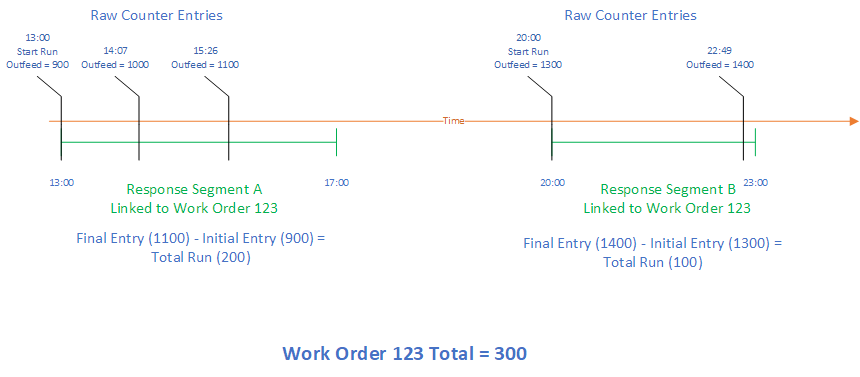
Operation count information may be calculated based on your counter configuration. For example, you have an Infeed and Reject counter; Outfeed is calculated. Decreasing the calculated Outfeed in this scenario can be achieved by either decreasing Infeed or increasing Rejects.
Scripts from the provided screen:
Refresh Button
Python |
def runAction(self, event): def executeWOSummaryAnalysis(eqPath, startDate, endDate): analysisSetting = system.mes.analysis.createMESAnalysisSettings('workorders') datapoints = [ "Work Order" ] analysisSetting.setDataPoints(datapoints) analysisSetting.addParameter('Path') analysisSetting.setFilterExpression("Equipment Path = @Path AND Work Order != ''") analysisSetting.setGroupBy("Work Order") params = {'Path':eqPath} results = system.mes.analysis.executeAnalysis(startDate, endDate, analysisSetting, params) return results.getDataset() endDate = self.parent.custom.endDate startDate = self.parent.custom.startDate eqPath = self.getSibling("mesObjectSelector").props.selectedMESObject.equipmentPath ds = executeWOSummaryAnalysis(eqPath, startDate, endDate) data = [] for row in range(ds.getRowCount()): woName = ds.getValueAt(row,'Work Order') try: woObj = system.mes.workorder.getMESWorkOrder(woName) quantity = woObj.getActualQuantity() if not woObj.isClosed(): data.append({'work order':woName,'quantity':quantity}) except: continue self.getSibling("workOrders").props.data = data self.getSibling("segments").props.data = [] self.getSibling("counters").props.data = [] |
Work Order - onRowClick
Python |
def runAction(self, event): woName = event.value['work order'] woObj = system.mes.workorder.getMESWorkOrder(woName) opResponses = woObj.getOperationsResponses() data = [] for opResp in opResponses: for resSeg in opResp.getMESObject().getResponseSegments(): resObj = resSeg.getMESObject() if '_CO' not in resObj.getName(): segBeg = resObj.getPropertyValue('BeginDateTime') segEnd = resObj.getPropertyValue('EndDateTime') data.append({'Begin Operation':segBeg, 'End Operation':segEnd, 'UUID':resObj.getUUID()}) self.getSibling("segments").props.data = data self.getSibling("segments").custom.workOrder = woName |
Segments - onRowClick
Python |
def runAction(self, event): startDate = system.date.parse(event.value['Begin Operation'], 'E MMM d yyyy HH:mm:ss') if not event.value['End Operation']: #do not edit current running work orders return endDate = system.date.parse(event.value['End Operation'], 'E MMM d yyyy HH:mm:ss') self.getSibling("counters").custom.startDate = startDate self.getSibling("counters").custom.endDate = endDate self.getSibling("counters").custom.respSegUUID = event.value['UUID'] eqPath = self.getSibling("mesObjectSelector").props.selectedMESObject.equipmentPath eqObj = system.mes.loadMESObjectByEquipmentPath(eqPath) complexPropCount = eqObj.getComplexPropertyCount('Counter') data = [] for i in range(complexPropCount): counterProp = eqObj.getComplexProperty('Counter',i) counterName = counterProp.getName() counterKind = counterProp.getCountKind().getName() counterMode = counterProp.getCountMode() counterValue = system.mes.getTagCollectorDeltaValue(eqPath, 'Equipment Count', counterName, startDate, endDate) data.append({ 'counterName':counterName, 'counterKind':counterKind, 'counterValue':counterValue, 'counterMode':counterMode }) self.getSibling("counters").props.data = data |
Counters - onRowClick
Python |
def runAction(self, event): self.custom.oldValue = event.value['counterValue'] |
Counters - onEditCellCommit
Python |
def executeWOSummaryAnalysis(eqPath, startDate, endDate): analysisSetting = system.mes.analysis.createMESAnalysisSettings('workorders') datapoints = [ "Work Order" ] analysisSetting.setDataPoints(datapoints) analysisSetting.addParameter('Path') analysisSetting.setFilterExpression("Equipment Path = @Path AND Work Order != ''") analysisSetting.setGroupBy("Work Order") params = {'Path':eqPath} results = system.mes.analysis.executeAnalysis(startDate, endDate, analysisSetting, params) return results.getDataset() ####END executeWOSummaryAnalysis#### def updateWorkOrder(respSegUUID, workOrderName, counterKind, oldVal, newVal): seg = system.mes.loadMESObject(self.custom.respSegUUID) lotProp = seg.getLot('Material Out') #Get previous work order quantity value oldlotPropVal = seg.getMaterialActualQuantity('Material Out') newQuantity = 0 infeedOutfeed = ['Infeed','Outfeed'] changed = False #Decrease reject OR Increase Infeed OR Increase Outfeed if (counterKind == 'Reject' and oldVal > newVal) or (counterKind in infeedOutfeed and oldVal < newVal): newQuantity = oldlotPropVal + abs(newVal-oldVal) changed = True #Increase Reject OR Decrease Infeed OR Decrease Outfeed elif (counterKind == 'Reject' and oldVal < newVal) or (counterKind in infeedOutfeed and oldVal > newVal): newQuantity = oldlotPropVal - abs(newVal-oldVal) if newQuantity < 0: newQuantity = 0 changed = True if changed: lotProp.setQuantity(newQuantity) system.mes.saveMESObject(seg) woObj = system.mes.workorder.getMESWorkOrder(self.custom.workOrderName) woObj.updateQuantities() ####END updateWorkOrder#### equipmentPath = self.getSibling("mesObjectSelector").props.selectedMESObject.equipmentPath respSegUUID = self.custom.respSegUUID workOrderName = self.custom.workOrderName counter = self.props.data[event.rowIndex]['counterName'] endDate = self.custom.endDate startDate = self.custom.startDate newVal = int(event.value) oldVal = int(self.custom.oldValue) counterKind = self.props.data[event.rowIndex]['counterKind'] counterMode = self.props.data[event.rowIndex]['counterMode'] val = system.mes.getTagCollectorPreviousValue(equipmentPath, 'Equipment Count', counter, endDate) origTS = system.mes.getTagCollectorPreviousTimeStamp(equipmentPath, 'Equipment Count', counter, endDate) if origTS: if system.date.isBetween(origTS, startDate, endDate): newTagCollectorValue = val + (newVal - oldVal) system.mes.updateTagCollectorValue(equipmentPath, 'Equipment Count', counter, origTS, newTagCollectorValue) updateWorkOrder(respSegUUID, workOrderName, counterKind, oldVal, newVal) else: #last entry not within date range, need to account for it newTagCollectorValue = val + (newVal - val) updateWorkOrder(respSegUUID, workOrderName, counterKind, oldVal, newVal) else: #no previous entry exists if counterMode == 'POSITIVE_CHANGE': system.mes.addTagCollectorValue(equipmentPath, 'Equipment Count', counter, startDate, 1) newVal = newVal + 1 system.mes.addTagCollectorValue(equipmentPath, 'Equipment Count', counter, system.date.addSeconds(startDate,+1), newVal) updateWorkOrder(respSegUUID, workOrderName, counterKind, oldVal, newVal) #Update work order display ds = executeWOSummaryAnalysis(equipmentPath, startDate, endDate) data = [] for row in range(ds.getRowCount()): woName = ds.getValueAt(row,'Work Order') try: woObj = system.mes.workorder.getMESWorkOrder(woName) quantity = woObj.getActualQuantity() if not woObj.isClosed(): data.append({'work order':woName,'quantity':quantity}) except: continue self.getSibling("workOrders").props.data = data self.props.data[event.rowIndex]['counterValue'] = event.value |
WorkOrder Adjustment Screen
Preview: