Completing Call Business Connector Chart
For time savings, this View has been mostly pre-built and only requires students to complete it by adding script functionality to the Call BC Chart button.
Complete Call BC Chart Button Script
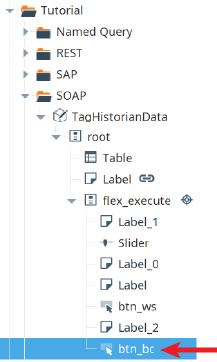
- In the Perspective → Views → Tutorial → SOAP folder, open the View called TagHistorianData.
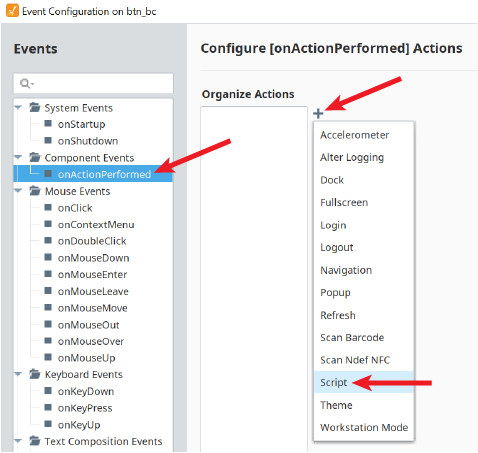
- Expand the View in the Project Browser, right-click on btn_bc and select Configure Events...
- Add the following script to the onActionPerformed event, to complete the Call BC Chart (btn_bc) button functionality.
Script for Call BC Chart Button
Python |
end = system.date.now() start = system.date.addMinutes(end, -int(self.getSibling("Slider").props.value)) chartPath = 'Complete/SOAP/TagHistoryAverage' #Optional. Used to override default parameter values #parameterValues = None parameterValues = { 'tagPaths' : {'tagPathsRoot' : { 'Tank1Path': "[default]New Enterprise/Site 1/Tank 1 Level", 'Tank2Path': "[default]New Enterprise/Site 1/Tank 2 Level", 'Tank3Path': "[default]New Enterprise/Site 1/Tank 3 Level", 'Tank4Path': "[default]New Enterprise/Site 1/Tank 4 Level", 'Tank5Path': "[default]New Enterprise/Site 1/Tank 5 Level" } }, 'startDate' : start, 'endDate' : end } #Python list of chart parameters to retrieve values for. Pass in '*' to return all. returnThese = ['TagResponseData'] #Executes and waits for the chart to complete before control returns to the script. returnedParams = system.mes.bc.executeChartSynchronous(chartPath, parameterValues, returnThese) dict = returnedParams['TagResponseData']['TagResponseDataRoot'] data = [] for key in dict.keys(): value = dict[key] data.append({'Tank':key,'Value':value}) self.parent.parent.getChild("Table").props.data = data |