Integrating and Executing the SOAP Call from a User Interface
The practical value of a web service is realized when it is integrated into an application, allowing users to interact with backend data and logic through a graphical user interface (GUI). This section demonstrates the final step of the workflow: calling the configured SOAP service from a button within a Perspective View and displaying the results.
Configuring the Perspective View Button
A pre-built Perspective View will be used to complete this integration. The task is to add the script that triggers the web service call.
For time savings, this View has been mostly pre-built and only requires students to complete it by adding script functionality to the CALL SOAP Request button.
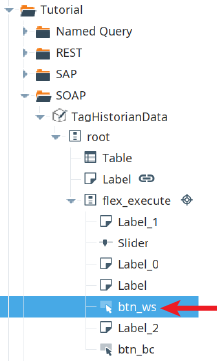
- Navigate to Perspective → Views → Tutorial → SOAP and open the View named TagHistorianData.
- In the Project Browser, expand the View's components, right-click on the button named btn_ws, and select Configure Events....
- Locate the onActionPerformed event, which fires when the button is clicked.
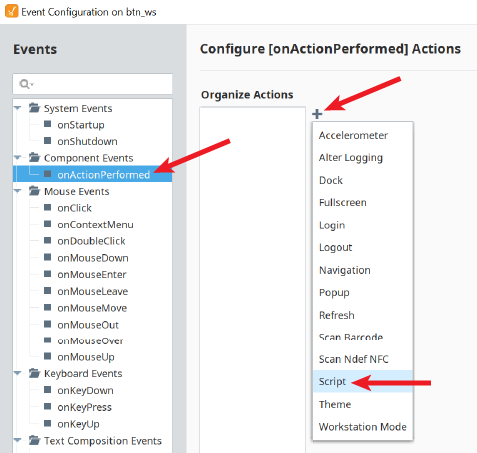
Deconstructing the runWebService Script
The following Python script should be added to the
onActionPerformed event to execute the SOAP request and process the response.Python |
end = system.date.now() start = system.date.addMinutes(end, -int(self.getSibling("Slider").props.value)) results = system.ws.runWebService("Complete/TagHistoryAverage", None, { 'TagAverages': { 'startDate':start, 'endDate':end, 'Tank1Path': "[default]New Enterprise/Site 1/Tank 1 Level", 'Tank2Path': "[default]New Enterprise/Site 1/Tank 2 Level", 'Tank3Path': "[default]New Enterprise/Site 1/Tank 3 Level", 'Tank4Path': "[default]New Enterprise/Site 1/Tank 4 Level", 'Tank5Path': "[default]New Enterprise/Site 1/Tank 5 Level" } }) dict = system.ws.toDict(results) data = [] for key in dict['Root']['TagAveragesResponse'].keys(): value = dict['Root']['TagAveragesResponse'][key] data.append({'Tank':key,'Value':value}) self.parent.parent.getChild("Table").props.data = data |
This script performs several key functions:
- Time Range Definition: It uses
system.date.now()andsystem.date.addMinutes()to create a dynamic start and end time based on the value of a slider component in the View. - Web Service Call: The
system.ws.runWebServicefunction is the core of the operation. It targets theTagHistoryAverageconsumer and passes a payload dictionary containing the start date, end date, and the specific tag paths for theTagAveragesoperation. - Response Conversion: The raw SOAP response is converted into a standard Python dictionary using
system.ws.toDict(), making the data much easier to work with. - Data Formatting: A
forloop iterates through the keys and values in the response dictionary, reformatting the data into a list of dictionaries that is compatible with the Ignition Table component'sdataproperty