SPC:SCR: Configure SPC Analysis in Script

Configure SPC Analysis in Script

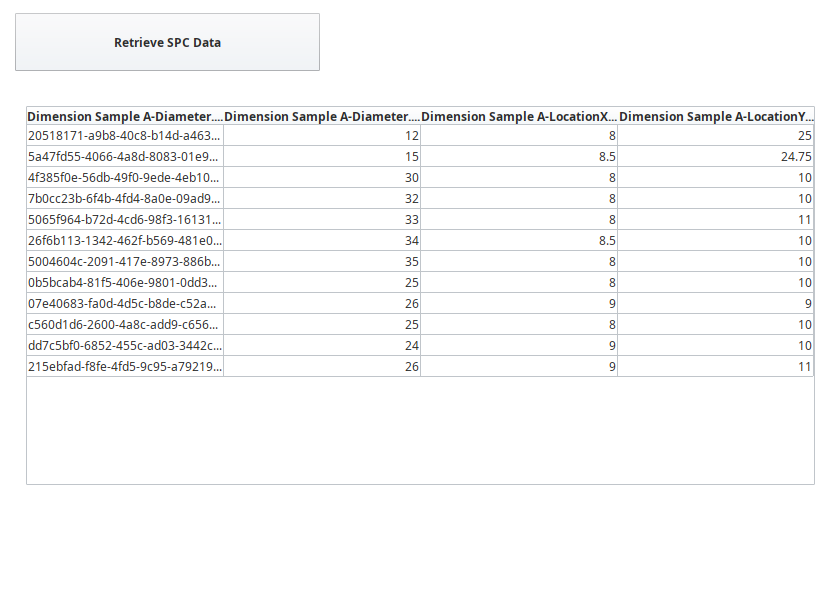
The SPC Analysis in Script page on the window SPC_03_Scripting/04_Reporting has two components:

  1. Button (Ignition)
  2. Power Table (Ignition)


Configure 'Generate SPC Data' Button

  • Drag an Ignition Button component onto the middle of the window. Resize it enough to fit the text shown above.

  • Change the Text property to Generate SPC Data.

  • Open the Component Scripting dialog box (Ctrl-J), select the actionPerformed event script area and paste in the script below (change the date range, if necessary, to span your data entries)

Script for Generate SPC Data Button

Code
##Configure an Analysis Setting within script
end = system.date.now()
begin = system.date.addHours(end, -8)

analysis = system.mes.analysis.createMESAnalysisSettings('analysis')
analysis.setDataPoints("Dimension Sample A-Diameter.SampleUUID,Dimension Sample A-Diameter.Sample Value,Dimension Sample A-LocationX.Sample Value,Dimension Sample A-LocationY.Sample Value")
analysis.setFilterExpression("Equipment Path = 'New Enterprise\Site\Area\Line 1\Sample Location'")
analysis.setGroupBy("Dimension Sample A-Diameter.SampleUUID")
results = system.mes.analysis.executeAnalysis(begin, end, analysis)
# getDataset() returns an Ignition Dataset
# For documentation, see: https://docs.inductiveautomation.com/display/DOC79/Datasets
dataset = results.getDataset()


###Example of calling a previously existing Analysis Setting.
#endDate = system.date.now()
#beginDate = system.date.addDays(endDate, -3)
#results = system.mes.analysis.executeAnalysis(beginDate, endDate, 'Door Placement')

event.source.parent.getComponent('Table').data = dataset


Configure Power Table

  • Drag an Ignition Power Table component onto the window. Position and resize as shown above.

  • Data will be 'pushed' into the Power Table by the Generate SPC Data button event (button pressed and released), so there is no configuration required.