Sepasoft MES Module Suite
Batch Recipe Editor Reference
Meta Property
| Name | batchRecipeEditor |
Related Links:
Component Properties
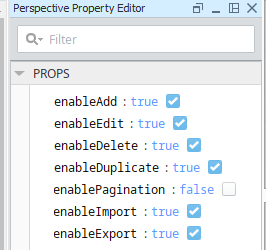
Perspective Property Editor in Ignition Designer
| Property Name | Data Type | Property Description | ||
|---|---|---|---|---|
| enableAdd | Boolean |
When set to True, displays the icon to add recipes. |
||
| enableDelete | Boolean |
When set to True, displays the icon to delete a recipe. | ||
| enableDiagramSearch | Boolean | If set to True, the search box will be visible when editing a recipe. | ||
| enableDuplicate | Boolean |
When set to True, displays the icon to copy recipes. | ||
| enableEdit | Boolean |
When set to True, displays the icon to edit a recipe. |
||
| enableExport | Boolean |
If set to True, the export icon displays to save as an .xml file. | ||
| enableImport | Boolean |
If set to True, displays the icon to import recipes. |
||
| enablePagination | Boolean |
Set to False by default. When set to True, pagination controls display at the bottom of the view. |
||
| enforceDocumentParameterBinding | Boolean | Set to True to enforce all Document Phase input fields to be attached to batch parameters before the document can be saved.
| ||
| recipeClassFilter | String |
An array of Recipe Class filters. The wildcard * can be used for 0 or more of any character, the ? wildcard can be used for any single character. If no wild cards are used, the string must contain the text of one of the items in this array, case insensitive.
|

Sepasoft MES Module Suite